• Competitor rules

    Please remember that any mention of competitors, hinting at competitors or offering to provide details of competitors will result in an account suspension. The full rules can be found under the 'Terms and Rules' link in the bottom right corner of your screen. Just don't mention competitors in any way, shape or form and you'll be OK.

Help!

Run a little check...

24-pin motherboard power connected?
4/8-pin CPU power connected?
GPU in correct x16 slot and seated right?
Both 6-pin PCI-e connected to the 5850?

Check those and report back to us :)

 
w1lliam if you still have your old video card there, stick it back in as a test to see if all is still working okay as before. Once you have done that to rule out any damage you may have caused while trying to upgrade. I would take the xfx 5050 and test it on another pc with a good power supply. Only thing I can think that is doing it now is the power supply if you tried what I said above.


Picture of your PSU sticker on side and the rated amps on each 12V..

http://oi55.tinypic.com/1zea7vo.jpg


I'm guessing your power supply is not able to power your system and you need to get a better one, may explain why it only has 1 x pci-express because the other 12v rail can't manage. One of the 12v rails is 17amp and the other is 16amp... You also have to remember the rest of the system will use some of that 12v too..
 
Confusing posts.

W1lliam> Are both the PCI-E connections hooked up to your power supply at present?

Although.. are you actually getting into windows (i.e. you hear the start up sounds) ?? (even though nothing is displaying)... if so ensure your monitor is actually on the right setting (DVI or HDMI as appropriate). Also try another port on the card if it has more than one as the primary out may only work on one port :-)
 
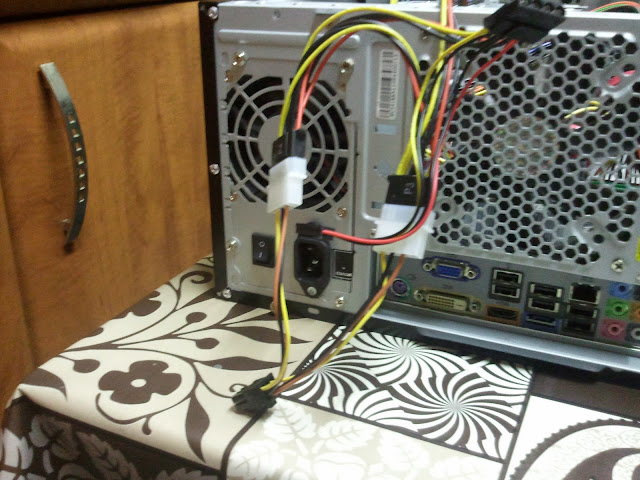
I disregarded the leaflet when the pc didnt start then got out the molex cables that they supplied and went to town connecting them to the psu and the other end to the gfx card. So now am stuck with everything running but no signal to the monitor and this is when i decided enough was enough and reset everything. And then posted my problem in the OP.

See when you say everything running are you sure it has booted into windows ? or are you just hearing the fans running and not getting into windows, easy way to know if it's getting into windows is to watch for hard drive activity and if you have speakers listen for the windows startup sounds (if they are enabled).
 
2010-12-23%2016.59.18.jpg


This look about right?
 
i see from that last image you have a motherboard with a on board graphics card, it is just worth checking in the bios at startup that it hasn't selected the onboard as the default and therefore not sending the signal to the new card. its probably not as normally these things are set to auto and detect plugin cards, but its worth checking.
 
SO tried everything again and this time the gfx card didnt even power up. No i did not hear windows booting up. Dont know about the hard drive since i wasnt really listening for it. Looks like im going to have to take it to a computer shop and see if they can get it started but knowing my luck ill have to buy a new psu on christmas eve and i really wanted to play jc2 on max settings.
 
Does it work when you have it back to before the graphics card was updated ? If it does means the power supply is not good enough and you need a more powerful one.
 
Okay power supply then mate... if you made sure in the bios that it should boot from the pci-express 1st and made sure all power connectors are now in, only thing left is faulty graphics card or power supply.

I don't believe it's the graphics card... I had same problem when I installed a 4870 with a low wattage PSU a few years ago and replacing the power supply with a higher wattage and better brand with a single rail cured all my problems.
 
Okay power supply then mate... if you made sure in the bios that it should boot from the pci-express 1st and made sure all power connectors are now in, only thing left is faulty graphics card or power supply.

I don't believe it's the graphics card... I had same problem when I installed a 4870 with a low wattage PSU a few years ago and replacing the power supply with a higher wattage and better brand with a single rail cured all my problems.

Thanks mate.

Hopefully it is the psu and not the graphics card as it will be a painfully learned lesson.

I havent gone into the bios to check boot but will set it before i knock off tonight so i can have another go in the morning before i pack everything to the nearest computer shop thats opened. But if i need a a bigger psu i might end up selling this and buying a 6850. But it depends upon the price of a new PSU at the shop
 
Back
Top Bottom