Soldato
- Joined
- 11 Oct 2005
- Posts
- 5,722
- Location
- Derbyshire
Right I have a problem or 2 and need some help please.
ISP: Orange free broadband (As pay monthly mobile phone customer)
History:
For the last 5 years my computer has been upstairs in the spare room. Telephone extension lead from master socket up under the stairs to the bedroom into a Netgear DG834v2 Router wired to my computer. Internet has always been okay. Around 1.2MB download speed.
Now I have been decorating that bedroom so moved the Router downstairs and plugged it directly into master socket.
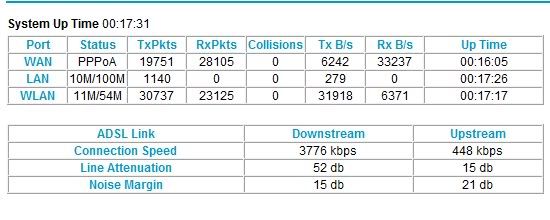
Speed has increased to
(See attached photo)
To me it is so much faster.
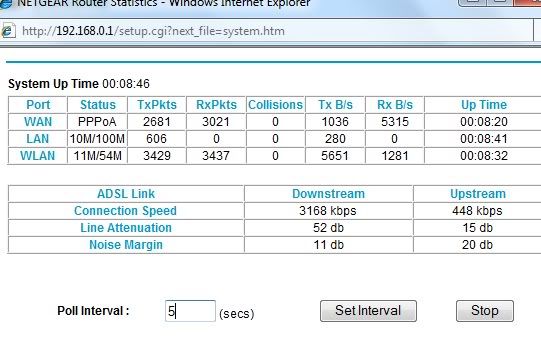
BUT the problem I have is evidentally the extension lead is slowing my broadband speed down a lot if I use it.
I could leave the Router downstairs (lounge) plugged into master socket and somehow, god knows how. Route a Cat5 (is that the right cable?) upstairs into the bedroom which I think would be best.
Although I have heard about 'Home-Plugs' I know nothing about them. Would they work instead? or one of those USB wireless dongles? What is my best way of getting a good speed to my PC upstairs from my router downstairs leaving it plugged into the master socket?
Worries me thinking of how on earth I would get a Cable all the way into that bedroom from the lounge.
Hopefully someone can help.
Also have a Laptop which wirelessly connects to router along with a PS3 and Squeezebox. No problem with those.
Just not sure if my router is NOT wired to my Main pc then I dont think my Squeezebox (wireless music player in lounge) would then work?
ISP: Orange free broadband (As pay monthly mobile phone customer)
History:
For the last 5 years my computer has been upstairs in the spare room. Telephone extension lead from master socket up under the stairs to the bedroom into a Netgear DG834v2 Router wired to my computer. Internet has always been okay. Around 1.2MB download speed.
Now I have been decorating that bedroom so moved the Router downstairs and plugged it directly into master socket.
Speed has increased to
(See attached photo)
To me it is so much faster.
BUT the problem I have is evidentally the extension lead is slowing my broadband speed down a lot if I use it.
I could leave the Router downstairs (lounge) plugged into master socket and somehow, god knows how. Route a Cat5 (is that the right cable?) upstairs into the bedroom which I think would be best.
Although I have heard about 'Home-Plugs' I know nothing about them. Would they work instead? or one of those USB wireless dongles? What is my best way of getting a good speed to my PC upstairs from my router downstairs leaving it plugged into the master socket?
Worries me thinking of how on earth I would get a Cable all the way into that bedroom from the lounge.
Hopefully someone can help.
Also have a Laptop which wirelessly connects to router along with a PS3 and Squeezebox. No problem with those.
Just not sure if my router is NOT wired to my Main pc then I dont think my Squeezebox (wireless music player in lounge) would then work?