


Associate
- Joined
- 15 Sep 2009
- Posts
- 1,720
- Location
- Birmingham
Not sure the best place to post this to ask so I thought I'd put it under general
I've recently bought some LS350 lighting strips to go with my Corsair fans and icue hubs. I have the lights connected via the icue link adaptor to 1 icue hub in my case with another icue hub with 4 cases fans and AIO
I had them all through the one hub to start with but I started to get this message after I plugged in the final light strip.
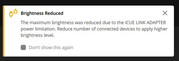
In the icue software, everything is showing at 100% brightness so not sure what the issue is..
I'm still getting the same message now after splitting across the 2 hubs so any help would be appreciated
I've recently bought some LS350 lighting strips to go with my Corsair fans and icue hubs. I have the lights connected via the icue link adaptor to 1 icue hub in my case with another icue hub with 4 cases fans and AIO
I had them all through the one hub to start with but I started to get this message after I plugged in the final light strip.
In the icue software, everything is showing at 100% brightness so not sure what the issue is..
I'm still getting the same message now after splitting across the 2 hubs so any help would be appreciated
