intel 80gb x25-m raid 0

Associate
Joined
1 Jan 2007
Posts
1,199
hi all just a quick question for any of you who have the intel ssd's in raid0,
i was wandering i you get much performance gain from 2 in raid for game loading times and large files like that, the reason i ask is i already have one and its not really big enough for all my games so i was thinking of getting another for all my games, any input would be appreciated.

 
I have used the Intel X25-M G2s as single HDD and RAID0 and there is a definite performance increase with them in RAID0, especially when moving/coping large files around (you would also get a nice performance increase for unzipping compressed files), also found that having the pagefile on C:\ gave best performance...

Intel will be releasing an ICHxR driver that supports TRIM in the not too distant future I would think...
 
ok cheers for that might get another and raid them as i need to format anyway as im having so many problems with my windows 7 install at the moment anyway,
 
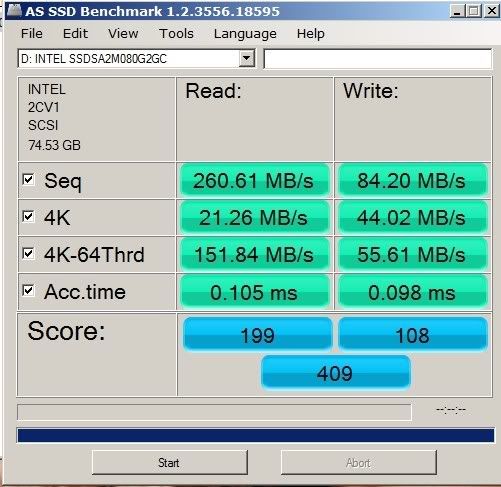
All you "writes" seem too low:

This is my X25-M G2 on the ICH10R cont in AHCI mode...

ASSSDBenchmark-SingleSSD.jpg


Have you enabled write cache?
 
I saw in a thread to disable write cache i just enabled it and this the speed this is on a single drive running my op system.


By jabbs

Is there anything else i should / shouldn't be doing i have the bios on AHCI, disabled defrag, disabled super fetch, also reading about disabling page file so i did that as well, should i install the Intel inf motherboard drivers or leave them as i have from fresh install.
 
Last edited:
Some programs will fall over if you don't have any virtual memory at all. The pagefile is ideally suited to SSDs, i.e. large reads and small writes.

Don't install the Intel drivers for AHCI/IDE if you want TRIM to work once the new firmware is released. ATM only the MS default Windows 7 driver supports TRIM.

You can disable the Search/Indexing if you really want to. It's mainly reads and you won't notice a difference but if you want to tweak you can do that. Also you can disable ReadyBoot if you haven't already.

To be honest though, there's really no need to tweak anything if you don't want to, with maybe the exception of defrag if Windows 7 doesn't disable that on your SSD automatically.
 
ok so if i do decide to get a second drive, ill format and start again, i have read somewhere that you are best installing windows to the ssd with no other drives attached, so if i detach my raid array ( 2x500gb w/d's) and build a raid array with ssds, install windows and then reattach my older raid array will i lose the information on the older array
 
I'd backup first, but it should be ok. It shouldn't make any difference but are they currently on ports 2 & 3 with your SSDs going on to 0 & 1? Also is it a stripe or mirror? If it's a mirror you might expect to see a rebuild when you reattach them.
 
not sure which sata ports they are on but definately not the first as my single ssd is on that with a space next to it, cant back it up as its nearly 900 gig of files, hence the reason i dont want to lose the array.
oh and its raid 0
 
oh my as ssd result, ssd not in ahci mode as i have a raid array,
AS SSD Benchmark 1.2.3577.40358
------------------------------
Name: INTEL SSDSA2M080G2GC
Firmware: 2CV1
Interface: SCSI
Size: 74.53 GB
Date: 27/11/2009 21:34:58
------------------------------
Sequential:
------------------------------
Read: 238.28 MB/s
Write: 69.71 MB/s
------------------------------
4K:
------------------------------
Read: 18.87 MB/s
Write: 30.56 MB/s
------------------------------
4K-64Threads:
------------------------------
Read: 127.47 MB/s
Write: 43.31 MB/s
------------------------------
Access Times:
------------------------------
Read: 0.136 ms
Write: 0.147 ms
------------------------------
Score:
------------------------------
Read: 170
Write: 81
Total: 337
------------------------------
 
not sure which sata ports they are on but definately not the first as my single ssd is on that with a space next to it, cant back it up as its nearly 900 gig of files, hence the reason i dont want to lose the array.
oh and its raid 0

Eeek....900gb of valuable files on RAID0.

Seriously get yourself a backup drive/solution before you get another SSD - it's going to be money better spent.
 
Back
Top Bottom