Intel IGPU and Jellyfin HWA

I can't find an option on Unraid that's similar to raid mirror, which is how I have a pair of HDDs set up. So, in their drive array, if the data drive failed, can I restore with parity? What happens if the parity drive fails instead of the data drive? And can I access the data if the data drive fail but parity drive is still functional? So it technically never stops since you always have access to the data.
Standard pool of two drives iirc, my servers currently in pieces (swapping case for more storage space) so I can't physically check but all my ssds are in mirrored setups and are under pools.

Just for reference I am on a legacy lifetime and am actually running jellyfin with intel quicksync active on a 13500 so when it's up and running again I can help with my config for that if needed.

 
I can't find an option on Unraid that's similar to raid mirror, which is how I have a pair of HDDs set up. So, in their drive array, if the data drive failed, can I restore with parity? What happens if the parity drive fails instead of the data drive? And can I access the data if the data drive fail but parity drive is still functional? So it technically never stops since you always have access to the data.
To backup @lsg1r , For a normal array, 1 parity + 1 data drive = mirror by default, and yes, if one fails, you still have all your data.

I had a HW issue the other day, I have 2 x nvme drives in my cache array (parity + data), one went mental and dropped off entirely, I didn’t even realise it was down for a few hours because everything worked as normal.. a quick reboot and the drive reappeared, did a scrub and all sorted..

You can also use ZFS if you want, their guide shows how to setup a new ZFS pool, ‘mirror’ is an option: https://docs.unraid.net/unraid-os/advanced-configurations/optimize-storage/zfs-storage/
 
Last edited:
I tried having two ZFS pools on one server. Before I did mdadm raid mirror, those two drives were using a ZFS mirror. But it seems two ZFS pools consume a lot of RAM during file transfer, so I dropped the ZFS mirror for an mdadm raid mirror.
 
I booted into the Unraid USB but it is not detecting the existing ZFSZ1 pool and EXT4 drive.
Does unraid see the drives, it might need them assigning to a pool and the array etc starting. Never actually done what you're trying to do so just thinking about what it might be.
 
It sees the drives but no pool or file system.

All the drives are in unassigned. I installed the unassigned drive plugin but they couldn't mount.

I installed ZFS Master but it still doesn't see any pool. I have backup the data but I still don't want to lose my current file system since I am only trying to see if Unraid works for me
 
Last edited:
Have you followed the online docs for importing an existing zfs pool?
I couldnt find anything on their doc. I couldn't even mount the existing ext4 drive which is not part of any pool or raid. I am not sure where to start here. I don't want to format the drives accidentally.

It knows the 4 drives belongs to the ZFSZ1, 2 for raid mirror, and 1 ext4 driver and all their sizes. However, I can't mount or use any of them and it doesn't know how much data the contain. I don't have that bar to show how much they are filled up.
 
Last edited:
I couldnt find anything on their doc. I couldn't even mount the existing ext4 drive which is not part of any pool or raid. I am not sure where to start here. I don't want to format the drives accidentally.

It knows the 4 drives belongs to the ZFSZ1, 2 for raid mirror, and 1 ext4 driver and all their sizes. However, I can't mount or use any of them and it doesn't know how much data the contain. I don't have that bar to show how much they are filled up.
Here’s the section
How to import a ZFS pool - Click to expand/collapse
  1. Stop the array: Ensure your Unraid array is stopped.
  2. Add new pool: Click Add Pool.
  3. Assign all drives:
    • Set Number of Data Slots to the total number of drives in your ZFS pool (including data vdevs and support vdevs).
    • Assign each drive to the correct slot.
    • Example: For a pool with a 4-drive mirrored vdev and a 2-drive L2ARC vdev, set 6 slots and assign all six drives.
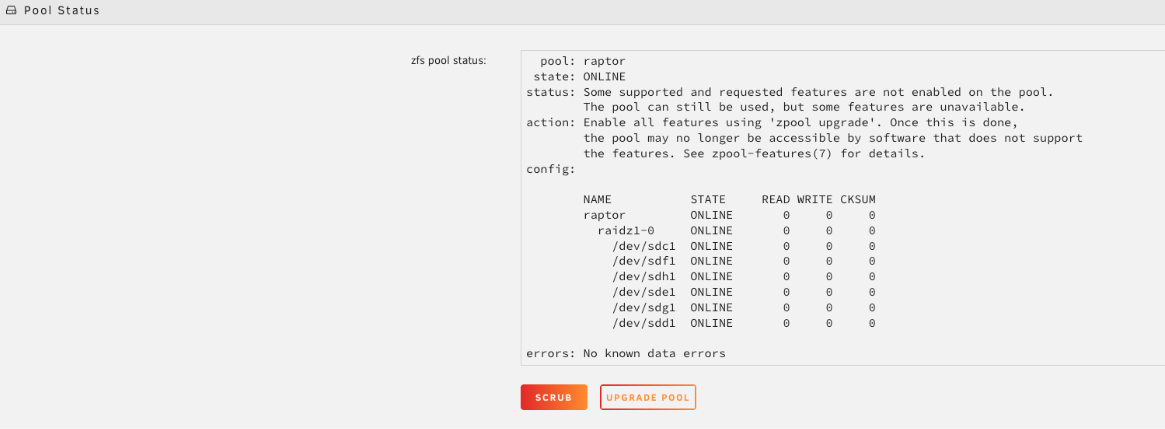
  4. Set file system to "Auto": Click the pool name (e.g., raptor) and set File System to Auto.
  5. Finish and start array: Click Done, then start the array.
AUTOMATIC DETECTION
Unraid will automatically detect and import the ZFS pool. Support vdevs (like log, cache/L2ARC, special/dedup) are listed under Subpools in the WebGUI. There is no need to add subpools separately after initiating the import. Unraid will automatically import them alongside the main data disks when all required drives are assigned.
After importing, running a scrub is highly recommended to verify data integrity.

  • Click the pool name (e.g., raptor) to open its configuration.
  • Under Pool Status, check the status and click Scrub.
zfs15-e52a186cecdd992803b04050ab345ccd.png


Also, it might be good to post in the pre-sales section on the unraid forum, there are some very experienced people including staff that help out and might be able to guide you through it..


Looks like there will be a Black Friday sales as well, so if you do get things running, you might save a little this Friday..
 
Last edited:
Here’s the section


Also, it might be good to post in the pre-sales section on the unraid forum, there are some very experienced people including staff that help out and might be able to guide you through it..


Looks like there will be a Black Friday sales as well, so if you do get things running, you might save a little this Friday..
I posted my question on their forum. So, adding drives to the pool won't reformat them? Sadly, I am going away this weekend so I can't experiment too much since I need it (namely home assistant) up for the weekend
 
I managed to get it to recognise the ZFS pool, however, I couldn't get Docker to start and create folders and share in the path I wanted. I thought it took out the Jellyfin server after I switched back to OMV. It changed all the paths to the ZFS pool. I don't I am going to use Unraid. It seems like it had the right Intel drive, but I just can't get around with how it deals with file systems.
 
Last edited:
Back
Top Bottom