Intel or AMD?

Associate
Joined
11 Aug 2007
Posts
1,666
Hi

Due to my motherboard and/or CPU crashing on me I need to buy new core components for my computer so I need a new motherboard, CPU (and aftermarket fan for overclocking) and memory.

I want to spend between £200 and £300, and I was wondering if I should go for an AMD Tri/Quad Core or an Intel i3?

Also, could you spec me a new motherboard, CPU and memory within that price range, basically the stuff I should be looking at getting.

Thanks for your help.

 
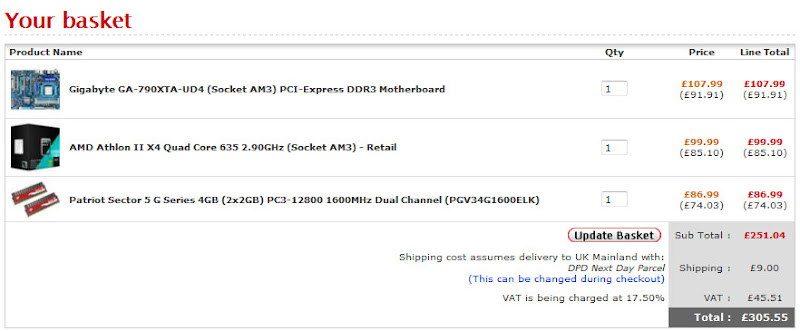
I wouldn't bother with the i3's personally unless you have no plan's to use a dedicated graphics card, actually even then I still wouldn't. For just under £300 you could have some pretty decent core parts like;

pcspec.jpg
 
Depends which way you want to go, the intel route will get you higher overclocked speeds but cost you closer to the £300 mark, while the similar AMD offerings get you a higher stock clock speed and paired which a board featuring the 710 SB like the gigabyte below will offer you the possibility of unlocking 2 extra cores effectivey giving you a Phenom X4. If you want bang for buck then definately the AMD but for slightly more performance once overclocked and if you dont want to take a chance with core unlocking intel is the better route

Patriot Viper 4Gb Kit ~ £73

AMD Phenom II X2 550 BE ~ £72

Gigabyte GA-MA770T-ES3 MA770 (Socket AM3) DDR3 Motherboard ~ £75
 
How easy is it to unlock the AMD chip to use the four cores? Also, is it a guaranteed unlock? As I'm looking at some of the reviews on OCUK and people say it's the luck of the draw as to whether it will actually unlock to four cores.

If it does unlock, can I then overclock it? And what is a good aftermarket cooler to use if I do want to run it as a quad core?

Thanks.
 
How easy is it to unlock the AMD chip to use the four cores? Also, is it a guaranteed unlock? As I'm looking at some of the reviews on OCUK and people say it's the luck of the draw as to whether it will actually unlock to four cores.

If it does unlock, can I then overclock it? And what is a good aftermarket cooler to use if I do want to run it as a quad core?

Thanks.

its all about luck, even if you unlock the extra 2 cores they might not be stable so dont buy a dual core thinking you will unlock 2 cores because it probably wont happen
 
With regards to the unlocking, sometimes you can unlock a quad with the 4th core unstable. Only asus boards will let you then choose to use 3 cores - all others will force you to use the default 2 cores :)
 
With regards to the unlocking, sometimes you can unlock a quad with the 4th core unstable. Only asus boards will let you then choose to use 3 cores - all others will force you to use the default 2 cores :)

Using a Gigabyte GA-MA785GMT-UD2H to unlock my 550 to a tri. Gigabyte boards also let you decide which of the 2 locked cores you want to unlock..
 
So, does that mean they will unlock to four cores or not? If I buy one, I will be expecting to be able to unlock four cores straight out of the box with an aftermarket cooler, so I definitely won't be buying one to expect a dual core.
 
There is around 80% chance to get 4 stable cores ( looks like first batch are all unlocked tho, maybe AMD didnt get enough for release so they just relased 965s with 2 cores locked )
But tbh, even if you don't unlock, it's still very fast as heck.
If you want 100% quad, buy 965BE or i5.

No risk no gain.
If it was 100% unlock it will be silly, looks like all the first batches unlock but it's never guaranteed. It's already a good enough move from AMD that you can get 145gbp worth CPU for under 80quid.
 
Hi

Due to my motherboard and/or CPU crashing on me I need to buy new core components for my computer
Thanks for your help.

Are you 100% sure you need new components? :confused:

Are you sure you have'nt got a failing PSU or RAM, overheating GPU/CPU, corrupt drivers etc. :confused:

You could buy new parts, put them in your old case with PSU and it starts crashing again..............:(
 
Are you 100% sure you need new components? :confused:

Are you sure you have'nt got a failing PSU or RAM, overheating GPU/CPU, corrupt drivers etc. :confused:

You could buy new parts, put them in your old case with PSU and it starts crashing again..............:(
Ok, so my computer basically just shutdown completely, turned itself off. And when I went to turn it back on it would power up but it wouldn't do anything else, no boot screen or anything. But the hard drive activity LED would be constanly 'on', not flickering etc, just 'on'.

I unplugged both hard drives, and just tested one, still getting the same problem, I unplugged all hard drives, still getting the same problem. I unplugged my GPU and plugged the monitor into the motherboard onboard graphics port, still getting the same problem. I re-seated the memory, still getting the same problem, I tried each memory stick separately, still getting the same problem. So I'm assuming that has narrowed it down to either being the CPU or the motherboard, both of which are getting on a bit these days and I have owned for nearly two years so either way, an upgrade would be a good thing.\

Thanks.
 
Most likely a CPU.
You could probably slap in there a 8-10quid celeron to see if it works ( worth a try, can always sell it for same price later, only loosing 2pound on postage : ).

But back on topic, 555BE definitely worth a try! Amazing cpu, blazingly fast even without any unlocks (which you're most likely to get anyways unless you're very unlucky) and if you feel it slowing down in 1-2yrs or so you could upgrade to a 965/975BE for next to no money ( sell old cpu for 40, buy new one for 80-90) or even grab one of the newcoming 6cores if you feel like it.


------------
just get one already tbh, u can also ditch it on the bay and get another one that unlocks :).
 
Ok, so my computer basically just shutdown completely, turned itself off. And when I went to turn it back on it would power up but it wouldn't do anything else, no boot screen or anything. But the hard drive activity LED would be constanly 'on', not flickering etc, just 'on'.

I unplugged both hard drives, and just tested one, still getting the same problem, I unplugged all hard drives, still getting the same problem. I unplugged my GPU and plugged the monitor into the motherboard onboard graphics port, still getting the same problem. I re-seated the memory, still getting the same problem, I tried each memory stick separately, still getting the same problem. So I'm assuming that has narrowed it down to either being the CPU or the motherboard, both of which are getting on a bit these days and I have owned for nearly two years so either way, an upgrade would be a good thing.\

Thanks.

Have you cleared the CMOS ??
 
That'll go well if there's something wrong with it ;)

You didn't read the whole thing did you ?
I was refering as to sell the 555BE in a year or so when it gets slow if he ever upgrades to it and gets unlucky enough to not be able to unlock and then upgrade to cheapo quad or six core.
 
Have you cleared the CMOS ??

I feel like a fool now because yesterday I was wondering to myself, should I reset the CMOS...and then I thought, nah, this doesn't seem like it could be something to do with that.

Yet I have just reset the CMOS (but I had to install the stock fan for my CPU, I managed to break my aftermarket one when I was fiddling about checking the CPU was ok, so now I doubt I can overclock my CPU back up to 3GHz), and now my PC is working again. It came up saying 'CMOS checksum error - reverting to default settings', or at least something along those lines, and now here we are, working PC.

Ah well, crisis averted, I doubt I'll be upgrading now then, I will probably just buy a new CPU fan as I broke the other one.
 
You didn't read the whole thing did you ?

Yeah I did. 'old cpu' was sufficiently ambiguous for me to misunderstand. :)

- aulthough if I'd taken any time to think about it I'd have realised that the proposal was too ridiculous to be what you meant.
 
Back
Top Bottom