Iracing upgrade - CPU only?

Soldato
Joined
15 Aug 2010
Posts
8,953
Location
N. Ireland
Hi folks,

I’ve noticed that I may need an upgrade to keep up with iRacing as I’ve noticed dips down to 60fps at race starts even with settings turned down.

I’m currently running an i5 12400F and 7800XT with 16GB Ddr4 at 3440x1440p.
The cpu gets pegged at 100 % while the gpu sits at 80% when racing.

I have a 14600KF in mind as I think my b660m mobo can take it with a bios update. Would this be the wisest/most efficient path to upgrade to see some improvements.

Also I do have a 49” I’m looking to use as well which will likely negate this upgrade on its own but looking to do it in phases.

TIA

 
I have a 14600KF in mind as I think my b660m mobo can take it with a bios update. Would this be the wisest/most efficient path to upgrade to see some improvements.
Yeah, raptor-core cpus are a modest upgrade on 12th gen, though I would be wary of buying a used one (especially tray), even if the 14600K/KF is believed to be the least affected.
 
Yeah, raptor-core cpus are a modest upgrade on 12th gen, though I would be wary of buying a used one (especially tray), even if the 14600K/KF is believed to be the least affected.
There are some B grade ones I see so I can send out an offer to the guys at ocuk.
I’ve accepted that I’d be losing something by sticking to ddr4, even the idea of upgrading to 32GB I’m toying with but should be the most economical while providing something.
I just wanted some reassurance that it’s not a stupid move and throwing money down the drain. Unfortunately not in a position to drop £800 on a 9800XD bundle right now.
 
I just wanted some reassurance that it’s not a stupid move and throwing money down the drain. Unfortunately not in a position to drop £800 on a 9800XD bundle right now.
It is just a mild upgrade in gaming performance between 12th and 14th gen, so with a 7800 XT you'd probably not want to bother in most cases.

But, if you're playing a game that is especially CPU demanding and want/need to keep the board/RAM, then that's the best option you have.

It is at least more worthwhile from a 12400, than it would be from a 12600K. I'd be surprised if you got more than 20-25% extra frames, even under heavy CPU load.

There are some B grade ones I see so I can send out an offer to the guys at ocuk.
I don't know if they'd still have the full warranty, maybe if they're boxed?
 
If you're not wanting to spend too much/avoid a total system overhaul then I think it's a sensible option, and then when you upgrade screen your gpu is likely to be even more limiting and so upgrading that would hopefully give you another bump.
 
Try underclocking, or ideally if possible overclocking, the CPU by at least 10% and see if the framerate changes by a relative amount in those situations - some games have CPU software bottlenecks which aren't always easily alleviated by simply throwing more CPU horsepower at it.
 
Last edited:
Cheers folks. I've not even went into the BIOS much as I knew I didn't have a lot to do with the CPU I had, didn't even realise B660 could undervolt.
I do believe iRacing is CPU based hence just the idea of throwing the 14600KF at it.
 
Cheers folks. I've not even went into the BIOS much as I knew I didn't have a lot to do with the CPU I had, didn't even realise B660 could undervolt.
I do believe iRacing is CPU based hence just the idea of throwing the 14600KF at it.
Did your check memory usage ?
 
I'd recommend an AMD X3D CPU. I went to a 7800X3D about 18 months ago, and it was a massive upgrade as regards iRacing. The extra cache really seems to help.
 
Last edited:
I'd recommend an AMD X3D CPU. I went to a 7800X3D about 18 months ago, and it was a massive upgrade as regards iRacing. The extra cache really seems to help.
Ideal upgrade would be a 9800X3D but can't justify it right now as that's a whole new platform.
 
Yeah, if you need RAM it's understandable given the current nonsense.

If you want a drop in replacement a 12700K or 12900K maybe? I'd steer clear of 13th/14th gen due to the issues. iRacing gets performance limited on the single core speed, so the faster the boost clocks the better in the absence of massive cache.
 
Last edited:
I can understand people being leery of the 13th/14th gen but the problem seems massively blown out of proportion - I can't even find a single case online of a 14600 SKU failing with symptoms consistent with the known degradation failure mechanisms and only know of 1 [probably] degraded 14600, albeit they aren't a CPU which has shifted in much volume.
 
Last edited:
i run a 13500 9070xt 32gb ddr4 and i havent checked my cpu usage, run at 3440x1440 so i best check if i need cpu upgrade as got me thinking as struggling to get 100fps in a race
 
You might want to ask about other people's setups in the gaming section and figure out whether you need more cores more raw clockspeed.

That'll help you figure out where it's better to put the money
 
You might want to ask about other people's setups in the gaming section and figure out whether you need more cores more raw clockspeed.

That'll help you figure out where it's better to put the money
It's single core performance. It basically hits two of the cores hard - one for the rendering, one for the physics. That's not going to potentially change until the new graphics engine arrives and iRacing gets off DirectX 11.

As mentioned above, 3D V-Cache seems to help as well.
 
It's single core performance. It basically hits two of the cores hard - one for the rendering, one for the physics. That's not going to potentially change until the new graphics engine arrives and iRacing gets off DirectX 11.

As mentioned above, 3D V-Cache seems to help as well.
In that case an overclocked 13600k could be an option. I've seen them hit 5.7ghz boost.
 
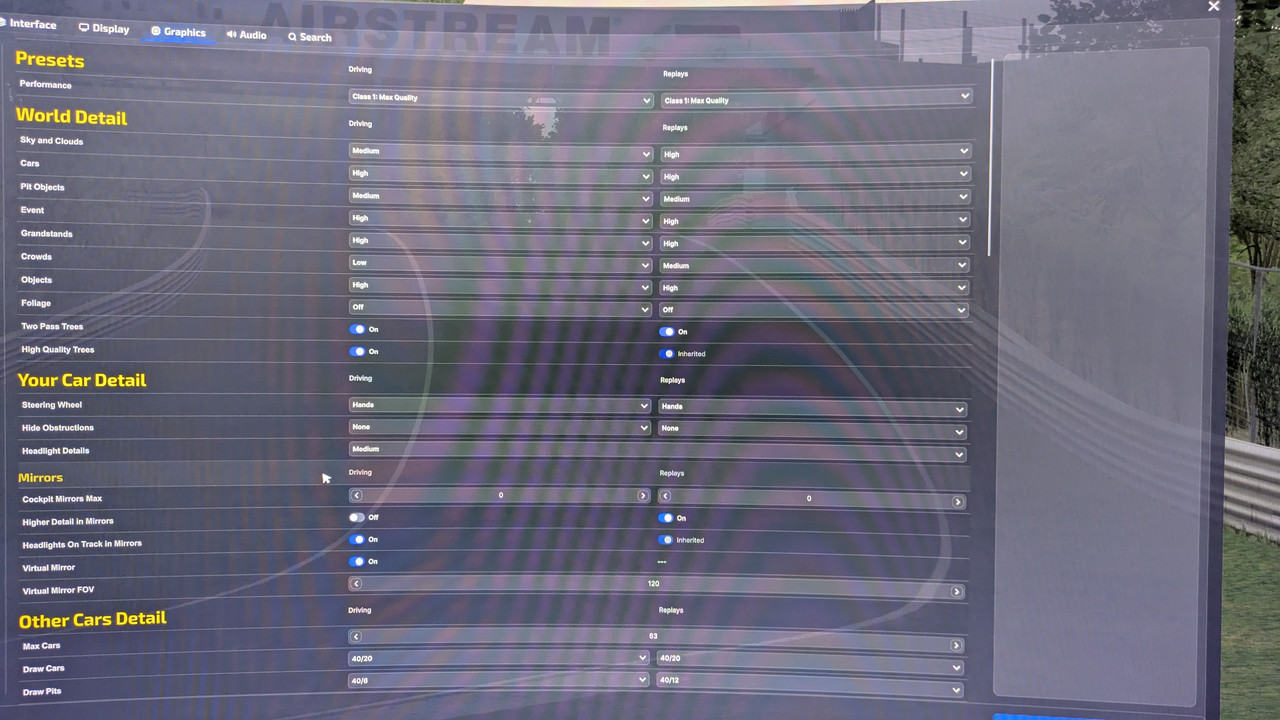
Can you share your settings if you get a chance?
Mines 100% cpu even at 3440x1440
i just used auto configuration

1000007171.jpg
 
Back
Top Bottom