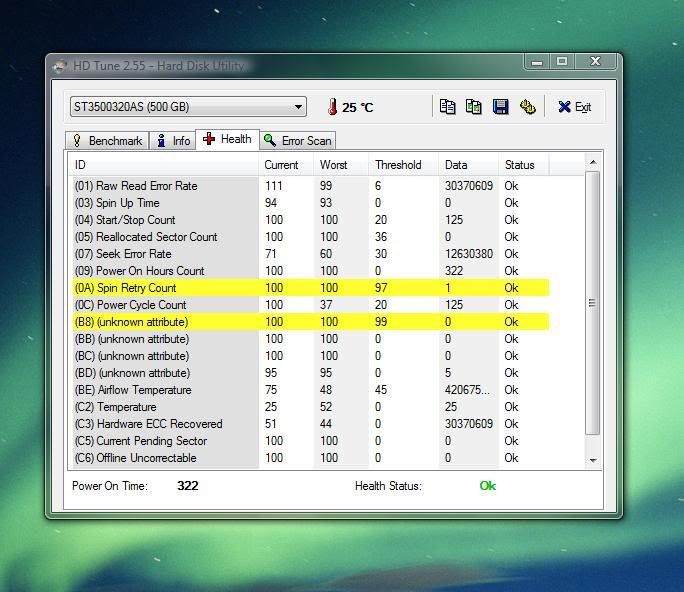
Is this a bad HD?

Soldato
Joined
19 Dec 2003
Posts
3,112
Location
UK
Ran HDTune and saw this;

hdtune.jpg


My other drive I have (WD AAKS) all shows up as ok.

I saw this in my event viewer the other day after a random BSOD that hasnt happened since;

The device, \Device\Harddisk2\DR2, has a bad block.

However, I have 2 hard drives, surely harddisk0 and harddisk1? In which case, could harddisk2 could have been my memory card being read from a printer?
 
Last edited:

Disk Management will confirm your guesses about hard drive designations. Plug in the memory card again and see if it appears there as harddrive 2.
 
I have seen this before regarding a Seagate drive and those two perimeters, as my newly bought 500GB drive, like yours, indicates just the same.

There is a thread here about it....

http://forums.vr-zone.com/showthread.php?t=137087

As for myself - I just don't think about it. Running Speed fan and checking the SMART analysis there all is well.
 
I have seen this before on perfectly good HD's. Try to do a full format (not quick) then run the test again. I recently did this on several brand new drives which I had only done a quick format on and they have worked perfectly afterwards. It can take several hours to do a full format (took 2.5 on my 750GB HD).
 
Hiya,

Im starting to get annoyed by Seagate, my friend bought the same drive on the same day, his completely went wrong last Friday (less than a month old) hence my paranoia, Seagate just aren't the same at the moment as they used to be in terms of reliability IMO.

If im gonna do a format, I might as well replace my drive as It takes me ages to put all my stuff back on here lol.

I can't get SMART data to show up on Speedfan, and I can't find a way to enable it in my BIOS (Abit IP35 Pro)
 
Back
Top Bottom