

-
Notice regarding image hosts and attachments. See here.
You are using an out of date browser. It may not display this or other websites correctly.
You should upgrade or use an alternative browser.
You should upgrade or use an alternative browser.
macbook pro pics
- Thread starter ringo747
- Start date
More options
Thread starter's posts

See, I just noticed from the photos - the closing mechanism is not magnetic?! I'm using a MacBook and I absolutely adore the magnetic closing mechanism, what do you think of the closing mechanism jonnyc747?
(See, them photos have more use than willy waving or as per suggested by Clarkey.)
(See, them photos have more use than willy waving or as per suggested by Clarkey.)

Soldato
- Joined
- 10 Apr 2006
- Posts
- 7,948
- Location
- North West
whats that? macbook porn?
Why yes i do have some
2x19" Samsung
1x24" Dell
15" Macbook Pro 2.33ghz 2GB RAM


Lovin the macbook so far!
If only i could use it as a desktop then i would get rid of windows forever!
Shame the speed goes from 2.33 to 1ghz when you take the battery out, although it is nice you can run it without the battery i suppose!
Why yes i do have some
2x19" Samsung
1x24" Dell
15" Macbook Pro 2.33ghz 2GB RAM
Lovin the macbook so far!
If only i could use it as a desktop then i would get rid of windows forever!
Shame the speed goes from 2.33 to 1ghz when you take the battery out, although it is nice you can run it without the battery i suppose!


Soldato
- Joined
- 10 Apr 2006
- Posts
- 7,948
- Location
- North West
Didn't think laptops would liked to be used for along period of time everyday.
House mate had a laptop and tried this, her battery lasted around 6months and she had to buy another one
Didn't want to be buying batteries every 6months - 1year for it, not too sure on how hot the macbook gets and if you can run it for 24hours, as my current desktop stays on for weeks on end.
I know you can run it with the battery out, but this makes the clock speed go down to 1ghz which is pointless.
But if there is no damage to using it for long periods of time to the battery or macbook itself then i suppose i could just use it, which is what im hoping for!
House mate had a laptop and tried this, her battery lasted around 6months and she had to buy another one
Didn't want to be buying batteries every 6months - 1year for it, not too sure on how hot the macbook gets and if you can run it for 24hours, as my current desktop stays on for weeks on end.
I know you can run it with the battery out, but this makes the clock speed go down to 1ghz which is pointless.
But if there is no damage to using it for long periods of time to the battery or macbook itself then i suppose i could just use it, which is what im hoping for!

Does this work? One thing I miss about my MBP compared to top-end Dell laptops is the option of a docking station. Would be a nice touch as atm my MacBook Pro is probably more powerful and takes up less desk-room than my desktop machine does.


tsinc80697 said:Didn't think laptops would liked to be used for along period of time everyday.
House mate had a laptop and tried this, her battery lasted around 6months and she had to buy another one
Didn't want to be buying batteries every 6months - 1year for it, not too sure on how hot the macbook gets and if you can run it for 24hours, as my current desktop stays on for weeks on end.
I know you can run it with the battery out, but this makes the clock speed go down to 1ghz which is pointless.
But if there is no damage to using it for long periods of time to the battery or macbook itself then i suppose i could just use it, which is what im hoping for!
I've been running my MacBook since I've gotten it 4months ago, nearly 24/7 - apart from restarts from updates and installs. 70% of the time it is plugged into AC and 30% traveling or battery use.
This is what Coconutbattry think of my current battery status:
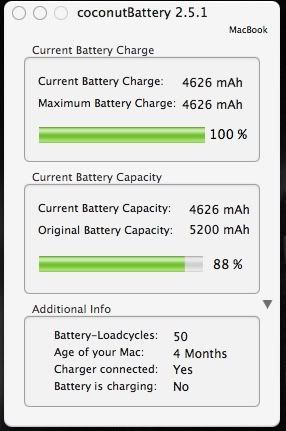
Not too shabby in my opinion.
Mr.Orb said:Oh man, going to have to wait for my April loan payout before I can get mine
Can't wait though, funny as i used to despise the things

and leopard will probably be out by then too!

Soldato
- Joined
- 3 Aug 2005
- Posts
- 4,533
- Location
- UK
I'd say I have reasonably similar charging habits to you with my MacBook – charged pretty much every day, 70% connected to a power source, 30% on the move. Here are my vital statistics:Dr Jones said:I've been running my MacBook since I've gotten it 4months ago, nearly 24/7 - apart from restarts from updates and installs. 70% of the time it is plugged into AC and 30% traveling or battery use.
This is what Coconutbattry think of my current battery status:
http://img.photobucket.com/albums/v392/halfpast5/coconutbattery.jpg
Not too shabby in my opinion.
----------
Current Battery Charge
Current Battery Charge: 5446 mAh
Maximum Battery Charge: 5451 mAh
(99%)
Current Battery Capacity
Current Battery Capacity: 5451 mAh
Original Battery Capacity: 5200 mAh
(100%)
Additional Info
Battery-Loadcycles: 135
Age of your Mac: 3 Months
Charger connected: Yes
Battery is charging: No
----------
And here I was thinking I was murdering my MacBook


Man of Honour
- Joined
- 31 Jan 2004
- Posts
- 16,332
- Location
- Plymouth
Pfft, amateurtsinc80697 said:whats that? macbook porn?
Why yes i do have some
2x19" Samsung
1x24" Dell
15" Macbook Pro 2.33ghz 2GB RAM

Desktop + Macbook Pro + 17" TFT (I know, hardly fantastic, but it's the super-sexy Samsung P-something from years ago and I love it
) + 26" HDTV + lots of cabling + remote controls + Parallels + bed = heaven 
Al Vallario said:I'd say I have reasonably similar charging habits to you with my MacBook – charged pretty much every day, 70% connected to a power source, 30% on the move. Here are my vital statistics:
----------
Current Battery Charge
Current Battery Charge: 5446 mAh
Maximum Battery Charge: 5451 mAh
(99%)
Current Battery Capacity
Current Battery Capacity: 5451 mAh
Original Battery Capacity: 5200 mAh
(100%)
Additional Info
Battery-Loadcycles: 135
Age of your Mac: 3 Months
Charger connected: Yes
Battery is charging: No
----------
And here I was thinking I was murdering my MacBook
just reading your posts about battery life and am wondering if it is better to run off the battery or continuously run off the mains if using this at home?

Soldato
- Joined
- 10 Apr 2006
- Posts
- 7,948
- Location
- North West
so once the battery is at 100%, the power will not be going through the battery itself but i will still be getting the full 2.33ghz and not 1ghz ?
If so then i think ill just do that then!
Amateur ? You havent seen my 32" LCD, xbox 360, double bed!
Not bad for just my student accommodation in a house
If so then i think ill just do that then!
Amateur ? You havent seen my 32" LCD, xbox 360, double bed!
Not bad for just my student accommodation in a house