


At some point after rebooting one of my systems today Windows enabled the Drag Tray feature... which nearly caused a big **** up in my work flow as I was trying to do something else when the panel unexpectedly popped up over what I was doing... really not cool.
You are using an out of date browser. It may not display this or other websites correctly.
You should upgrade or use an alternative browser.
You should upgrade or use an alternative browser.
*** Microsoft Windows 11 Thoughts & Discussion Thread ***
- Thread starter Deleted member 77746
- Start date
More options
Thread starter's posts
Silly me, my system is now updated to 25H2.
Don't ask...
It says 25H2 under the Windows Specifications, though I can see why I was a little confused,
as in the Update History in the Windows Update section, the last 'obvious' mention of it is 23H2.
I guess it must have been part of the .NET Framework Preview Update and subsequent updates earlier this month.
Don't ask...
It says 25H2 under the Windows Specifications, though I can see why I was a little confused,
as in the Update History in the Windows Update section, the last 'obvious' mention of it is 23H2.
I guess it must have been part of the .NET Framework Preview Update and subsequent updates earlier this month.
Last edited:

I am finding it useful that the Windows 11 feature for dynamic lighting is being supported, somewhat, by certain manufacturers. Either built in to the OS, or in the case of my MSI GPU, a very small download to the nadd the function to Windows, not needing their Mystic Lights...
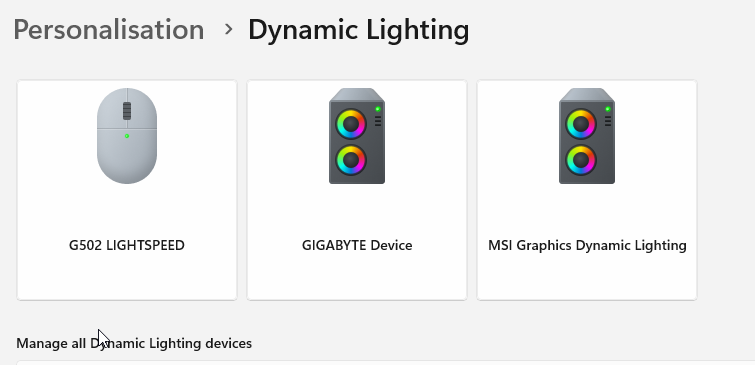
From what I have read, so far, it seems Corsair are holding out at this point and not providing such functions, without their iCue. I'll just get used to having 2 sticks of rainbow Dominator memory or use some black tape.
Gigabyte, in the above, is the motherboard with attached strip lighting.
From what I have read, so far, it seems Corsair are holding out at this point and not providing such functions, without their iCue. I'll just get used to having 2 sticks of rainbow Dominator memory or use some black tape.
Gigabyte, in the above, is the motherboard with attached strip lighting.



Im guessing this is a new thing with 25h2Installers not seeing your drive controller, so wont see attached drives.

Not that I've heard of.Im guessing this is a new thing with 25h2
Assuming you have CSM turned off etc
Yea i do, had a google and seems to be a wide spread issue. Strange never came across it before on the same system, some report 24h2 does not have this issue.Not that I've heard of.
Assuming you have CSM turned off etc
Rufus also fixed it
What was the actual fix that Rufus applied? Did it just copy some drivers over to the USB stick?Yea i do, had a google and seems to be a wide spread issue. Strange never came across it before on the same system, some report 24h2 does not have this issue.
Rufus also fixed it
In all honesty, I have no idea. Just saw it recommendedWhat was the actual fix that Rufus applied? Did it just copy some drivers over to the USB stick?

Depending when you get the blue screen, you might be able to trigger Windows into going into repair mode. After about a second or two of seeing the Windows logo, hit the reset button. Repeat this twice more and let Windows boot - you should see the repair options on the fourth boot.Has windows 11 dropped the repair install from boot option? I canmot find how to do it with a bluescreened system. If so, it is pretty rubbish.
You might only need to reset the PC twice during boot to trigger the repair mode, but three resets should do the trick.
Been reading how the January update is causing all sorts of problems, Notepad not launching, people unable to shutdown their PC, Outlook freezing, remote desktop, One Drive, apparently it caused so many problems they've had to issue two OOB patches, the first one to fix problems with the update and the second on to fix problems with the first OOB patch.
Makes me wonder how much worse Windows 11 will get or if they even care any more.
Makes me wonder how much worse Windows 11 will get or if they even care any more.
Last edited:

Microsoft is working to rebuild trust in Windows - The VergeWindows is in a weird spot. In its 40-year history, the operating system has weathered its fair share of missteps, but Windows 11 is testing the patience of its users in new ways. Persistent bugs, performance issues, intrusive prompts, ads, and bloatware have eroded the core Windows experience. Early system requirement decisions have also damaged trust among Microsoft’s most loyal users, an erosion that’s accelerated by the company’s aggressive push into AI that doesn’t always deliver on its promises.
Windows is at breaking point, and Microsoft knows it. Sources familiar with the company’s plans tell me Windows engineers are now focusing on fixing the core issues of Windows 11 over the coming months, in a process known as “swarming.” Microsoft is redirecting engineers to urgently fix Windows 11’s performance and reliability issues, aiming to halt the operating system’s death by a thousand cuts.
Microsoft is also going to spend the rest of the year focusing on all of the Windows 11 pain points. “The feedback we’re receiving from our community of passionate customers and Windows Insiders has been clear. We need to improve Windows in ways that are meaningful for people,” says Pavan Davuluri, president of Windows and devices, in a statement to Notepad. “This year you will see us focus on addressing pain points we hear consistently from customers: improving system performance, reliability, and the overall experience of Windows.”
Some of these improvements will be basic changes like fixing dark mode in Windows 11 and modernizing parts that have felt neglected over the past decade. While Microsoft has done a good job on improving driver stability and reducing BSODs in Windows 11, it still needs to address basic performance issues with File Explorer, or the fact that Linux can often run Windows games better than Windows.
The performance and reliability issues in Windows 11 have been apparent over the past year, as the pressure of supporting thousands of different PC configurations mounts up. Microsoft took months to fix Remote Desktop disconnection issues, then shipped a Windows Update that wiped out Copilot, and released updates that duplicated the Task Manager and created a nasty system recovery bug. Microsoft topped it all off with an update that was supposed to improve Windows 11’s dark mode, but also broke it with a white screen flash when opening File Explorer.
We’re only a month into the new year and the Windows 11 bugs are only getting worse. Microsoft’s first Windows 11 update of 2026 has been a buggy mess. Shutdown issues on some machines forced Microsoft to issue an unusual emergency out-of-band update, and then a week later, a second out-of-band fix arrived to address OneDrive and Dropbox crashes. Microsoft has also confirmed that some PCs used by businesses are failing to boot after installing its January update, because they were left in an “improper state” after failing to install December’s monthly update.
The bugs and reliability issues are exasperating the other issue: Windows 11 is annoying to use. Microsoft has been pushing Windows 11 users to switch to Edge and Bing in ways I’ve never seen before. At one point a couple of years ago, Microsoft even used malware-like pop-ups in a disgusting overreach. Windows 11 users are still routinely tricked into switching to Edge and Bing after some Windows Updates. If you search for an item on the Start menu, you’ll also get pushed into Edge for a Bing result even if you have Chrome or Firefox set as the default browser. Even parts of the Settings interface have links that force you into Edge and Bing.
Microsoft has also tried to upsell its OneDrive cloud storage with constant nags in Windows 11. At one point you couldn’t even close OneDrive without being asked why. It often feels like you’re fighting with Windows 11 to respect your defaults and settings. Microsoft is even forcing people into using a Microsoft account with Windows 11, making it increasingly difficult for the small percentage of users that want a local account.
The added tension of fighting with the OS and being served ads and pop-ups has also further broken down trust in Windows 11. Windows users were already wary of Windows 11 when Microsoft set system requirements that left millions of machines out in the cold, and Microsoft keeps doing things that eat away at any remaining trust. The launch of Recall, a Windows 11 feature that takes snapshots of mostly everything you see on your screen, was highly controversial and generated privacy concerns on top of suspicion around the telemetry data Microsoft collects from its OS.
This breakdown in trust has only made Windows 11 users balk at AI additions to the OS, leading to Microsoft often getting branded as “Microslop” when these features appear. Microsoft did some great engineering work with Windows on Arm for its Copilot Plus PCs, but it was undermined by Recall and the desperate need to push its Copilot AI into every single part of the OS. Microsoft’s Edge browser now has a Copilot mode, dedicated Copilot and Microsoft 365 Copilot apps are preinstalled, and Copilot is also coming to the taskbar. Even Paint and Notepad, which were once basic apps, now have Copilot buttons and Paint is getting AI coloring books. There simply aren’t enough useful AI features to make people care about AI PCs.
Microsoft now faces a tough fight to win back the trust of Windows users, let alone build back excitement around the OS. I’ve been covering Windows for more than 20 years, and it feels like fans of the OS have disappeared over the past couple of years. It’s a far cry from Microsoft CEO Satya Nadella’s promise to win back Windows fans more than a decade ago. “We want to move from people needing Windows to choosing Windows, to loving Windows,” said Nadella, months before the company shipped Windows 10.
Microsoft has remained tight-lipped about the problems with Windows 11, and the core members of its Windows Insider team moved to different roles inside the company recently. The Windows Insider program was created to help test Windows 10 and get feedback directly from users, after the disastrous changes in Windows 8. Microsoft needs its Windows Insider program more than ever before, but it now feels like a faceless operation, rather than one that’s built on community and trust.
I’m really hoping that Microsoft’s commitment to improvements means it also addresses the daily annoyances of Windows 11, especially as more and more Windows users seriously contemplate switching to Linux. There’s a long way to go, but it’s encouraging to hear Microsoft finally respond to the complaints.
“Trust is earned over time and we are committed to building it back with the Windows community,” says Davuluri.
I can't wait to see many of these fixes will just end up drowning us in yet more AI and telemetry that nobody wants.

They have to do something to keep the revenue figures up as they're waiting on $280bn "revenue backlog" from OpenAI. That's more than quarter of a trillion dollars....I can't wait to see many of these fixes will just end up drowning us in yet more AI and telemetry that nobody wants.
I think Windows is done.
Between MS and Trump a lot of companies/govts are going to be looking harder at Linux both in terms of reliability and sovereignty.
It'll take a few years but I think its done - partly because the Azure side of the business will get hammered as EU companies/govts switch to local EU-based hyperscalers. They will be compelled to & quite rightly as USA law gives Trump the power to exfiltrate any data/turn off any service which a USA company provides anywhere in the world. Remember that if Trump drops dead tomorrow, things won't get "better", not with the people waiting in the wings. The USA can't be trusted, not from now on.
Windows makes MS bugger all in terms of revenue, its under 10% of total revenue. In terms of being a "gateway drug" to other MS services, well that's a different matter.
Perfect storm is going to hit MS (and Oracle who are also in the ****) when OpenAI goes pop.
Completely agree with the above. Also, I can't see how they will improve Windows 11 for the user as it's whole design ethos is to drive engagement to other MS services either by nagging you or forcing you - then you have the telemetry on top and the drive for AI integration. It's just not user centric any more.
Edit - And that is without touching on the lack of trust with the enforced patching and resetting of user defined options.
Edit - And that is without touching on the lack of trust with the enforced patching and resetting of user defined options.
Last edited:
Yeah, Windows 11 has gone down the pan for awhile now.Completely agree with the above. Also, I can't see how they will improve Windows 11 for the user as it's whole design ethos is to drive engagement to other MS services either by nagging you or forcing you - then you have the telemetry on top and the drive for AI integration. It's just not user centric any more.
Edit - And that is without touching on the lack of trust with the enforced patching and resetting of user defined options.
Cannot see them improving it that much without adding more telephony and AI crap to it.
They need to debloat it themselves or give users the option to remove what they want without it being re installed or forced back on to systems
In terms of eliminating MS's AI, well its getting more difficult as MS keep "deprecating" settings in group policy and foisting it back on you until you find the new settings. Its so bad Applocker is about the only solution which works reliably but that isn't an option for most people.
I spotted this a bit before el reg : https://www.theregister.com/2026/01/13/script_removes_ai_from_windows/?td=rt-4a
I've had it on a machine for a while & it seems to work OK. YMMV.
I spotted this a bit before el reg : https://www.theregister.com/2026/01/13/script_removes_ai_from_windows/?td=rt-4a
I've had it on a machine for a while & it seems to work OK. YMMV.
Last edited:
I've ran this on my system since going to 25H2 from 23H2 as this went EOL. (Was about November last year)In terms of eliminating MS's AI, well its getting more difficult as MS keep "deprecating" settings in group policy and foisting it back on you until you find the new settings. Its so bad Applocker is about the only solution which works reliably but that isn't an option for most people.
I spotted this a bit before el reg : https://www.theregister.com/2026/01/13/script_removes_ai_from_windows/?td=rt-4a
I've had it on a machine for a while & it seems to work OK. YMMV.
not noticed any issues with what it does and no OS problems either
Last edited: