Monitor/unknown problem. Pretty urgent!

Associate
Joined
30 May 2011
Posts
62
I've got a 24" monitor I've been using since early 2010 with my desktop I purchased in 2009. Recently it just slowly started to deteriorate; at first it would just black out after a few hours of use followed by a 'No signal' message and then the monitor LED would start to flash instead of remaining constant as it does when it's turned on. After a while it just started to not work at all, or only for very short amounts of time (5 mins).

Now today I built my first computer from scratch, it turns on fine but it has the same problem with the 24" monitor - doesn't turn on, says 'No signal'. The thing is though, I tried my old monitor with both computers and it does the same thing.

What the hell is wrong? Is it both my monitors or both my computers? I'm at a complete loss and I would hugely appreciate any help you guys could give me. It's a pain in the arse because I'm rearing to put my new computer to use.

 
So have you built the new PC correctly?

Its definitely posting ok as far as you can tell? does the GFX card in it need/have additional power from the PSU?
 
I'm not entirely sure sorry, I've got a semi-modular PSU and there are two cables left over that I haven't been able to find anything to connect them to: one is a long cable with three 4-pin molex connectors and a small 4 pin and the other is a cable with a single 4-pin molex.

There doesn't seem to be any more ports to insert cables on my 6850.
 
Last edited:
i3-2100
XFX 6850
Antec TruePower 650w
Seagate 500GB 3.5" SATA-III 6Gb/s Barracuda Hard Drive 7200RPM 16MB Cache
Corsair Vengeance 2x2Gb DDR3
Bitfenix Shinobi with window
Asus P8Z68-V PRO Z68 Socket 1155 8 Channel HD Audio
LiteOn iHAS124-19 24x DVD±RW DL & RAM SATA Optical Drive
 
your Z68 board should have onboard GFX. If you have a third party GFX card remove it and use the onboard GFX while testing
 
The motherboard needs a 24pin (20+4pin) and a 8pin (4+4pin) from the PSU.

The 6850 card needs a single 6pin PCI-E connector from the PSU (there is a cable with a 6pin and a 6+2pin)

Use a single stick of RAM at the moment.

Ignore the drives, you dont need these to display a POST/BIOS screen.

You are plugging the monitor into the GFX card and not the motherboard outputs?
 
The motherboard needs a 24pin (20+4pin) and a 8pin (4+4pin) from the PSU.

The 6850 card needs a single 6pin PCI-E connector from the PSU (there is a cable with a 6pin and a 6+2pin)

Use a single stick of RAM at the moment.

Ignore the drives, you dont need these to display a POST/BIOS screen.

You are plugging the monitor into the GFX card and not the motherboard outputs?

Motherboard and card are connected correctly.
 
Erm how do you do that? Only the power connected to the wall and the big blue serial port connector in the motherboard like it was with my other computer.

Oh and by the way when my computer isn't connected to the monitor it says 'Cable not connected' so I'm getting something out of it at least. Confused.
 
Last edited:
The monitor gets its signal from the GFX card.

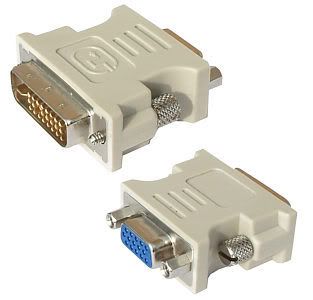
It needs to be connected to the GFX card by DVI/HDMI or VGA using a DVI to VGA adapter.
 
In the GFX card box, is there something like this?

vga-to-dvi.jpg
 
Back
Top Bottom