

You are using an out of date browser. It may not display this or other websites correctly.
You should upgrade or use an alternative browser.
You should upgrade or use an alternative browser.
MP3 Rip program
- Thread starter Jimmy1983
- Start date
More options
Thread starter's posts
http://www.google.co.uk/search?hl=e...&ct=result&cd=1&q=mp3+ripper+&+burner&spell=1
Too many to list mate.
Too many to list mate.

http://bleddyn.co.uk/creations/EAC.exe
there you go, EAC with Lame preconfigured for you, double click the exe once and it'll install itself
check start menu for the link to it
select the files you want, and click mp3, the default output folder is C:\MP3, you can change it in the options
there you go, EAC with Lame preconfigured for you, double click the exe once and it'll install itself
check start menu for the link to it
select the files you want, and click mp3, the default output folder is C:\MP3, you can change it in the options
http://bleddyn.co.uk/creations/EAC.exe
there you go, EAC with Lame preconfigured for you, double click the exe once and it'll install itself
check start menu for the link to it
select the files you want, and click mp3, the default output folder is C:\MP3, you can change it in the options

guess it doesnt work in Vista X64?
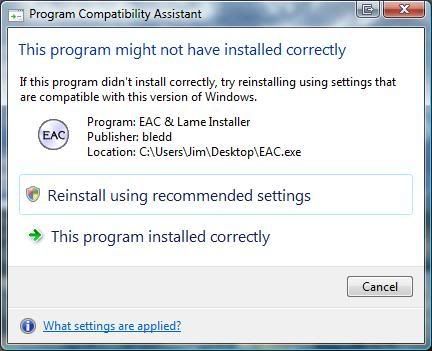
Hmmmm, working now...odd


Soldato
- Joined
- 7 Mar 2005
- Posts
- 19,709
- Location
- LU7
I think EAC rips to wav to begin with, and then converts it to mp3.
I think EAC rips to wav to begin with, and then converts it to mp3.
Yer your right, I didnt leave it too finish. Other thing is when I change the compression to 128kbps, after each rip the cd is ripped at 256, do you know why? Do I need to change the LAME encoder?
Soldato
- Joined
- 7 Mar 2005
- Posts
- 19,709
- Location
- LU7
Well what EAC does is rip each track to a wav file and then launches Lame to convert to MP3. As for 128Kbps/256Kbps, what I think is going on is that you've set 128Kbps and that is the average and 256Kbps is being reported probably because its the highest bitrate used in the song.
What happens is that where a song needs lots of detail in the sound, then a higher bitrate is used for that. Where a song is quieter then the bitrate used is lower. This achieves a kind of compromised trade-off between small file size and good quality sounds. If you watch the Lame MP3 external window when it is converting the wav to MP3 you'll see each bitrate and it starts to encode the track and you'll see what bitrate it is using and how much of the song uses each bitrate as it goes along.
What happens is that where a song needs lots of detail in the sound, then a higher bitrate is used for that. Where a song is quieter then the bitrate used is lower. This achieves a kind of compromised trade-off between small file size and good quality sounds. If you watch the Lame MP3 external window when it is converting the wav to MP3 you'll see each bitrate and it starts to encode the track and you'll see what bitrate it is using and how much of the song uses each bitrate as it goes along.

- Joined
- 2 Aug 2005
- Posts
- 8,720
- Location
- Cleveland, Ohio, USA
It's a FOSS mp3 encoder widely regarded as producing the highest quality sound at a given bitrate.EAC selected the correct disc! BTW, what lame again, heard about it before.
http://en.wikipedia.org/wiki/LAME

Soldato
- Joined
- 7 Mar 2005
- Posts
- 19,709
- Location
- LU7
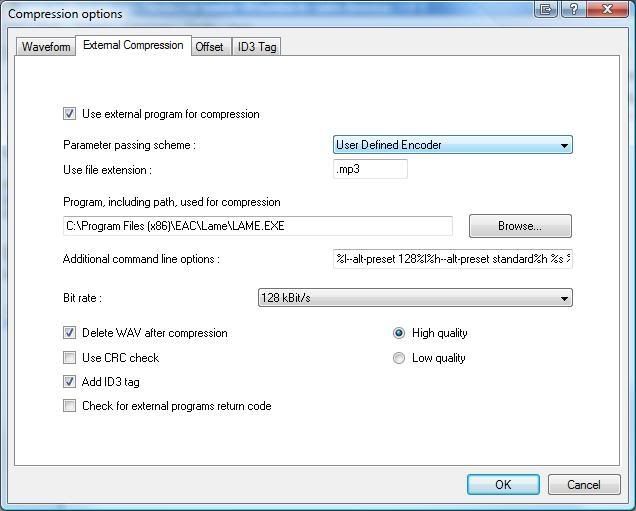
I've got that as well and I've selected 192Kbps.Yeh I see what your saying, Iam sure I should be able to get 128 tho.
Some off the tracks have been ripped to 256 and others to 320, not ideal as I wanted 128.
It's a FOSS mp3 encoder widely regarded as producing the highest quality sound at a given bitrate.
http://en.wikipedia.org/wiki/LAME
The default is the user defined encoder, leave it at that? There is LAME MP3 Encoder in that drop down list aswell
Soldato
- Joined
- 7 Mar 2005
- Posts
- 19,709
- Location
- LU7
Did you download and install Bledd's version of EAC? If so, it is all set up for you.
Did you download and install Bledd's version of EAC? If so, it is all set up for you.
Yer I did. Only changed the filename/bit rate settings