Never used a mechanical keyboard before

Thanks all for the advice, looking into the K95 platinum keyboard.

hugely over priced imo.

My k90 recently failed, burnt tracked on the motherboard so it's toast. There is no way im paying current prices for another corsair keyboard given their pretty rubbish track record for reliability. I have a velocifire VM90 arriving today with kailh blacks in which are pretty much the same as the cherry reds in my k90 but stiffer (preferable for me actually). RBG and all that jazz, 104key rollover, macros blah blah...50 quid. I'm not suggestion you go buy one, but i'd sersiouly reconsider spending the best part of £200 on a corsair keyboard. There are much better VFM keyboards available.
 
I've been out of the pc scene for many years and have never used a mechanical keyboard in my life.
Just a note, if you have been using PC's for a long time but not recently then you may very well be used to mechanical keyboards but unaware of it. Mechanical was the standard type before the now more common cheapo ones flooded the market in the late 90's.
 
hugely over priced imo.

My k90 recently failed, burnt tracked on the motherboard so it's toast. There is no way im paying current prices for another corsair keyboard given their pretty rubbish track record for reliability. I have a velocifire VM90 arriving today with kailh blacks in which are pretty much the same as the cherry reds in my k90 but stiffer (preferable for me actually). RBG and all that jazz, 104key rollover, macros blah blah...50 quid. I'm not suggestion you go buy one, but i'd sersiouly reconsider spending the best part of £200 on a corsair keyboard. There are much better VFM keyboards available.

I agree it's an expensive keyboard, I didn't know the Corsair keyboard's had such a bad name for reliability?. How long did you have your K90 for?. That keyboard you've just brought sounds good.

Just a note, if you have been using PC's for a long time but not recently then you may very well be used to mechanical keyboards but unaware of it. Mechanical was the standard type before the now more common cheapo ones flooded the market in the late 90's.

Cheers fot that, never knew that to be honest.
 
I agree it's an expensive keyboard, I didn't know the Corsair keyboard's had such a bad name for reliability?. How long did you have your K90 for?. That keyboard you've just brought sounds good.

My k90 lasted a few years. I bought it second hand so i guess in all its probably lasted 5 years which doesnt sound so bad but it's a simple mechanical keyboard, I've had hard drives last longer than that lol. I wouldnt mind it if it was a £50 keyboard being hammered to death all day long but not from relatively well looked after keyboards costing £100 or more and the k95 plat is just insane.

Corsair had a big problem with the leds failing on the original k95 and i believe the the first run of k95 RGB boards, as well as the lower end keyboards in the range. I believe that's all but resolved now? I don't know, however on past experiance alone I'm just not impressed with corsair in general. A work colleague (incidentally the guy i bought the k90 from .....) has owned a range of corsair products over the years, from keyboards to ram to AIO coolers and every single product he bought had to be replaced prematurely. He rates their RMA service pretty highly, which is a good job as he had to use it so much :p He's done with them now, though. As am i!
 
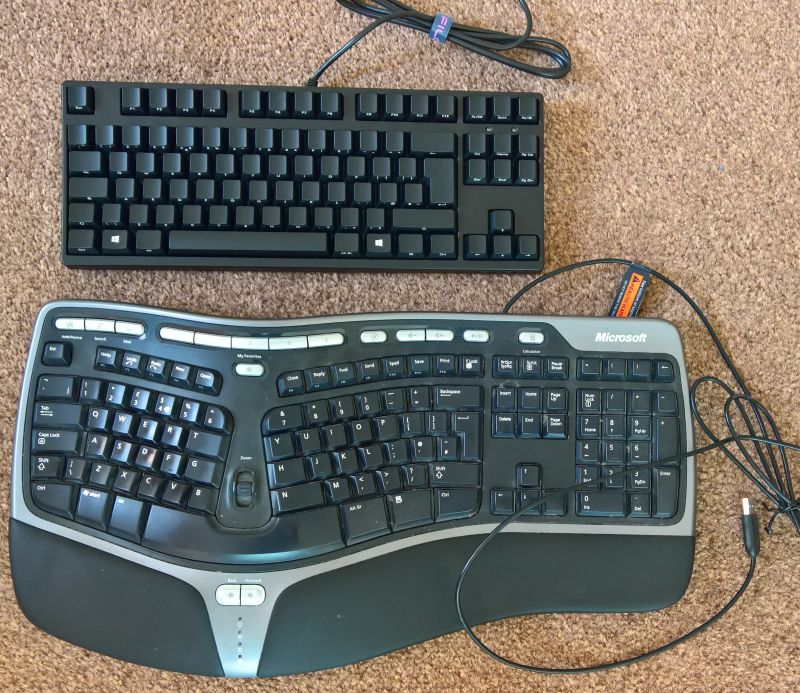
I just received a Filco Ninja Tenkeyless keyboard. Only used it for 15 mins or so but it's awesome. I was unsure which key type to go for but was either going to be brown or blue. I thought they were a bit expensive but saw the Filco with the brown keys was on offer so picked one up. Not sure it makes me a better typist or quicker but it just feels a quality sturdy keyboard to use. Having said that I've used two Microsoft Ergonomic keyboards for many years and both are still going strong. I picked up the Filco due to it's small size. Using the mouse is one of the biggest causes of RSI so like to use different keyboards - this one allows the mouse to be used closer to the body.
The brown keys are not too noisey.
Compared to an ergonomic keyboard it's dinky. For some they are expensive and unnecessary but if you don't mind paying more for the quality feel then I would recommend, ideally trying one first.
Filco.jpg
 
My k90 lasted a few years. I bought it second hand so i guess in all its probably lasted 5 years which doesnt sound so bad but it's a simple mechanical keyboard, I've had hard drives last longer than that lol. I wouldnt mind it if it was a £50 keyboard being hammered to death all day long but not from relatively well looked after keyboards costing £100 or more and the k95 plat is just insane.

Corsair had a big problem with the leds failing on the original k95 and i believe the the first run of k95 RGB boards, as well as the lower end keyboards in the range. I believe that's all but resolved now? I don't know, however on past experiance alone I'm just not impressed with corsair in general. A work colleague (incidentally the guy i bought the k90 from .....) has owned a range of corsair products over the years, from keyboards to ram to AIO coolers and every single product he bought had to be replaced prematurely. He rates their RMA service pretty highly, which is a good job as he had to use it so much :p He's done with them now, though. As am i!

That puts you off buying Corsair :D, quite shocking stuff. I liked the way you could K95 looked with aluminium frame, looks a very sleek frame.

I enjoy the customisation of the RGB keys, also has a nice cable management feature and a usb port for my mouse.

Do many keyboards have features like these?.

Thanks.

I just received a Filco Ninja Tenkeyless keyboard. Only used it for 15 mins or so but it's awesome. I was unsure which key type to go for but was either going to be brown or blue. I thought they were a bit expensive but saw the Filco with the brown keys was on offer so picked one up. Not sure it makes me a better typist or quicker but it just feels a quality sturdy keyboard to use. Having said that I've used two Microsoft Ergonomic keyboards for many years and both are still going strong. I picked up the Filco due to it's small size. Using the mouse is one of the biggest causes of RSI so like to use different keyboards - this one allows the mouse to be used closer to the body.
The brown keys are not too noisey.
Compared to an ergonomic keyboard it's dinky. For some they are expensive and unnecessary but if you don't mind paying more for the quality feel then I would recommend, ideally trying one first.
Filco.jpg

The keyboard does look nice and compact, how are you finding it?. I don't mind paying for quality, brought a whole new system. So just after a nice keyboard to finish my setup off.

Really enjoy the RGB customisation.
 
It's great, still only used it for typing a few emails so far but used to it already. It doesn't have any RGB though and I'm not into that although have a steel series mouse which I customised the colour to match the LED colour in my case but a mouse with RGB is enough for me.
The compact size makes the desk look less cluttered and despite it's small size it has a good solid weight to it so won't budge easily on the desk.
 
rlAfJI3h.jpg


ZOkcEzMh.jpg


sorry, potato photos. Might take some proper photos later.

I've not had long to play around with this but i am seriously impressed with it. keys very much feel like firmer versions of the cheery reds in my K90. It feels better built as its all mechanical (k90 has dome function keys, Corsair went all mech after that i believe...). the back lighting is much brighter and clearer and the colour of each key backlight can be changed individually. It has macros which i dont use and flashy multi colour backlight cycling which is cool for 5 minutes but all that stuff aside it's very well built and I've already adjusted using to it.

Pros:
The Build; This doesnt fell like it's 'only' a £50 keyboard.
The switchs: Ive not used kailh switches before and ive heard plenty of stories of uneven actuation and varying spring pressure but there's none of that on this keyboard. the keys are uniform across the keyboard, wobble is minimal, i can press the space bar right on the edge of either side and it'll actuate just as if you're pressing it right in the center. I loved the cherry red in the k90 but with the additional stiffness I love these kailh blacks even more. It's enough to stop me bottoming out the keys far more often, feels nicer to type on.
The Backlight: BRIGHT. wasnt expecting to be so bright. can change the colours of each key independently. You can vary the backlight intensity and if you have one of the backlight patterns activated you can vary the speed of that too.
PRICE. stupendous value for money.


Oh it has a usb port on the back too.

Niggles:
- the Palm Rest: It feels great but it's held on with magnets which arent quite strong enough so the rest comes off if i move the keyboard. I don't think I'll me moving it around much however ...
- The volume scroller: There isnt one. I'll miss that from the k90
- it has 5 modes to store your custom backlight profiles but doing so is a pain. You set the colour of each key by pressing it to cycle through the colours however when you start programming a profile you always start with no keys illuminated. So whatever you do needs to be right the first time!

I've not tried the software yet, pretty much everything can be accessed without using any software, so that may have a better way of programming the keys and i will look at that shortly...

overall: 9/10. It's a solid keyboard, better built than my k90, brighter backlight, RGB, comes with some spare red key caps if that's your bag, and it's 50 quid. Assuming this doesn't spontaneously combust for some reason, amazing keyboard for the price.

 
It's great, still only used it for typing a few emails so far but used to it already. It doesn't have any RGB though and I'm not into that although have a steel series mouse which I customised the colour to match the LED colour in my case but a mouse with RGB is enough for me.
The compact size makes the desk look less cluttered and despite it's small size it has a good solid weight to it so won't budge easily on the desk.

It's a good practical keyboard and I can see it's advantages, I'll just miss my RGB feature.

Thanks for your help though.

rlAfJI3h.jpg


ZOkcEzMh.jpg


sorry, potato photos. Might take some proper photos later.

I've not had long to play around with this but i am seriously impressed with it. keys very much feel like firmer versions of the cheery reds in my K90. It feels better built as its all mechanical (k90 has dome function keys, Corsair went all mech after that i believe...). the back lighting is much brighter and clearer and the colour of each key backlight can be changed individually. It has macros which i dont use and flashy multi colour backlight cycling which is cool for 5 minutes but all that stuff aside it's very well built and I've already adjusted using to it.

Pros:
The Build; This doesnt fell like it's 'only' a £50 keyboard.
The switchs: Ive not used kailh switches before and ive heard plenty of stories of uneven actuation and varying spring pressure but there's none of that on this keyboard. the keys are uniform across the keyboard, wobble is minimal, i can press the space bar right on the edge of either side and it'll actuate just as if you're pressing it right in the center. I loved the cherry red in the k90 but with the additional stiffness I love these kailh blacks even more. It's enough to stop me bottoming out the keys far more often, feels nicer to type on.
The Backlight: BRIGHT. wasnt expecting to be so bright. can change the colours of each key independently. You can vary the backlight intensity and if you have one of the backlight patterns activated you can vary the speed of that too.
PRICE. stupendous value for money.


Oh it has a usb port on the back too.

Niggles:
- the Palm Rest: It feels great but it's held on with magnets which arent quite strong enough so the rest comes off if i move the keyboard. I don't think I'll me moving it around much however ...
- The volume scroller: There isnt one. I'll miss that from the k90
- it has 5 modes to store your custom backlight profiles but doing so is a pain. You set the colour of each key by pressing it to cycle through the colours however when you start programming a profile you always start with no keys illuminated. So whatever you do needs to be right the first time!

I've not tried the software yet, pretty much everything can be accessed without using any software, so that may have a better way of programming the keys and i will look at that shortly...

overall: 9/10. It's a solid keyboard, better built than my k90, brighter backlight, RGB, comes with some spare red key caps if that's your bag, and it's 50 quid. Assuming this doesn't spontaneously combust for some reason, amazing keyboard for the price.


Thank you very much for this review!, as soon as I seen this keyboard I thought it looked really good. I really like the way you can custom bind colours to specific keys and the back light cycling are all features which are essential for me.

It's good to hear the back light is bright to, I watched a YouTube review of the K95 platinum that did say the back light brightness could have done being more brighter.

USB port is also great to hear for my mouse!, like you mentioned about the palm rest, once the keyboard is in it's place it will rarely be moved.

For £50 this sounds really appealing.

Thanks again for the review.
 
Back
Top Bottom