• Notice regarding image hosts and attachments. See here.

New Agility 3

Soldato
Joined
17 Jan 2011
Posts
4,450
Location
London
Hey Chaps!

Finally joined the SSD drive crew, and got myself a 60GB Agility 3. Primarily just for win7 and a couple of games.

Just a quick query really. What sort of speeds should I be looking for and what benchmarking tools are best recommended? I've got ATTO, but is that the most accurate/reliable tool around?

Cheers guys n dolls,

FRO

EDIT:

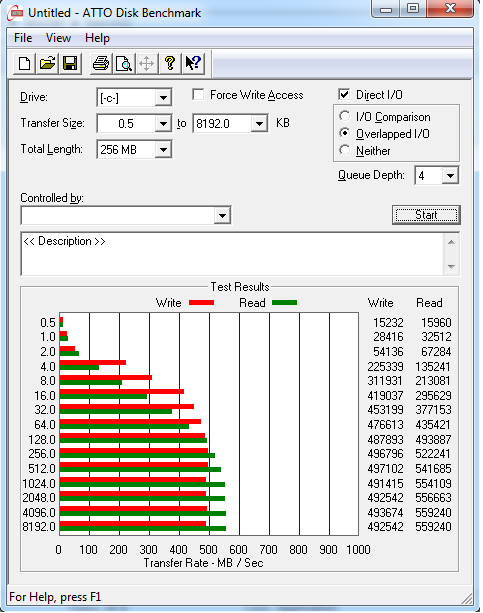
This is what ATTO is showing me, I thought these looked a little low.

Untitled-3.png


Also I do have it plugged into a 6Gb/s port (port 0 on my mobo) and it's connected using an Akasa Sata III cable.
 
Last edited:

There are total of eight SATA ports on the Z68A-GD65 (G3), with both white ports offering SATA 6 Gb/s connectivity, while the four black ports are SATA 3 Gb/s natively. The lower white SATA 6 Gb/s ports are driven by a Marvell controller, while the other set of white ports, as well as the four black ports, are driven by the Z68 PCH (Platform Controller Hub

Maybe you're on the Marvell ports? (horrible) If you're connected to the white ports at towards the bottom of the board it would seem so. Try the other white ports closer to the cpu side.

sata_ports_small.jpg


i.e the white ones on the right.

Also have you installed the Intel chipset drivers etc?
 
Not trying to hijack the thread here but how do I know which ports on my mobo are marvell ones, or does it not have any?

Just trying to make sure I have my agility 3 plugged into the correct port for maximum performance :D
 
Turns out it was plugged into the Marvell ones! Check this out:

properspeeds.png


Literally all I needed to do was switch the Sata III cable over, reboot, jump into BIOS and make sure the boot sequence was correct again by ensuring the Agility 3 was my primary boot drive, then hit F10 and restart. Straight away I could tell I had nailed it because it booted up at phenomenal speeds!

Azi, your best bet is to consult your user manual. It should show diagrammatically somewhere. I'll have a little look online to see if I can help though dude
 
Yours looks to be just the Intel ones, they will be grey for SATA 3.

Mine is in the grey one so it seems to be in the correct one then :)

Thanks

Turns out it was plugged into the Marvell ones! Check this out:

properspeeds.png


Literally all I needed to do was switch the Sata III cable over, reboot, jump into BIOS and make sure the boot sequence was correct again by ensuring the Agility 3 was my primary boot drive, then hit F10 and restart. Straight away I could tell I had nailed it because it booted up at phenomenal speeds!

Azi, your best bet is to consult your user manual. It should show diagrammatically somewhere. I'll have a little look online to see if I can help though dude

Nice speeds there!

I think from what Justintime said, mine is in the correct port, I just wanted to check :)

I will run ATTO in a second and post here what I get :D
 
Glad to help. The Marvells might perform a little better with updated drivers or so but nowhere near the native Intel speeds, don't know why they even bother sticking it on newer boards, used to be an excuse for so called Sata 3 support on x58 etc.. with no native S3 support, but pointless now!
 
I dont understand the marvel discrepencies between this boards marvel ports and my motherboards marvel ports.

My marvel ports achieve the same speeds (over the quoted speeds just like the OP) as the OP's drive connected to the PCH ports.

So yeah I think you might be correct Justintime with regards to updated marvel drivers.
 
Nice! Feels good to have installed something and to see others with very similar results as well. Shows we're all doing something right at least!

One thing I will note for any thread readers about the Sata cable I linked to above, it be careful as to where your 6Gb/s ports are. Mine were overhanging a part of the case and the bulkyness of the head of the cable at the right angle bit means I had to take a knife to it to get rid of some excess cable. If you know your sata port might be tight, then i'd advise going for a flat connector and not a right angle one.
 
That's some good speeds :) mine tops out at ~280mb because of SATA2 :( not sure whether it's worth getting a SATA3 PCI-E card as I plan to keep my mobo for a while yet.
 
^^ or use the cable the correct way around :p right angle in the drive, with the flat end in the board!

Well I wanted it because stacking two on top of each other on the SATA ports of an MSI board is quite tight, especially if you want to remove one. And as for using it on the drive, the Z9 case comes with a 2.5" SSD tray adapter which lets it sit above the ordinary HDD bays. But because of this it doesn't let you use a right angle connector because it's set back a little bit. I guess I could have turned it around, but I chose not to and besides that point, I needed it for the above reason anyway :)

I'll post a pic of what I mean shortly once I've installed a few things.
 
Don't have a double flat one for that? I understand it can be tight ( I know mine are ) but I would be worried about the extra upwards pressure on the port from squishing in a right angled cable... but if you were able to trim it down enough to stop that, all well and good i guess :D I dont think i'ld be able to trim enough off to stop that in my rig tho, I've had ports come away from the motherboard from previous mistakes see xD
 
Don't have a double flat one for that? I understand it can be tight ( I know mine are ) but I would be worried about the extra upwards pressure on the port from squishing in a right angled cable... but if you were able to trim it down enough to stop that, all well and good i guess :D I dont think i'ld be able to trim enough off to stop that in my rig tho, I've had ports come away from the motherboard from previous mistakes see xD

Aye I hear ya, was no problem with a stanley knife though. Didn't have a Sata III double flat one as I bought it specifically from OcUK on boxing day for this very purpose, not looking ahead to see if I had the space for right angle wire to connect to my mobo. Doh!
 
Back
Top Bottom