Overclocking help

Associate
Joined
31 Jan 2008
Posts
1,331
Location
S Wales
its been an awful long time since i upgraded my old rig (p4 2.8 m0) but I was 'forced' into it due to a failed mobo. Had to do things on a budget unfortunatly but I know theres some headroom in this.

Bios has a whole load of settings that I dont really understand as they are quite new, and foreign, to me so I was hoping for some pointers :)

Abit IP43 with a 2160, 4gb Corsair 6400, 4850 off a 500W OCZ psu

I managed to get 240fsb with a little vcore bump but its unstable, in fact almost anything over 220 is :( These are the options I have available for voltage control, where i believe i'm falling down -

CPU Core voltage - understand this one
CPU VTT voltage
DRAM Voltage
MCH 1.1 Voltage
ICH 1.1 Voltage
ICHIO Voltage
CPU GTLREF Voltage

Now what on earth are all of those?

Thanks :)
 
E2160

Thanks for the contiued help :) Just wish things were as simple as they used to be :p (I sound like unlce albert no?:p)
 
Well no matter what I do I still cant get past 225fsb so I'm getting to think that the mobo must not be capable. Not much info around on P43's so its difficult to gauge :(

Only other thing I can think of is that my PSU only has a 4pin CPU connector to the motherboard rather than an 8 - Could it be a lack of power? Its a 500w OCZ so I would have thought it would be ok?
 
Seems your right :p

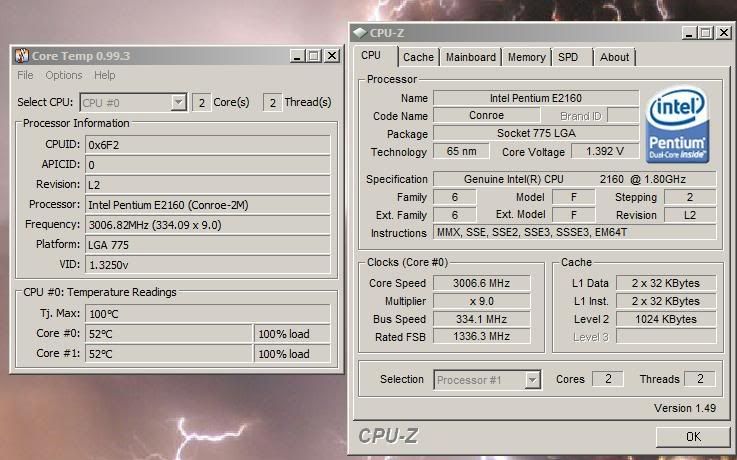
cpuz1.jpg


cpuz2.jpg


cpuz3.jpg


So i need to go an find a memory divider of some sorts i guess? Will reboot and have a look through the bios once i've finished this bit of work :)

Thanks for the help so far :D
 
Well i've only got 3 options in the bios for memory

Auto
800
667

Seems that my ram craps out at 450 in cpuz.

so i tried it on 800 and that gave the same as Auto, popped it on 667 and have so far got to 2384mhz with the ram running at 441. Had to give it a little vcore, vtt and mch to get it there but seems ok.

Fingers crossed it will be stable but I'm guessing there is not much more to give as i'm about at the ram limit and I cant see a way of lowering it versus fsb anymore :(

Am I on the right track now?

Thanks again

Lumey

ps - gonna go find out about prime now, seems to be the 'stability' checker. Its running seti/boinc ok at the moment though.


Edit - is there a program that can show me actual voltages in windows? The abit widget that came with the mobo doesnt seem to like vista64 much :( I'm a little suspicious that i'm a fair bit lower voltage wise that the bios says as I cant check it under load in the bios.
 
Last edited:
Found them :)

FSB STRAP TO NB it was marked at.

200 = 1:1
266 = 2:3
333 = 5:6

Got it on 266 at the moment, FSB set to 300 and it 'seems' fine. Ram is at 450 in cpuz and 2700mhz. Not bad for a cpu i bought for £5 :p

Will take a look at that HWmontior now, thanks :)
 
I'm glad too lol :)

Seems my actual voltages are a little lower than the bios says setting wise (according the HWmonitor) so I've got a little headroom there too.

One odd thing is it shows my +12v as 6.58v? must be wrong lol :)
 
cpuz4.jpg


That seems to be it. Running prime now ok, tried at 3200mhz but it did the bsod trick once at the desktop, dont really want to put anymore vcore in than it has currently or i'm gonna be heating my room :p
 
up to 3240 now at 1.45vcore, things starting to get quite warm though! 63c @ 100%

The mobo has a passive cooled NB thats now getting almost too hot to touch also :(
 
Back
Top Bottom