P5Q-E

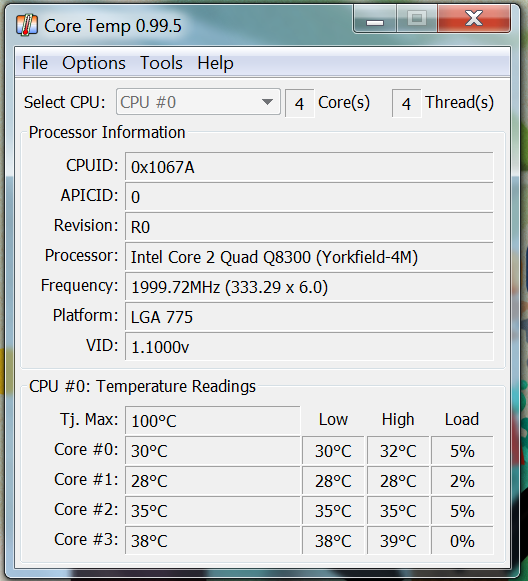
coretemp.png
 
Had chance to look at the adjustments I made in the bios.:D

All changes are in the 'Ai Tweaker' section:-
(reading top to bottom of that page)

Ai Overclock Tuner..... Manual
CPU Ratio Sett...........Auto
FSB..........................445
(Obviously you set this to the fsb that you hope your chip/board can cope with- a setting of 400 should be good to start with, although one cannot say for sure!)
PCIE Strap to ............Auto
DRAM Frequency ........DDR2 - 1069
(the above provides a no. (about4/5) of ddr2 speed settings that the board can auto give you - basically dividers - the actual speeds offered are dependent upon your choice of FSB . Best to err on side of safety to begin with i.e. if your ram is suppossed to run @1066 pick the nearest speed available BELOW 1066 - you can always adjust later ; as I have 1069 is o'k for me but not the next one up which ,if memory serves me correctly, was about 1100. You are not , I believe, obliged to choose one of those on offer it's just a hell of a lot easier!)
DRAM CLK...............Ai.. Auto
....".......................A2..Auto
....".......................B1..Auto
DRAM ....................B2..Auto
DRAM Timing Control - I have this set at 'Manual' and have then put in my rams actual timings. Your choice of course but to start with would probably leave at Auto (change it later if need be) - My rams timings as shown being:-
Cas # latency:5
Dram Ras# to Cas:5
Dram Ras#Prechge:5
Dram Ras# to.......:15
Auto for next 21 entries !! - hopefully I've counted correctly but the last entry in this first section of Ai should be ' Ai Transaction Booster ...Auto'
Next Section
CPU voltage : 1.18125
(Obviously you need to adjust this to the more or less lowest voltage that you can with everything stable BUT to start with you could leave it on Auto as you can then be sure that (assuming your board complies with the usual Asus Board tradition) the cpu will be given more than enough volts and later ,assuming ok at Auto you can then try to find the lowest stable point , starting at ,say,the chips vid)
Apart from 'Dram Voltage'- which needs adjusting to your rams required voltage (on mine it's 2.1v) - all other entries are left at 'Auto'

I hope the above is helpfull :D

Lastly just to mention:-
1. As advised previously would strongly recommend that you use only 2 sticks of Ram to start with.
2. If it's stable with 2 but falls over with 4 it's probably not enough voltage to northbridge problem. I DO NOT KNOW where to increase/decrease the voltage (never got an answer to that ?)
3. Be very wary of the board overvolting the northbridge!! - Although I've never been able to find out what voltage is being pushed through the Northbridge (and even if I did , as I have no idea what the voltage SHOULD be it would not be too much help) I kept a very carefull eye on its temperature for a few days to be sure it was not overheating (simple hand on bridge - did it feel hot - no- so ok-approach)

 
Last edited:
tried it at 350 and OCCT was successful, trying 380fsb, will do it in small stages rather than jumping in.

is it better to have a low multiplier and high fsb, high multiplier low fsb, or leave multiplier alone?
 
is it better to have a low multiplier and high fsb, high multiplier low fsb, or leave multiplier alone?

In certain circumstances a low multi +higher fsb can give you a higher clock. BUT in general this is unusual. For now I would leave the multiplier alone.

See how far you can get.

Main thing to do is keep a VERY careful eye on temps and volts.(Remember if your on Auto Asus will probably overvolt!)

DO not go above 1.4volt in any circumstances and preferably keep it below 1.3v IF NOT more like your vid.

It's your call but generally your better of with a cooler running system !!

Also a quicker test for stability is Intel Burn Test - be carefull it really stresses and gets HOT ( Personally I do not want any core of the cpu to exceed 50c - although 60c is probably ok but ,even if Intel etc say it may be fine in small doses, if it's getting to 70c it's too hot - pull back a bit.)


http://downloads.guru3d.com/IntelBurnTest-v2.3-download-2047.html
 
You need to find out why it's failing - it could be board, ram or cpu.

1.18v is still very low - you may need more.

It's not a quick process - trial and error I'm afraid

Leaving the cpu volts @ auto will it boot etc @ 400 /425 fsb ?

Are you adjusting the ram speed each time you adjust fsb - You need to.
 
i can get it to boot at 425fsb, have tried adjusting the ram speed too but still nothing, most i can get to is 380fsb stable, nowhere near the 427fsb the biostar was allowing.
 
was using all 4 as i didnt really want to take it apart again unless i had to. i do have 2x2gb ddr800 kingston ram, would i be better using them?
 
was using all 4 as i didnt really want to take it apart again unless i had to. i do have 2x2gb ddr800 kingston ram, would i be better using them?

For now use 2 sticks only - see what you can get to . The problem with 4 sticks is a known issue.

Personally would go with 2x2gb 800 - You've got 4gb and the speed difference will not make that much difference. (remember to watch the ram speed setting in the bios!)

OR

Run 2x 1gb 1066 - get it stable and then look to add the other 2 knowing that if there is an issue it's down to the ram/board/northbridge 'issue' which may be curable with an increased northbridge voltage.


Whichever you choose it it looks stable then first run mem test - to check that the ram is stable. If ok run Burn test which tests the whole lot.

I'm afraid it is time consuming - to get mine happy took best part of 2 days - but has been rock solid (touching wood etc here !) since.

N.B. if changing ram remember to change speed and Voltage (assuming it's diffrent from the ones already in)
 
how long do i leave memtest running?

It usually finds errors very Quickly - I work on basis that if it's run for 100% then unlikely to have any problems.

I really need to know what settings your actually using in your bios to provide decent advise - I'm somewhat guessing at the moment!!
 
have dropped the ram speed down another notch and its done 100% without errors on memtest, worth running OCCT on it, dont know the other program so weary about using it.
 
Back
Top Bottom