PC Upgrade

Associate
Joined
27 Sep 2012
Posts
377
Hey All,

Last year I was lucky enough to get my hands on an RTX 3090. I play a fair amount of Warzone and I posted some threads about my FPS sucking, which has not improved.

I have uninstalled everything, checked drivers etc and I'm still only getting 110-120 FPS and very unstable. I know the game is rubbish but clearly something is bottle necking me.

My spec is:

AMD R7 3700X
Giga APRUS P750 Plus Gold 750W
Giga X570 GAMING X mobo
Corsair Vengeance LPX 16GB DDR4
Alpenfohn Brocken ECO Advanced CPU Cooler
ASUS PCE-AC56 AC1300 PCI-E adapter
Everything at stock

I'm thinking I would like to upgrade the CPU and RAM. I'm unsure whether a mobo upgrade would be worthwhile, and also whether my network card could use an upgrade (I get weird lags in game, but not sure if this is the connection or my CPU - latency is generally around 30 and I am plugged into network adapters).

My temps are around 70-73 when playing games, so possibly cooling needs looking at too?

Any advice would be gratefully received on what to upgrade.
 
Thanks @JollyJamma

The rest of the build was purchased in 2019, upgraded an RTX SUPER 2070 to the 3090 last year. The 750 seems to be enough, but I have been keeping an eye on it. Might be worth doing anyway if I'm going to upgrade a few other components.

Agreed on the new CPU. I'll be honest, I didn't realise warzone was more CPU dependent than GPU when I purchased the 3090. Not that it won't come in useful for other games and the future.
 
Try this fix, set it to 8 since your CPU has 8 cores.


I just tried that and some how the frames are worse?

You would still benefit from a 5800X/5900X in warzone as it is quite CPU demanding but the 3700X should be performing better than it is.

I just tried switching back to my 1080p monitor and frames were less than 100...

No idea what is wrong but something is clearly messed up with my system. Every time I ADS in the game the latency spikes and my game lags out.
 
Have you tried monitoring stuff like core usage, RAM,VRAM, dusk usage etc?

Ether log to a file, or since you have a second monitor set the monitoring software you display to that. Although observing can make a difference as logging isn't totally CPU free and driving a second monitor well put more stress on the GPU (although I suspect either your CPU is your bottleneck or you have CPU hogging background task.

I did try it just after getting the 3090 and couldn't see anything out of the ordinary, in terms of the RAM and disk usage. I will try again tomorrow though and see if it picks anything up.

have you tried turning off reflex in the Nvidia control panel and setting the game to full screen rather than borderless window?

I always run full screen but will try the Nvidia changes. I did try endless Nvidia and other tweaks prior with little to no effect. My issue is I just don't know enough about PCs. I know enough to know it's wrong, but not enough to know how to fix it :confused:
 
CPU-Z says 1796.4 MHz but it's dual channel so 3600 essentially which looks right.

Not sure about the D.O.C.P. Last time I checked the bios it was standard?
 
Sorry for the double post.

I have found a company that offer remote PC optimisation. At this stage I think I need someone who knows their stuff to look at it.

I'm thinking I am probably better off upgrading first, then getting them to look at it?

That being the case, if I upgrade my CPU, RAM and PSU, is my current mobo, cooler and network card sufficient to keep up with a 58/900x and rtx 3090?
 
Try monitoring DPC latency of drivers during gameplay:
https://www.resplendence.com/latencymon
At least that could give hints to what cause might be.


Really lots of plain scamming in that area with likely very hard to find companies with genuinely knowledgeable workers...

Thank you @EsaT Will try that next time I am on.

Yes, that is my concern. Unfortunately the only IT people I know are more tech, rather than gaming. There is a PC repair place with decent reviews in town, but I need someone to look at my setup, rather than lugging everything down there.
 
So I spent yesterday afternoon playing around with the following:
  • RAM speeds
  • Nvidia control panel settings
  • In game settings
  • Windows game mode
  • Monitor profiles
And probably a few other things I can't think of. End result...no improvement, if anything I was actually getting <100 FPS at the start of games.

At this point I have no idea what else to try, other than upgrading a few components and then paying for someone to look at it remotely (and keeping my fingers crossed they are legit).

In terms of upgrades, if I were to go with a 5900X, should I:
Appreciate your help.
 
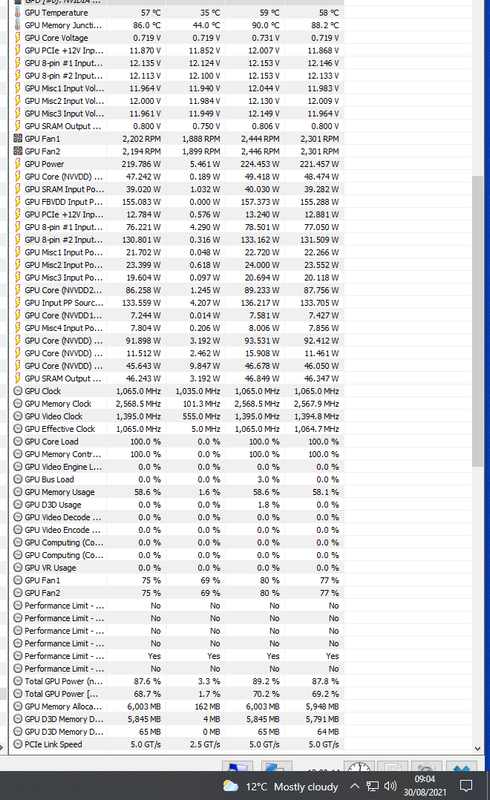
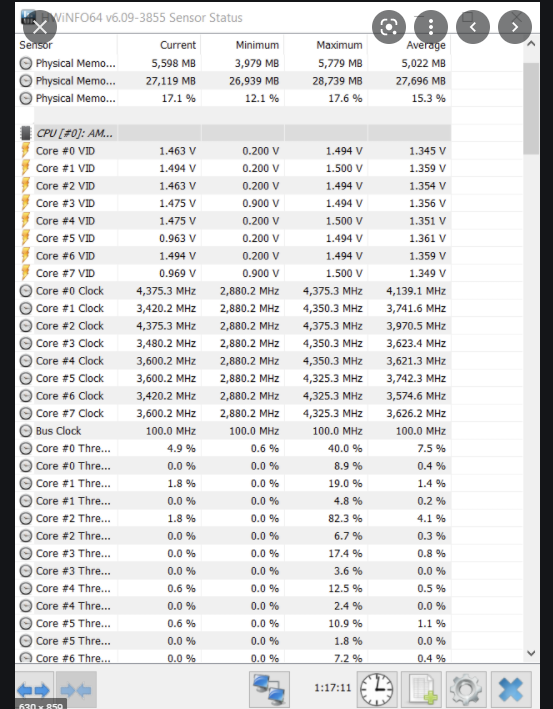
Try installing HW info and open the monitoring, leave it running in the background while you play some warzone then once your done gaming take a snapshot of the CPU and GPU sections and post them up so we can have a look.

Just run the monitoring sensors when in game and screenshot?
 
Ya should look like this.

Screenshot-137.png

Brilliant, thank you. I'll try and get that tested today.
 
Looks like you need to set the memory speed again as its only running at around 2400mhz and you are right on the edge of memory usage so you may want to consider a 32gb kit.

Also the CPU looks like it's only running at the base clock of 3.6ghz which would definetly hurt fps, it should be hitting around 4.4ghz. Check in the bios for a setting called "core performance boost" and make sure this is turned on.

Thank you, it must have reset with the bios update - likely explains the drop in frames again.

The core boost setting is on auto (only other option was disabled).

There was a red figure for the power usage, is that suggesting an upgrade for the PSU too?

Would the following upgrades make sense:

Would there be a noticeable temp increase with a new CPU and PSU?
 
I don't think it's psu related but there is something that's making your CPU run at just 3.4ghz and 1v where is should be running at 4.4ghz and up to 1.475v,

Is the core clock set to auto?

Check the CPU isn't running at a 45w mode etc.

Do you have Latest chipset driver and Windows power plan set to balanced?

https://www.amd.com/en/support/chipsets/amd-socket-am4/x570

I haven't overclocked my CPU, everything is still stock. I can't see any options in my bios to change anything from stock settings. When I looked into OC the CPU, the benchmarks suggested it wasn't worth it.

Power plan is set to gaming.
 
The CPU is running at base clocks though, stock settings should see it boosting to 4.4ghz.

If it's only running at 3.4ghz this is why your fps is low.

This is what the clocks should look like on a 3700X at stock.

Screenshot-143.png

I have changed the power setting to balanced, and downloaded and installed the AMD chipset update - do I need to do anything else having installed it? The bios looks the same as before.
 
Have a look in hwinfo and see if the clocks and voltage are bouncing around.

The 'Active Clock' is fluctuating between 35XX and 42XX with the ratio between 35-43. That looks as though it has worked? I will try it tomorrow and run hwinfo whilst playing and post screenshots again with FPS results.

Thank you for your help, really appreciate it.
 
I had this issue with Destiny 2, Had a 3700x and a 3080. Everything was fine, but I was getting ridiculously low frames in busy areas, which shouldn't really happen with such a card (unless you're on flight sim at 8k). 1440p maxed out I was getting maybe 70-90fps in busy scenes. Cold war without DLSS was around 140fps, which was fine to me. Yesterday I upgraded to a 5800x, and my god the difference is huge. at least 40fps increase in busy scenes, and stable fps across the board, not to mention cold war without DLSS maxed now runs between 160-200fps. Unfortunately its our CPU that is bottlenecking, as my ram is only 3200mhz CL16. Even a 5600x would be good enough to upgrade to.

Thanks @serious_adam15 I think I will go with the 5800x or 5900x and also upgrade my RAM to be on the safe side. Those frame rates are more in line with what I've seen on Twitch etc. Banging my head against a wall running a £1000+ GPU and getting 110 FPS...
 
Yeah, I know the feeling. The only issue is you may see temp increases with these chips as they run hotter than zen 2. Make sure you have a decent cooler on it and it will be a much better improvement to your fps.

I was concerned about that. I was thinking of getting a Dark Rock Pro 4 as an upgrade to my existing cooler. Hopefully that will help.
 
So I have decided to go ahead and upgrade several components of my build. Will the following work along with my existing mobo and GPU?

https://ibb.co/C7nFKd9

My two main concerns are the heat from the new PSU and whether the new cooler will fit (I have a Lian-Li Lancool One Digital Midi Tower - Black Window case).
 
So I went ahead and upgraded the cpu, ram, psu and cooler. Took me most of yesterday to watch videos and figure out how to replace everything! Did a quick Heaven (6000) and Cineworld R23 (19000 for multi) bench yesterday, will try again today - slightly worried about the temps and Cineworld bench seemed to be a bit low at first glance.
 
Back
Top Bottom