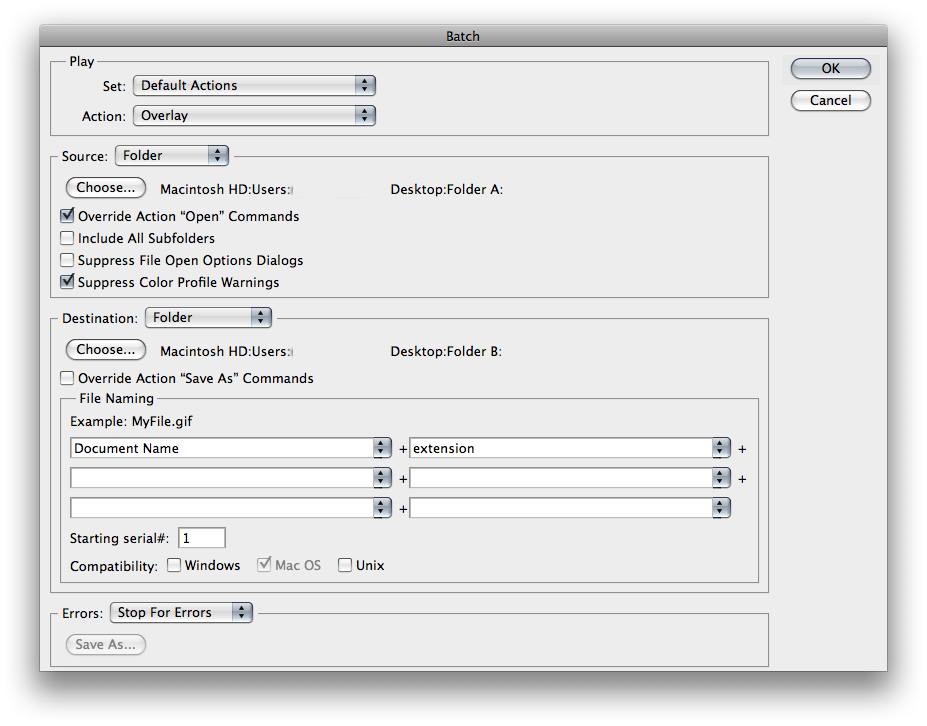
Basically im trying to create an action to autobatch but it doesnt seem to be working.
I have two folders, each folder has 100+ images in with the same names.
Im trying to open the first image from folder A, copy and paste it exactally over the same named image in folder B, change the overlay setting and save it out into a new seperate folder with the same name. Then for Photoshop to move onto the next image in the folder and repeat like previous. Seems like it should be simple...
The problem im having is that Photoshop doesnt understand that im wanting to everytime reopen the next image in folder A with the same named image in folder B and then save it out...
I hope ive made SOME sence and you can get the jyst of what im trying to say
Thanks!
I have two folders, each folder has 100+ images in with the same names.
Im trying to open the first image from folder A, copy and paste it exactally over the same named image in folder B, change the overlay setting and save it out into a new seperate folder with the same name. Then for Photoshop to move onto the next image in the folder and repeat like previous. Seems like it should be simple...
The problem im having is that Photoshop doesnt understand that im wanting to everytime reopen the next image in folder A with the same named image in folder B and then save it out...
I hope ive made SOME sence and you can get the jyst of what im trying to say
Thanks!
Last edited: