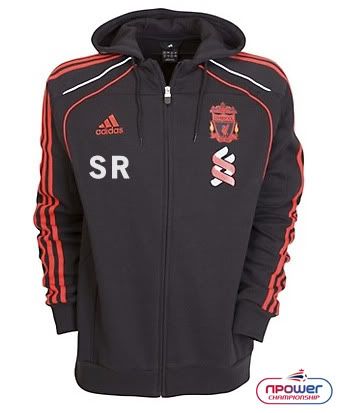
I am getting my mate a Liverpool top with his initials printed on. Could anyone please photoshop his initials SR (in white) on to the picture under the Adidas logo? I am trying to work out what size to have it. The embroiderer wants to do it the same height and width (almost) as the Adidas logo but I fear this might be too small. Could you maybe try it a little bigger than the Adidas logo to see how it looks?
I'm not sure if this picture is good enough, will it be okay?

I tried to get a larger one from kitbag but I don't know how to get it out of the zoom viewer. Is it possible?
http://www.kitbag.com/stores/kitbag/products/product_details.aspx?pid=72650
Any help greatly appreciated.
Edit: It might be best if it's a similar height to the double helix design on the right.
I'm not sure if this picture is good enough, will it be okay?
I tried to get a larger one from kitbag but I don't know how to get it out of the zoom viewer. Is it possible?
http://www.kitbag.com/stores/kitbag/products/product_details.aspx?pid=72650
Any help greatly appreciated.
Edit: It might be best if it's a similar height to the double helix design on the right.
Last edited:
![[FnG]magnolia](/styles/overclockers/avatars/9.png)