Please help, lost all hope

Friend raising a point, my GPU is designed for PCIe 3.0, but my mobo and CPU were designed for and support PCIe 2.0.

I had been previously advised that the GPU would just run at 2.0 speeds and that it wouldn't be an issue, is this correct, or is that my big fat problem right thar?

3.0 PCIE GPUs are backwards compatible in 2.0 slots

So no worries there.

 
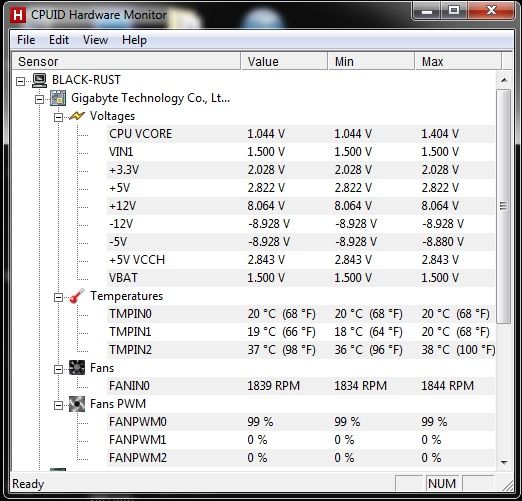
Checking PSU voltages with CPU HWmonitor.

Do these power readings seem right to you, they seem low to me.

COMPvolt.jpg


System is only on google chrome and not under any stress. I have furmark but i'm not sure if using furmark is safe with onboard graphics???

Would love to test with the GPU in but obviously, no POST.

(trying this whilst I wait for a friend to come online so I can ask if I can try my GPU in his PC)

-=-=-=-=-=-

In the bios it says the 12v is running at 12.168v

An error in HWmonitor it seems then. Bah. I'm at a loss, this computer is frying my brain and I just don't know.
 
Last edited:
HW monitor also reports my 1000Watt CoolerMaster PSU as 8v on the 12v side.
It's a very good idea but I don't think it's reliable TBH
 
I hope you have kept all your correspondance with the retailer/web retailer in question.

They can't quote you that you have passed the deadline when they are holding your components for testing.

I would report them to Trading Standards.

Then I would write a letter asking for a full refund, mentioning that you have sent copies of all correspondance to the Trading Standards.

Then finally take them to small claims court.

Companies scamming off the little man gets me riled up no end.

Then Finally, buy your parts from a respectable firm like OcUK from now on :)
 
I had a very similar problem,

I had a full new build with an MSI 660 twin frozr, Having the card installed there was no boot at all no beeps just a black screen the PSU was working GPU's fans were spinning but no boot, it booted every time with onboard graphics i tried changing the bios to boot from PCI-E still nothing,

The next step was to try my old HD4850 and bam it booted straight away.

As SkodaMart and Wazza300 suggested do you have an old GPU hanging around to test or have a friend with one? this sounds like the exact problem i had and it was a GPU problem, it really put my mind at ease to get it to boot with a GPU as i knew at least the whole pc wasn't junk =)

Personally i returned the MSI 660 and got a sapphire 7870 ghz edition and that work right away no bother.

If the company you bought the components from won't exchange or refund (which legaly i am pretty sure they can't do) after you have worked out the problem just contact the manufacturer directly and explain the situation perhaps can help. ;)

GL m8 keep us posted
 
Last edited:
Just one thing to check before I borrow a friends GPU (this is my first tower, wow is it going well, just used laptops before stupidly thinking they were cheaper).

If there is some form of problem with my Power Supply, what are the chances of me damaging my friends GPU?

Obviously checking to give myself and them peace of mind.
 
It will not hurt the card. But if its a lower power card say a 5450, then your psu could still run it, like its ok with onboard, but then still not be man enough anymore to run a 7850.
 
Yeah he has a significantly weaker card, hmm.

Hopefully he has a powerful enough power supply so he can try my card in his system..

I think the most powerful card my friends have are Geforce 9600gt. We're all a bit behind times here.
 
Can you not take your card to a local shop and ask them to test it for you?

OCUK may even do it, but obviously there will be a charge involved.
 
Finally managed to get someone to help me test my components.

In a friends PC the graphics card booted up the pc but I couldn't change any graphical settings, it was acting very strangely.
In my PC with graphics card in the PC won't even POST.

Took friends GPU and placed it in my system, and it booted up fine first time, happy as larry.

This leads me to believe that either A) the GPU is faulty, or B the Power Supply isn't providing enough voltage.

(GPU's tested: XFX radeon HD 7850 CORE 2gb and GeForce 9600GT. Both require 6pin power)
 
Back
Top Bottom