Poor RAID 5 performance

Associate
Joined
11 Oct 2007
Posts
8
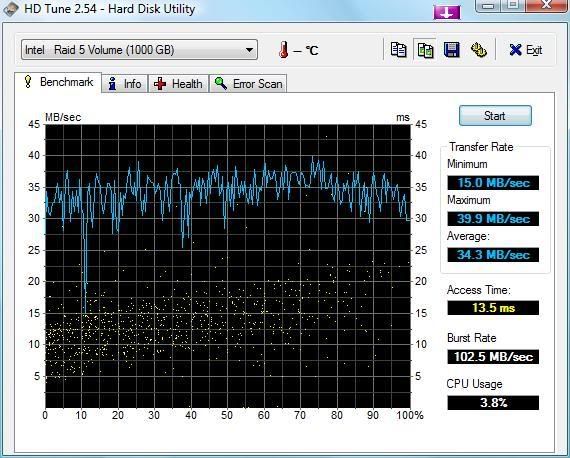
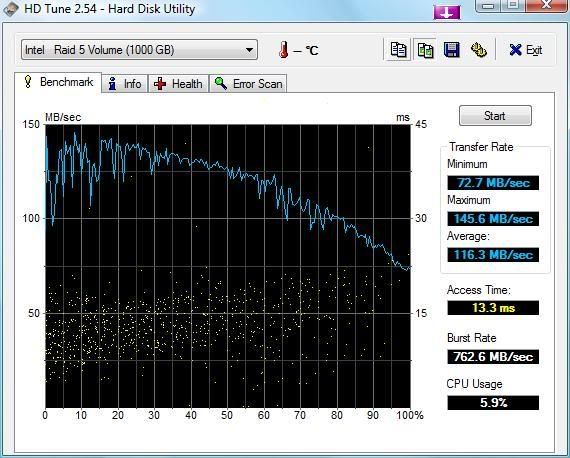
I have just build a new machine with RAID 5 with 3 x WD5000AAKS drives. However on benchmarking my system they don't seem to be performing like they should.

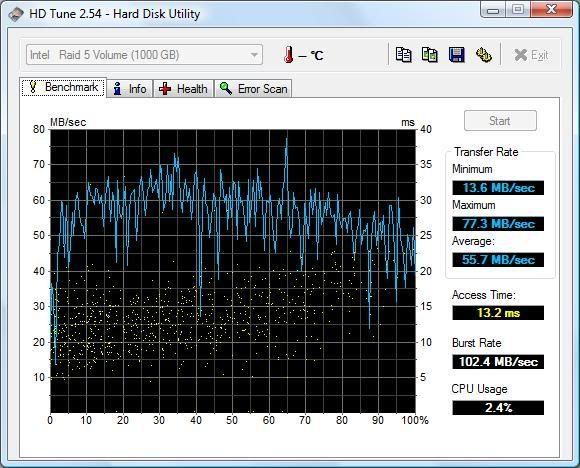
The 1st image shows the benchmark I did first and then the 2nd image is the latter benchmark I did a few hours later. Is there any way I can check the status of the array, and also is there anything I can do to increase the speed of the array?

I am running the array on a Abit IP35 Pro board with 64kb strips.

I'm pretty new to this whole RAID thing so you'll have to bear with me.
WD5000AAKSRaid5-3Drives.jpg


WD5000AAKSRaid5-3Drives_1.jpg
 
You appear to be using the ICH9R controller for the RAID5 setup, this is probably the reason you are getting such low Average reads, simply because the ICH9R is a software implementation of RAID5...if you want good RAID5 read/write transfers you need a true "hardware" SATA RAID card...something like the Areca ARC 1110/1210, Promise EX4350...although these are expensive....

rpstewart I'm sure will be able to illumunate you more...:)
 
You appear to be using the ICH9R controller for the RAID5 setup, this is probably the reason you are getting such low Average reads, simply because the ICH9R is a software implementation of RAID5...if you want good RAID5 read/write transfers you need a true "hardware" SATA RAID card...something like the Areca ARC 1110/1210, Promise EX4350...although these are expensive....

rpstewart I'm sure will be able to illumunate you more...:)

Find intel matrix storage manager, there are a few settings you can play with on that, which should make a significant difference
 
rpstewart I'm sure will be able to illumunate you more...:)
Sorry, been offline for a few days....

Find intel matrix storage manager, there are a few settings you can play with on that, which should make a significant difference
That's a reasonable place to start, check that the Write Back Caching is enabled.

However, the traces still look awfully slow. A three drive RAID5 array should give read performance roughly equivalent to that of a 2 disk RAID0 array so you should expect something of the order of 120MB/s plus. It's only the writes which tend to be a problem with onboard RAID5 implementations (although there are some reports of far better performance with some controllers on Vista which may be more down to Vista's partitioning layout rather than the controller).

The first thing I'd be looking at is what else is running at the same time as the benchmark. If there is I/O contention then the benchmark results will be lower.
 
That's more what I'd expect from a three disk array.

from using onboard that looks pretty good, the cpu usage is low, and the speeds are quite good, also looks like some processes are running in the background, but otherwise better :)
 
Here are my results (SiSoftware Sandra 2007 file system benchmark) from an attempt to discover why a RAID 5 on Intel ICH9R using three Seagate Barracuda ST3320620AS disk drives under Vista delivered absolutely rotten performance:

Three drives in RAID 5 Array: 16MB/s
Three drives in RAID 0 Array: 167MB/s 6ms
Two drives in RAID 0 Array: 116MB/s 7ms
Three drives benchmarked individually non-raid: 65MB/s 6ms

The first test gave an anomalous access time measure (1ms!) while the last one is an average for the three drives tested independently (but with all three attached).

There is clearly something badly wrong in RAID5 mode! I've tried everything I can think of to fix it, but the results remain consistent.

Any ideas anyone - I would expect RAID5 3-disk to be roughly the same as RAID0 2-disk.

By the way I do not buy the argument about parity calculations being expensive - parity is actually a very simple calculation easily implemented in hardware and I'd be amazed if the ICH9R offloads this to the CPU. The advantage of a dedicated processor on the controller card should mainly be seen when rebuilding from a failed disk. In any case this machine is a Core 2 Quad, so should not be short of processing power.

Before everyone piles in and blames Vista and/or Sandra, I tested simple large file copies under both Vista and Bart PE (XP based) with consistent results. I've also tried building the RAID5 in the BIOS and also in Intel Matrix Storage Console under Vista.
 
Hi JohnHind, sorry to hijack your thread.

I'm currently migrating a load of drives to Raid 5, so far its taken a few days, another 25 hours to go too! This is on the ICH9R onboard controller on the Abit IP35 Pro board. I had 4 drives in Raid 0 and then added another identical drive for Raid 5.

The PC is virtually un-usable in Windows as it takes so long to do anything, CPU usage is about 2% too.

Sorry, just seems like you might know or is related somehow to what you're doing so thought I'd be cheeky and ask - I'm just sitting about, waiting for my machine to finish migrating in the Intel Matrix Storage Console thing so I can get on with some work. :)
 
Last edited:
MintSauce: Is your machine doing "Volume Initialization"? Mine has started on that for the first time on rebooting this morning, it went quite quickly to 70% complete and now recons it will be a little under two hours to complete (3x310GB disks). Not sure exactly why it is doing this now or what it is about, but I'm going to let it complete and see if it improves anything. It seems very odd to have a volume initializing itself after I've already installed the OS on it and booted from it!

jbloggs: At the moment, no it is not enabled. I'll try enabling it when the initialization operation completes. Thanks for your tip - although I've seen this before I've only just discovered where this option is hidden in Matrix Storage Console - you have to right click on the volume name (NOT the volume icon) to reveal a raft of optons not on the main Actions menu. What kind of UI design is this?

INTEL technical support advised me to upgrade to the 7.8.0.1012 version from their web site. This is later than the one on the ASUS website (for my P5K-E MB). Immediately after upgrading to this was able to benchmark the expected performance level (about 2% slower than two-disk RAID0, >100MB/s). So I started copying files onto the volume, the first big file went well, but then performance sunk back to sub-10MB/s levels again and since then I've not been able to duplicate this short period of grace.
 
Hey JohnHind,

Yep, I got that and it went on for hours for me, I think it was around 9 hours to initialize for me. I'm thinking it's down to the ICH9R being onboard rather than a proper Raid controller.

Strange that yours went fast and then slowed down again.. The only thing I can think of is that the Matrix Storage Manager is doing something else which is why you're looking at sub 10MB/s speeds. Does anything show up in there?
 
Yea, a glimmer of hope again.

After the Initializing process completed (about four hours total) I enabled the Volume Write-Back Cache and benchmarked it at 110MB/s 8ms. Then I disabled the cache again and benchmarked at 112MB/s 8ms, so this setting does not seem to be the problem!

There is some hope that it is the initializing process that solved the problem, but I'm not getting my hopes up yet as previous experience shows it could easily fall back again.

Puzzle is, why have I not seen this process before? This is about the fifth time I've rebuilt the array from scratch and it's never done this before. This time, I built the array in the BIOS, installed VISTA Ultimate from CD, supplied the driver from USB drive (although the VISTA installer recognised the volume even before installing the driver), and then installed the Intel chipset drivers and Matrix Storage Controller. This was all last night and when completed the performance was poor. (Oddly it did not seem poor during OS installation which went as fast as ever, just when I started copying data files over or benchmarking). Then I left it in some disgust last night. When I booted first thing this morning, the Matrix Storage Console started automatically and began this Initialization process (on the system volume!!).

My fingers are crossed!

Another annoyance is that installing the Matrix Storage Controller seems to de-activate Windows. You start out with 29 days to activate, you activate, install the Controller and now you've got 3 days to activate; and you've exhausted your automatic allowance so you're down to exchanging 48-digit numbers with MS over the phone! Nice one Microsoft!
 
OK, I seem to be getting consistent performance around the 100MB/s mark now.

I think I see what was happening. The RAID 5 array needs to be initialized before it can be written to. If you write to it immediately after creating it, it has to initialize a bit of the volume incrementally immediately prior to each write which slows down performance to the very low levels I was seeing. However given a chance, the bulk initialization process cuts in and initializes the rest of the volume making subsequent writes able to work at full speed.

What was tripping me up was the poor UI design of the Matrix Storage Console - it should indicate more clearly that the volume is not initialized and make it easier to find volume related actions like starting the initialization process - I was right-clicking on the Icon, wheras you actually have to right-click on the volume name to see these actions.

I'm not sure about the Volume Write-Back Cache - it does not seem to make much difference to performance and the help file suggests it is not very safe unless you have a UPS. No point in buying resilliance against a disk failure at the cost of becomming vulnerable to power cuts and BSODs which are probably a much greater risk!

I also do not buy the theory that a dedicated RAID controller with on-board processing capacity will perform much better than a chipset implementation. SATA-300 has loads of bandwidth headroom and modern performance computers are certainly not processor-constrained. The bottleneck here must be the performance of the physical disks and their large capacity, and you are stuck with that however good the rest of the hardware is.
 
Back
Top Bottom