


I am currently reinstalling everything for my car pc project. I was having problems with the last install with it crashing. I have therefore replaced the main HDD with an onld 60gb IDE hdd. Now its working perfect.
I now want to add the laptop HDD i had which is 100gb, however when i boot windows up the only device it picks up is the dvd rom. It i fine when not connecting the laptop HDD.
The 60gb HDD is set to master however cant see where the jumper could go on the laptop one.
What does the setting, cable select, mean?
This is what i am using for the Laptop HDD
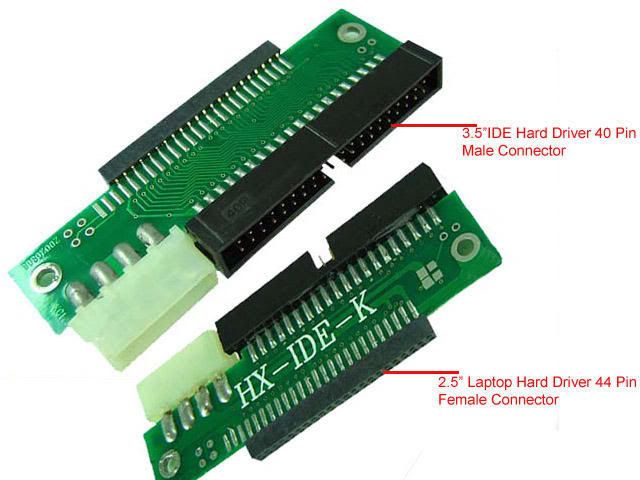
Anyone able to help?
Thanks
I now want to add the laptop HDD i had which is 100gb, however when i boot windows up the only device it picks up is the dvd rom. It i fine when not connecting the laptop HDD.
The 60gb HDD is set to master however cant see where the jumper could go on the laptop one.
What does the setting, cable select, mean?
This is what i am using for the Laptop HDD
Anyone able to help?
Thanks

