• Competitor rules

    Please remember that any mention of competitors, hinting at competitors or offering to provide details of competitors will result in an account suspension. The full rules can be found under the 'Terms and Rules' link in the bottom right corner of your screen. Just don't mention competitors in any way, shape or form and you'll be OK.

Radeon 4870 X2 Flicker

Associate
Joined
26 Sep 2005
Posts
875
Location
Midlands
Hi there :)

I purchased one of the 4870 X2's earlier in the week. Was excited to get it plumbed in and fired up. Bought a new PSU specially to power it...

Anywho, got her all installed and working. Installed Catalyst 8.10 and fired up a game.

On dark areas I'm seeing a constant flickering. It may be happening on lighter colours too but it's much more noticeable on dark colours. After gaming for a while it just gives me a headache.

I searched for solutions to the problem but I seem to be getting the message that this is a known issue and can't be fixed at the moment?

If that's the case, a graphics card that causes headaches isn't really of much use to me. Will OC take it back do you think?

Thanks for any help :rolleyes:

 
I'm seeing no mention of VSync anywhere in the CCC...


Wait for Vertical Refresh: This option controls Vertical Synchronization (VSync) in games. VSync is the synchronization of your graphics card and monitor's abilities to redraw the screen a number of times each second (measured in FPS or Hz). There are four choices here:

Always Off - Vertical Sync will always be set to Off, regardless of the setting in the game or 3D application. This provides fastest performance but may result in image 'tearing' which can be annoying to some.

Off, Unless Application Specifies - Vertical Sync will be off by default, however if you choose to enable it in a game or 3D application, it will be enabled for that game/app. This is the recommended mode.

On, Unless Application Specifies - Same as above, except Vertical Sync will be on by default unless otherwise disabled in a particular game or 3D application.

Always On - Vertical Sync will always remain on, regardless of the setting in the game or 3D application. This is not recommended, as it may reduce performance however it guarantees that there will never be any screen "tearing".
 
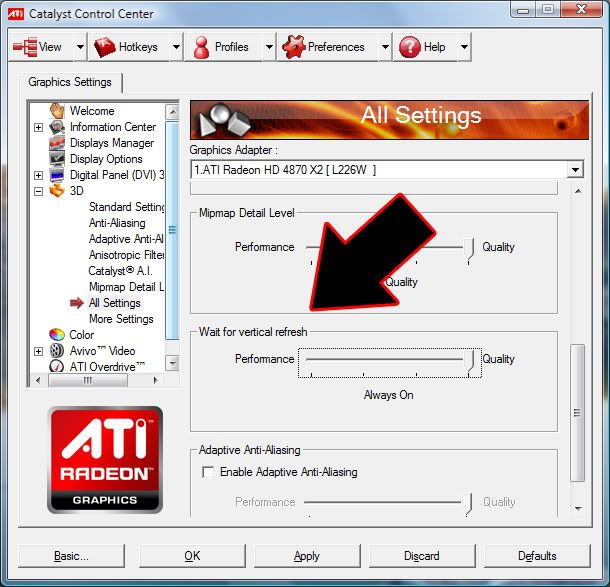
Sorry, but I'm still seeing no mention of VSync or Vertical Synchronization :confused:


This is what I see when I run the CCC:

2971040065_f479612044_o.jpg


Where exactly should these settings be?
 
Doh, sliderbar on the right as well as left.

Got it, thanks :)

Doesn't seem to correct the problem however. Still flickering on the dark backgrounds :mad:

Am I going to be stuck with this problem until ATI come out with a fix? If they ever do...

If so, I'd probably be better getting it replaced sooner rather than later right?
 
Ok, so just to test it, I decided to check the box for "Disable VSync" on the game. I'm still getting the flickering / shimmering either way.

So I thought I'd try another game. The game I tried was Republic Commando. I can't even get this game to run. I get to the ingame options. VSync is off. No AA. Click NEW GAME, game starts loading, crash to desktop.

Knew I should never have gone with ATI again. They've always been crap everytime I've had them! :(
 
Never enable vsync, it will give you mouse lag and limit your frames to your monitors refresh rate. The flickering you are describing is not the typical "tearing" that normally appears without vsync. I'd say its somthing else.
 
Never enable vsync, it will give you mouse lag and limit your frames to your monitors refresh rate. The flickering you are describing is not the typical "tearing" that normally appears without vsync. I'd say its somthing else.

I didn't think it was the VSync but that's been the only suggestion for a possible fix so far :(

The whole screen has a sort of shimmering flickering going on. Only in the game though. Within Windows and on the ingame loading screens it's fine.

It's a brand new Acer G24 gaming monitor which worked perfectly fine with the 8800GTX I was using minutes before installing the ATI.

I am having a few issues with my m/b at the moment but I dunno if they're related or not. No one seems to know what's wrong THERE either :(
 
Update...

I've done a full system re-installation. Nothing installed except Windows XP SP3, Catalyst 8.10, game. Still get the shimmering / flickering.

Have a call logged with ATI / AMD, interesting to see what they have to say...
 
What game is this appearing in? And what do you mean by flickering? Does the whole black area go white now and then? Or does it look like tearing?

I don;t seem to see anything like this on my 4870x2... but tell me what game it is, and if I have it I'll give it a go too.

Edit: Alos, what temps is the card running at? Do the fans kick in when in game?
 
Back
Top Bottom