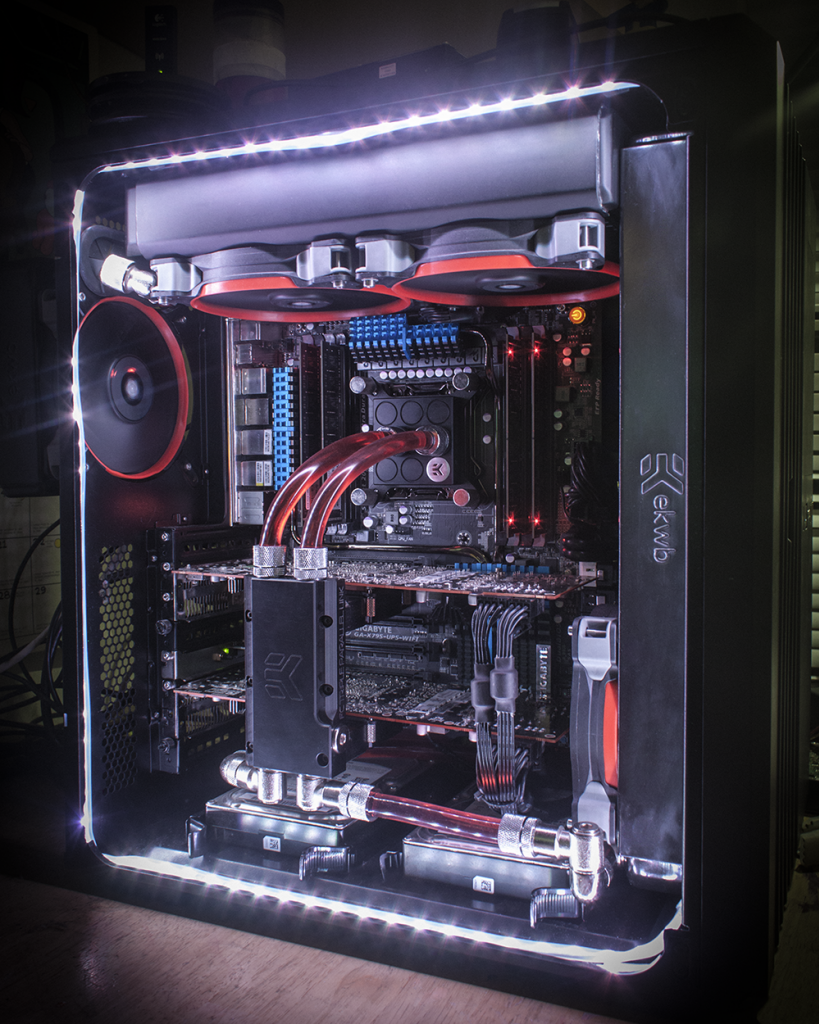
Res + GPU block help needed.

Soldato
Joined
18 Mar 2012
Posts
5,518
Location
Eastbourne
I have got some bits coming for my first ever water cooling loop but i need help with a res and gpu block.

Below are the two Reservoirs i have chosen, i'm guessing 150ml is about right for a gpu and CPU? Which one would you go for? or are there any others that i should go for?

YOUR BASKET
1 x EK Water Blocks EK-RES X3 150 Reservoir £39.98
1 x Aqua Computer Aqualis ECO 150ml with Nano Coating £39.95
Total : £88.63 (includes shipping : £7.25 Ex.VAT).


And GPU block, OcUK don't sell the water block for my Lightning 290x and where i have seen it, it's selling for £120+ :eek:
No one on here seems to be selling one :(

So what about universal blocks? i know it doesn't look as pretty and probably doesn't work as well but has anyone tried them? Would have to buy VRM heatsinks for it.

Any thoughts and opinions would be great, thanks in advance

 
For you res I would use which ever you like the look of more I can't see any real benefit from one over the other.

As to your gpu block yes I can only see one other site selling them at £114 + £5 postage and in stock.
The EK-FC R9-290X Lightning is a full cover block meaning it covers everything that needs to be cooled on the card were a universal block would only cover the gpu only and you would need to get ram sinks to cool the memory and make sure there is air going over them.
 
i think I'll go for the Aqua computer then.

I have plenty of airflow over the card so is there a universal block you would recommend?

Using Eks site it says the EK-VGA Supremacy is a compatible block there are
other blocks just check that there compatable as some need plates fitted
 
Sorry for all the questions, if I were to buy that ek block, would I be able to keep my normal back plate on?

I would love to go for a full block but I can't justify £120 for something I'm going to potentially have until the 390x comes out and will lose almost all resale value :(

Think i'm going to go for this. With a couple of packs of VRM Heatsinks

YOUR BASKET
1 x EK Water Blocks EK-Thermosphere - Acetal+Nickel £55.99
1 x Watercool passive cooler for VGA RAM 8 Pack £5.59
Total : £71.18 (includes shipping : £8.00 Ex.VAT).

 
Last edited:
Pretty sure you will have to lose the backplate im afraid

Also will have to source the mounting plates for 290 series cards for the Thermosphere.The one it comes with out the box is only compatible with nviida cards.

I dont think Ocuk stock them,can be found elsewhere for about £10 tho
 
Sorry for all the questions, if I were to buy that ek block, would I be able to keep my normal back plate on?

I would love to go for a full block but I can't justify £120 for something I'm going to potentially have until the 390x comes out and will lose almost all resale value :(

Think i'm going to go for this. With a couple of packs of VRM Heatsinks

YOUR BASKET
1 x EK Water Blocks EK-Thermosphere - Acetal+Nickel £55.99
1 x Watercool passive cooler for VGA RAM 8 Pack £5.59
Total : £71.18 (includes shipping : £8.00 Ex.VAT).


You will have to lose the backplate most probably.
Only the EK-VGA Supremacy is compatible out of the box other blocks you will need to buy the mounting brackets.
The Thermosphere is not compatible as it is [I have checked the ek site its not listing the lighting it can work on 290's but doesn't list the lighting :/]
Also your need more ram sinks I think there are 16 ram chips on the board but maybe someone else at confirm that
 
Last edited:
I've got EK VGA Supreme waterblocks on my 290X cards. They need VRM heatsinks, but the blocks seem to be performing well. I tend to get load temps of about 50-55 with a 4.5Ghz 4930K in the same loop.
 
Yeah I did say few packs :)

It's slowly getting closer to the point where I may as well just buy the full block. It's like £85 for all this and the shipping on top an extra £35 and I've got a full block! Plus a back plate, but I don't mind that.
 
I've got EK VGA Supreme waterblocks on my 290X cards. They need VRM heatsinks, but the blocks seem to be performing well. I tend to get load temps of about 50-55 with a 4.5Ghz 4930K in the same loop.

That's not bad at all. Mind putting a picture up? I can't seem to find a pic with them in a loop.
 
Yeah no problem;

Corsair540-1000_zps27f65f55.png
 
Yeah I did say few packs :)

It's slowly getting closer to the point where I may as well just buy the full block. It's like £85 for all this and the shipping on top an extra £35 and I've got a full block! Plus a back plate, but I don't mind that.

Ahh but you can reuse universal blocks! Mine were on 7950s originally, and I moved them to 290Xs easily enough. I will only buy full cover blocks second hand now when they're getting on a bit. My old 7950s are now in a secondary PC, and I picked up some full cover blocks for about £17 each.
 
They don't look too bad, even without back plates..

Really nice build btw!

My ghetto build isn't going to look anywhere near that good haha

Haha, thanks. I think mine is ghetto though... :p

Speaking of ghetto, I actually managed to change the motherboard recently without undoing any of the watercooling loop, which was a total nightmare, but worked out in the end.
 
Last edited:
Ahh but you can reuse universal blocks! Mine were on 7950s originally, and I moved them to 290Xs easily enough. I will only buy full cover blocks second hand now when they're getting on a bit. My old 7950s are now in a secondary PC, and I picked up some full cover blocks for about £17 each.

That's very true. I have pretty good cooling over the cards so it should be fine.

Haha, thanks. I think mine is ghetto though... :p

Speaking of ghetto, I actually managed to change the motherboard recently without undoing any of the watercooling loop, which was a total nightmare, but worked out in the end.

That's far from ghetto. There's no rads outside or anything!! Apart from that one tube leading out the back, that's tiny bit.

I want to do a build log type thing for it so I can look back and laugh at It!! So then you'll see ghetto :D
 
The Thermosphere is a cracking block but as someone has already pointed out, we are now back to needing adaptors for it to fit different cards and of course OCUK doesn't stock them so you need to get them elsewhere. This is a step backwards in my opinion. The universal blocks I have had before (Aquaextreme MP1 and XSPC Rasa VGA) fitted most if not all cards out of the box. Can't help but feel this is a money making scheme by EK and that when the Thermosphere gets replaced in a couple of years time that these adaptors will dry up and force owners to upgrade the block again. A universal block that only fits cards in a certain series from a certain manufacturer out of the box is not a universal block. If you can find the extended Supremacy VGA's that Spoffle has then buy them.

On a side note, I have been changing cards, cpu's and motherboards for years without draining or stripping down the loop. A bit of thought when you set it up can save a lot of hassle later on.
 
Last edited:
On a side note, I have been changing cards, cpu's and motherboards for years without draining or stripping down the loop. A bit of thought when you set it up can save a lot of hassle later on.

The main issue I had was that my hardware was pretty much shoehorned into the case, the motherboards were a really tight fit being E-ATX and I think I was playing with millimetres of space with the two internal radiators that also just about fit. If either one was 1mm thicker I don't think I'd have got them in. :p

Getting the motherboard out was painful, but fortunately getting the new one in was a little better as it was slightly smaller.
 
I do find it a little silly that you have to buy extra fittings for a universal block, defeats the objective of it but hey ho, they are only a couple of quid.

@spoffle I'm assuming you had to buy them for yours, which size did you use? R600 (54 x 54mm)

What's the best way to split a loop then so you don't have to keep draining it to replace parts. I rarely upgrade so it won't bother me too much but still.
 
It depends on your case really. If the rads are tucked out of the way, say at the top and front of the case, it should be easy enough to remove the motherboard with them in situ. Just plan your tubing well so it will allow you to do it. If you just change the cpu (not many do these days) just undo the mounting screws and swing the block out of the way. Tying it back is a good idea so it doesn't drop down on the exposed socket. Drop the new cpu in with tim already applied and refit the block. Same process with the gpu when using a universal block.

It's simple for me because all I have in the actual pc are the cpu and gpu blocks with a bit of tubing. My pumps are in a box along with the small psu that powers them and the fans and my two rads are in another filtered box sitting in a windowsill sucking in the cooler air from outside. :D:D:D
 
Yeah no problem;

Corsair540-1000_zps27f65f55.png

Lol those Rads are snugly in place :D

I face a similar issue when i install my new stuff this week,99% sure my rads be a mm or 2 too big with the exact config i want to run ,really dont wanna have to mount the fans out side on the front,looks like i might have too tho :/
 
Back
Top Bottom