• Competitor rules

    Please remember that any mention of competitors, hinting at competitors or offering to provide details of competitors will result in an account suspension. The full rules can be found under the 'Terms and Rules' link in the bottom right corner of your screen. Just don't mention competitors in any way, shape or form and you'll be OK.

Screen flickering

Associate
Joined
20 Jul 2007
Posts
295
Location
Preston
Recently re-installed windows 7, before I re-installed windows 7 my computer ran fine and the monitors never flickers or went crazy.

Now my monitors flicker when the other one is refreshing a webpage or something is loading. For example if the right monitor is refreshing then the left monitor will kinda flicker and go crazy and it does the same if its the left monitor refreshing.

Im running a 4850 with 2 dell st2410's with the most recent drivers installed.

 
The flickering happens when the RAM on the card changes speed which it does a lot more with the newest drivers as they addeds support for flash video hardware decoding and any type of video recording the card sets the RAM to 900Mhz and the GPU to 400MHz (so don't have a flash video site open when you're playing games guys). I got around it by editing the bios on my card to lock the RAM to run at full speed all the time.
 
Last edited:
You need to edit the profile its flickering when the card jumps from idle.

You need to create a new profile.
Options
Profiles
Profile manager
then this
profile.PNG

give it a name
Dont activate just save!
Go to computer>local disk(C:)User>Yourname>Appdata>local>ati>ACE
In there you will find the PROFILES dir
open that in there you will find the thing you made, Open with note pad.
forum1.PNG

Once you have it open edit and save. You want to stop it jumping so set all the same ie your normal clock speeds.
So i would use:
<Feature name="CoreClockTarget_0">
<Property name="Want_0" value="90000" />
<Property name="Want_1" value="90000" />
<Property name="Want_2" value="90000" />

Once you have done this save and close and go back to CAT and then Options>Profiles>activate pick the name you did before and that should fix it.
 
Thanks the guide Danny_75 but I cannot find where the file is located, there is no folder called Appdata anywhere on my computer.

Edit: found the folder location it was in a different place then you first said but when I open up the profiles file it looks nothing like yours, mine just has.

<Profile>
<Caste name="Graphics">
<Groups />
<Adapter name="PCI_VEN_1002&amp;DEV_68B8&amp;SUBSYS_29901682&amp;REV_00_4&amp;27574D66&amp;0&amp;0008A" />
<Adapter name="PCI_VEN_1002&amp;DEV_68B8&amp;SUBSYS_29901682&amp;REV_00_4&amp;27574D66&amp;0&amp;0008&amp;02A" />
</Caste>
</Profile>
 
Last edited:
^^My computer, C:, Program files X86, ATI Technologies, Application Profiles...then open with notepad.

Might be even easier just try opening with notepad to start with, then select 'File', 'Open' and then allow 'All Files' and then applications profiles should appear. Double click on it and you can then change the clock values. :)
 
Last edited:
^^My computer, C:, Program files X86, ATI Technologies, Application Profiles...then open with notepad.

Might be even easier just try opening with notepad to start with, then select 'File', 'Open' and then allow 'All Files' and then applications profiles should appear. Double click on it and you can then change the clock values. :)

I don't have an Application Profile folder, the only thing I have in ATI Technologies is ATL.ACE.
 
Right, did as you said and changed the values in my profile but now every time I load anything with flash the graphics drivers crash and my monitors turn off.

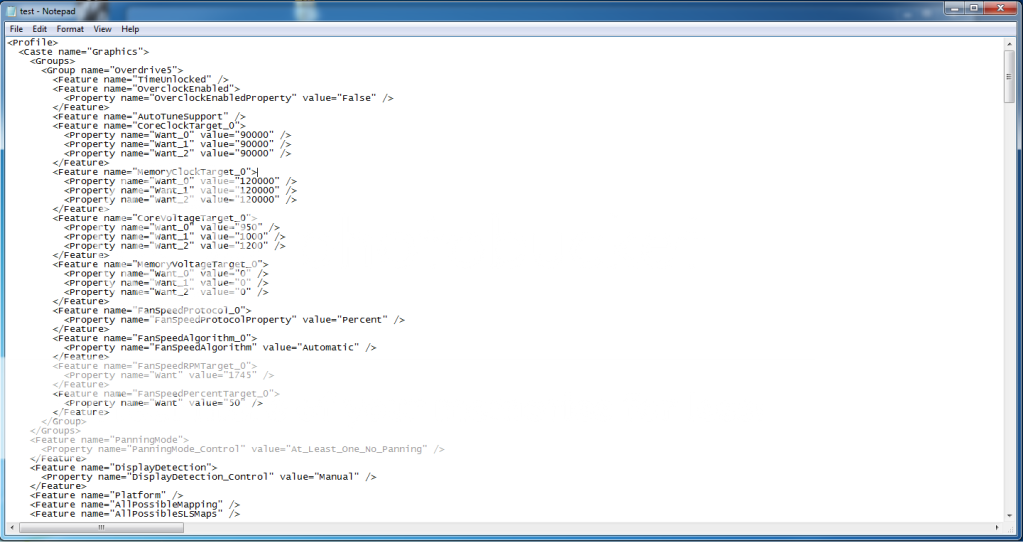
That's that my profile page looks like,

test.png
 
Thats exactly what happens when i tried the same thing, it's because the GPU has to run at 400Mhz to do the hardware decoding so you forcing it to run at 900Mhz is causing it to crash. Leave the GPU clocks as it was originally just lock down the memory clocks as it's the memory changing speed which is causing the flickering.
 
Thats exactly what happens when i tried the same thing, it's because the GPU has to run at 400Mhz to do the hardware decoding so you forcing it to run at 900Mhz is causing it to crash. Leave the GPU clocks as it was originally just lock down the memory clocks as it's the memory changing speed which is causing the flickering.

How do would I about locking down the memory clocks?
 
This is what i use 24/7 with no problems
<Profile>
<Caste name="Graphics">
<Groups>
<Group name="Overdrive5">
<Feature name="TimeUnlocked" />
<Feature name="OverclockEnabled">
<Property name="OverclockEnabledProperty" value="False" />
</Feature>
<Feature name="AutoTuneSupport" />
<Feature name="CoreClockTarget_1">
<Property name="Want_0" value="40000" />
<Property name="Want_1" value="60000" />
<Property name="Want_2" value="96000" />
</Feature>
<Feature name="MemoryClockTarget_1">
<Property name="Want_0" value="125000" />
<Property name="Want_1" value="125000" />
<Property name="Want_2" value="125000" />
 
This is what i use 24/7 with no problems
<Profile>
<Caste name="Graphics">
<Groups>
<Group name="Overdrive5">
<Feature name="TimeUnlocked" />
<Feature name="OverclockEnabled">
<Property name="OverclockEnabledProperty" value="False" />
</Feature>
<Feature name="AutoTuneSupport" />
<Feature name="CoreClockTarget_1">
<Property name="Want_0" value="40000" />
<Property name="Want_1" value="60000" />
<Property name="Want_2" value="96000" />
</Feature>
<Feature name="MemoryClockTarget_1">
<Property name="Want_0" value="125000" />
<Property name="Want_1" value="125000" />
<Property name="Want_2" value="125000" />


Didn't fix it.
 
Dont use the same settings, Thats for a water cooled 5970. Try

<Profile>
<Caste name="Graphics">
<Groups>
<Group name="Overdrive5">
<Feature name="TimeUnlocked" />
<Feature name="OverclockEnabled">
<Property name="OverclockEnabledProperty" value="False" />
</Feature>
<Feature name="AutoTuneSupport" />
<Feature name="CoreClockTarget_1">
<Property name="Want_0" value="40000" />
<Property name="Want_1" value="60000" />
<Property name="Want_2" value="90000" />
</Feature>
<Feature name="MemoryClockTarget_1">
<Property name="Want_0" value="120000" />
<Property name="Want_1" value="120000" />
<Property name="Want_2" value="120000" />
 
Back
Top Bottom