Should i get better cooling?

Soldato
Joined
7 Jan 2009
Posts
7,121
I know its been stupidly hot but today first time half way through a round of BF6 just crashed to desktop.

instantly thought i wonder if my CPU has hit TPD and playing another round (which didn't crash) yeah looks like indeed its VERY close to TDP.


The thing is what exactly would be better cooling than a Noctua NH-D15S Chromax Black?

I went with Air cooling because i don't like the constant whine of an AIO pump.

 
An NH-D15S is pretty much a NH-D15 minus a fan to prioritise memory stick clearance.

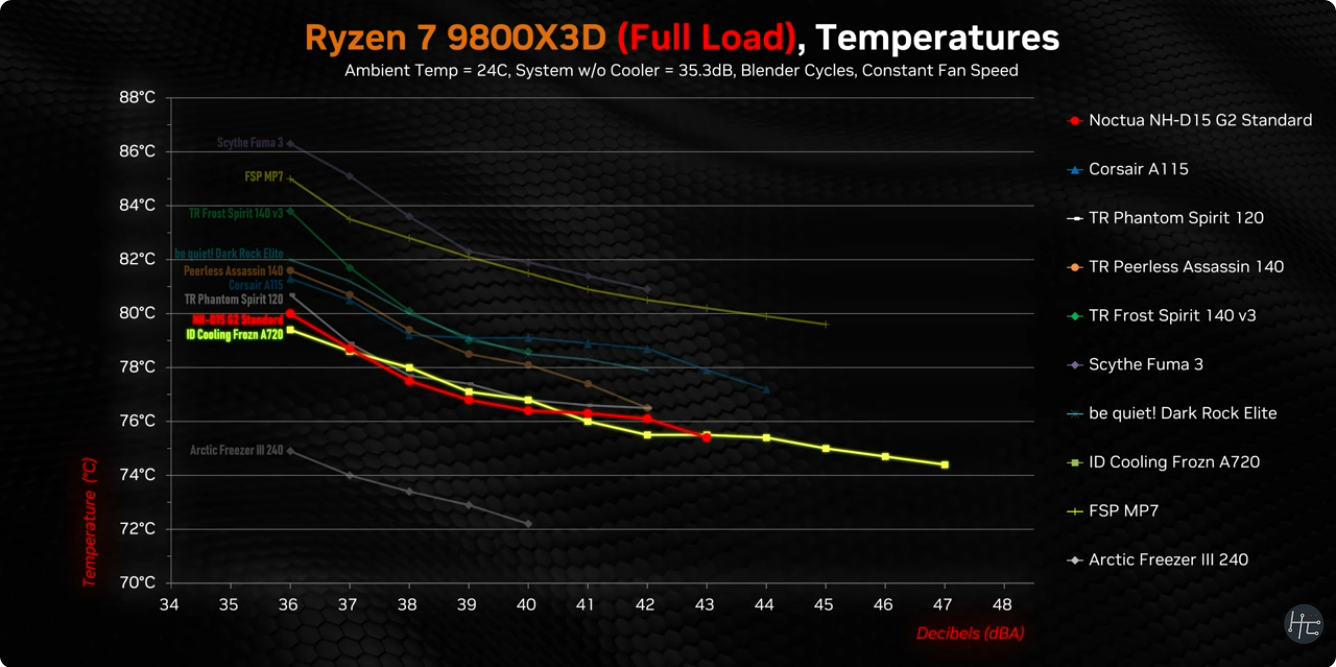
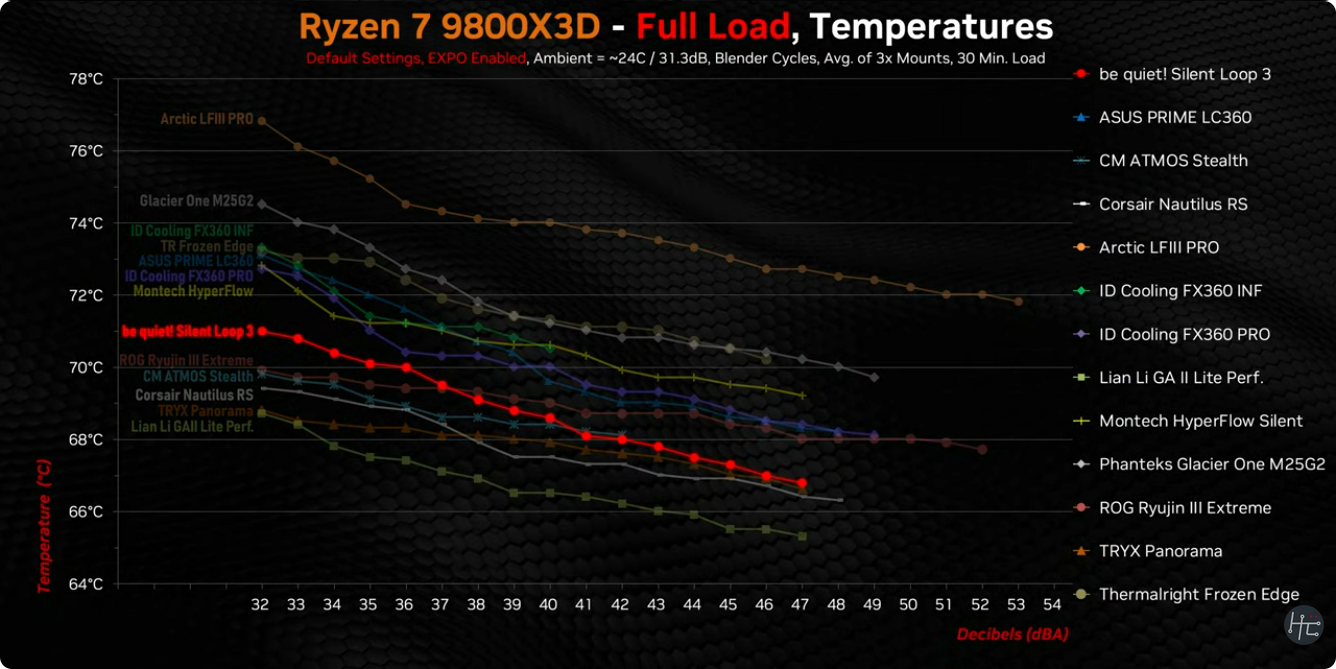
But the best air cooler is not competitive with a 2-3 fan AIO for cooling a 9800x3d, the wattage isn't high but the heat is in a small spot. Spraying water at it and cooling the water elsewhere just works better.

A comparison of some air coolers with one AIO included. The NH-D15 (two fans vs your one) does well compared to other air coolers. But is well behind the AIO:

CAQpKIS.png


And just AIO coolers:

CAQpQ3b.png


If you have to stick with air then I'd check fan is set to maximum no quiet settings and maybe add another and if not already, think about liquid metal to maximise what you can do.
 
What's your case cooling like?

Maybe try increasing fan speed while the weather is hot.

Can you attach a second fan to the cooler?
Good, a Havn BF360 ,I have 3x 120mm intake (Noctua fans) but on lowest speed (which probably doesn't help)

i actually do have a secondary 120mm fan on the front of the CPU cooler. :)

An NH-D15S is pretty much a NH-D15 minus a fan to prioritise memory stick clearance.

But the best air cooler is not competitive with a 2-3 fan AIO for cooling a 9800x3d, the wattage isn't high but the heat is in a small spot. Spraying water at it and cooling the water elsewhere just works better.

A comparison of some air coolers with one AIO included. The NH-D15 (two fans vs your one) does well compared to other air coolers. But is well behind the AIO:


And just AIO coolers:


If you have to stick with air then I'd check fan is set to maximum no quiet settings and maybe add another and if not already, think about liquid metal to maximise what you can do.
Intresting,I just know though that the AIO Pump noise would do my head in, I'm quite sensitive to this stuff as my desktop is right the side of me.
Take the side panel off your case that should help until.
i guess i could,
A modern Ryzen CPU hitting max temp or close to it shouldn't make it crash, have you checked the temps of your RAM?
I haven't, although i suspect they're okay as they're in direct airflow, Well at least one stick is.
What is your case? Is it an oven?
Havn BF360 with 3x Noctua fans as intake and a 120mm on the rear as exhaust.
 
I know its been stupidly hot but today first time half way through a round of BF6 just crashed to desktop.

instantly thought i wonder if my CPU has hit TPD and playing another round (which didn't crash) yeah looks like indeed its VERY close to TDP.
What are other temps like memory like?
 
As said, try running with side cover off and see if temps go down.

I use a cheap digital indoor/outdoor thermometer with remote lead outdoorprobe and put outdoor probe in front of cool to see what air temp entering cooler is. Cheap aquarium remote sensor thermometer work too. If it's more than a 5c warmer than room case definitely needs more / better airflow.

Increase intake fan speed to just about audible when CPU temps are above 60c, set fan curve faster if needed and maximum speed above 85-90c.
 
Good, a Havn BF360 ,I have 3x 120mm intake (Noctua fans) but on lowest speed (which probably doesn't help)

i actually do have a secondary 120mm fan on the front of the CPU cooler. :)

My recommendation is to set up Fan Control (or your BIOS) to ramp your fans when the system gets hot. I've got the same CPU and cooler in a sound proofed case (foam soundproofing also insulates heat), and even doing video conversion for a few hours in a 35 degree room could only get the CPU up to barely peak at 92 degrees with cores hitting 5.2 Ghz. You just need more airflow when things get hot. The cooler can get the heat out of the CPU, but then you have to get the heat from the cooler and out of the case.

Also make sure you are using the correct cooler mounting point as the Noctua has an offset mounting point for the 9800X3D that puts the base more squarely over the CCD to optimise the heat transfer from the hottest part of the die.
 
Use hwinfo64 and see what they level out at after a while of gaming. GPUs with a flowthrough cooler will be dumping heat directly in its path.
Thanks, it makes sense.

I did think about possibly trying out thermal grizzly extreme thermal pad but they do like 4x different thickness and i wouldn't have any idea which one to get and don't like the idea of having to keep pulling and trying different ones,

Currently I'm using Kryonaut Extreme thermal paste but who knows if over time its spread out to the sides.

I also have the Contact sealing frame along with the offset mount that the Noctua cooler comes with.


I've had zero crashing since so I'm just thinking that maybe it was nothing heat related that one time, Could have been a game crash itself.
But of course who doesn't like cooler temps!
 
Back
Top Bottom