

• Competitor rules

    Please remember that any mention of competitors, hinting at competitors or offering to provide details of competitors will result in an account suspension. The full rules can be found under the 'Terms and Rules' link in the bottom right corner of your screen. Just don't mention competitors in any way, shape or form and you'll be OK.

Sli problem

Associate
Joined
7 May 2013
Posts
467
Hi,

Just built a new PC with an overclockers oc bundle, got into windows no problem, all working fine. Mobo drivers all installed (z87x-oc) and a clean install of windows on an SSD. PSU is a corsair ax1200

Got 2 780tis, initially got the drivers on no problem (did express setup) but it hanged then after a few mins fully locked up when it prompted me to enable SLI and I did. After a few attempts managed to get it enabled but then windows locked a few mins later.

Driver ive used is 331.82.

Anyone any ideas?

Thanks :(
 
Install drivers

Enable SLI ASAP

Reboot

This sometime happens with GTX 690s, after rebooting with SLI enabled things should be ok. Having said that 780ti's may not do the same.

managed to do that :) didnt install the 3d drivers or the audio and it seems to have gone on, windows feels a bit sluggish for some reason, something not quite right. tried running the heaven benchmark but it hung on the loading screen. hmm...
 
Try reinstall and check the clean install option, after which head right into the NV control panel and enable SLI. If it needs to reboot again. It should be installing the 3d/audio driver too for the card.

do I need the 3d/audio drivers if I dont have a 3d monitor? assumed I wouldnt need them.

Just ran heaven benchmark and got this:

Unigine Heaven Benchmark 4.0

FPS: 40.1
Score: 1011
Min FPS: 7.3
Max FPS: 76.0

System

Platform: Windows 7 (build 7601, Service Pack 1) 64bit
CPU model: Intel(R) Core(TM) i7-4770K CPU @ 3.50GHz (3491MHz) x4
GPU model: NVIDIA GeForce GTX 780 Ti 9.18.13.3182 (3072MB) x2

Settings

Render: Direct3D11
Mode: 1920x1080 8xAA fullscreen
Preset: Custom
Quality: Ultra
Tessellation: Extreme

Thing is there, the overclock doesnt appear to be applied, I bought an extreme overclocked bundle (should be 4.6ghz) off ocuk as part of a new PC and didnt think it was working, does the above confirm it?
 
Last edited:
just looking at other scores and mine is rubbish in comparison, guessing I defo have something set up wrong here. would be eternally grateful if anyone can help me get this set up as it should be :)
 
Turn off

remove one card

Boot up

re install drivers

Run Heaven 4, you should score about 1350 - 1400 for a single card.

Turn off

Refit second card and sli bridge

Boot up

Enable SLI

Reboot

Run Heaven 4, now looking for 2700 - 2800 score for two card.

Thanks mate, think its worth trying each card on its own then I will try them together again.

Ive got the cards in the following slots:

1st and 3rd pci-e, is that right?

az9amf.jpg


I have Z87x-OC Force not sure if yours has onboard graphics, if so disable it in the Bios to see if that makes a difference. The Cpu overclock will not make a vast difference in Heaven 4 its a Gpu Benchtest.
Check in the Bios profiles list, their should be a OC one that is the 4.6Ghz oc.

Had it enabled at first but then disabled it, should I remove the drivers as well? With regards to the overclock should it not be shown in the benchmark that it is actually overclocked though? Total novice with overclocking so please excuse the silly questions :D

As an afterthought I'm guessing overclockers will have set up the bios to be all how it should be?
 
Last edited:
Looks fine to me, have you tried plugging in the connectors into different ones in the psu unit? i would also say try using one on their own for a day then the other the next day if no issues then that's them eliminated from the problem.You may want to try them in different pci-express slots too so that is taken out of the problem solving i.e like the picture you have shown keep the top card for 1st day of testing then remove it and test bottom card in same slot it's currently in next day.

(could be connection related, psu or driver then)

not tried different psu slots, can give that a go. will flip the sli connector and give it another go.

they both benchmarked using heaven ok, had them both in the top slot when I did that. only did the one bench though.

im guessing I shouldnt try the slot above so both cards are pretty much right next to each other?
 
The slots you have in should be fine...just take 1 out of their current slots for a day to test with gaming then put back in the next day removing the next from it's current if the sli bridge and psu connectors do not solve anything.

From a pic on google your bridge seems upside down so hopefully it's the case....look here: http://i.haymarket.net.au/News/SLI-GTX-780.jpg

flipping it over has made no difference :(

I know this isnt particularly seen as any good but I did the windows assessment thing and got this

28svb44.png


My old PC got better CPU/Mem scores than that :confused: and that was one of the very first i7s @ 2.6ghz. Its supposed to be an extreme overclocked bundle. Says 4.6ghz in the bios but nowhere else
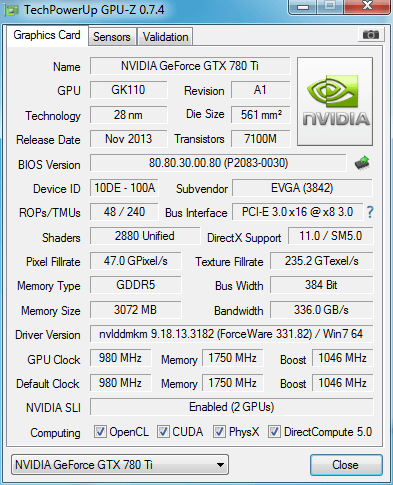
Have I done something monumentally wrong setting this up, is there anything I can do to check stuff? Sorry for all the questions its just this is so frustrating, spent a fortune on a new PC and at the moment its slower than my old one
 
You might just have a duff motherboard, this is my third motherboard in 2 weeks and the Force is a lot more expensive, ring Overclockers in the morning and go from there. I spent 2 days solid on my last motherboard as the onboard sound went off, re-installed windows on 3 different drives, just sent it back in the end and all was ok with this one.

That doesnt sound good...

I bought an overclocked bundle though, build time was 7 days, surely that means it goes through a load of testing?

Can it be down to drivers you install for the board?
 
They will only test the cpu overclock is stable with the memory, the only drivers you would need are the Intel inf driver and the nvidia driver to run and test the sli.

You can check if there is a profile named OC in the bios, if there is you can load optimized default bios then try that, as long as that OC profile is there you can reload it back after.

Also check this
2 x PCI Express x16 slots, running at x4 (PCIEX4_1, PCIEX4_2)
* The PCIEX4_1 slot shares bandwidth with the PCIEX16 and PCIEX8 slots. When it is populated, the PCIEX16 slot will operate at up to x8 mode and the PCIEX8 slot will operate at up to x4 mode.
* When installing a x8 or above card in the PCIEX4_1 slot, make sure to set PCIE Slot Configuration in BIOS Setup to x4. (Refer to Chapter 2, "BIOS Setup," "Peripherals," for more information.)
(The PCIEX16, PCIEX8, and PCIEX4_1 slots conform to PCI Express 3.0 standard.)

Mine is different as it has 3x PCIEX16 slots running at x16

It was on auto. Is this board not very good then?
 
ok bios looks ok

switched the 2nd card to the slot above so the cards are right next to each other and sli is no longer an option in the nv control panel. device manager shows 2 ti's still and the bridge is connected
 
Back
Top Bottom