SSD installed

Man of Honour
Joined
17 Feb 2003
Posts
29,640
Location
Chelmsford
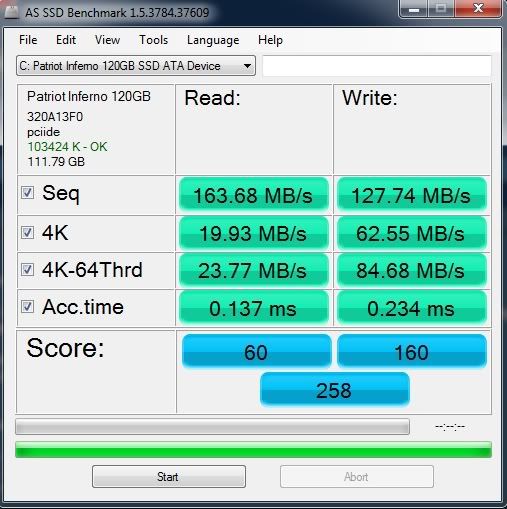
How does this seem:

AdmiralADSSDBench.jpg


Patriot Inferno 120GB SATA-II

http://www.overclockers.co.uk/showproduct.php?prodid=HD-008-PA&groupid=701&catid=14&subcat=1427

Fresh windows install, Trim enabled.

Things a little more zippy but nothing to write home about and sequential read speed well short of the quoted 285MB/s

In BIOS Onbaord devices, J Micron SATA/PATA is enabled and configured as AHCI

Yet strangely, the SATA config = Enhanced and Config SATA as IDE.

Not sure if this is relevent
 
Last edited:
I'm no expert but I'd maybe give ATTO a whirl, see what results you get with that. ATTO seems to be the one everyone uses to bench SSDs.

Also I don't think you want to put it on a JMicron controller, I always just disable that completely and use the intel controller (and make sure it is set to AHCI). If you need to reinstall your OS you'll need to secure erase your drive before you do.


Unfortunately, the Asus P5KC only has a JMicron controller.. i believe.
 
The P5KC does have the ICH9 cont (southbridge), there are 4 x SATA ports, 2 red (use for boot disk) and 2 black, Page 2-32 of manual...

Does need to be running in AHCI mode, also you best using v 9.6.0.1014 drivers...

Try using ATTO for your benches...

ok cheers.. I assumed this because I can only see a BIOS entry for JMicron controller, which is set to AHCI.. Guess that was my confussion.

Those rapid starge drivers you mention, I wasn't promopted for any drivers during install.. nor did i press F6 to install drivers.. Should there have been and or should I have done?

ATTO benchies:

atto.jpg
 
Last edited:
Ok I've checked my manual,

According to the manual, there should be an AHCI option under the "SATA config for SB" in the BIOS but there is only an IDE option, not both.

The setting I have made for ACHI is in the JM eSATA controller hence the confusion.

Would this make sense?

Also, why is the SATA config not showing an option for ACHI when the manual says it should?
 
I suspect W7 will have just installed the standard Microsoft drivers for your SATA/IDE controllers. These should work fine.

As far as i can see in DM this is true but I'm puzzled as to why there is no ACHI option in the BIOS? Does this make a difference?

How do the ATTO benchies look?
 
Yep... but the OP seems to be implying that it "is" running in AHCI mode but just with the standard Microsoft drivers that W7 installs. Something you can tell easily enough if you look in device Manager. He should be seeing something like:

AHCI controller driver ver. 21/06/06 ... 6.1.760.16385

Sort of.. I don't get an option in the BIOS to change the SATA configuration to AHCI like the manual suggests. However, I do see the AHCI controller drver ver as you state in DM.

Assuming I'm looking at the correct manual for your board.

Page reference 4.3.5 talks about " SATA configuration"

http://dlcdnet.asus.com/pub/ASUS/mb/socket775/P5K-C/e3155_p5kc.pdf ... page 84

But from what you say, Device Manager appears to be showing the correct thing, so you must be in AHCI mode.

I'm really not sure.. as I said above, there is no option. I have just checked the BIOS revision and I'm one behind the lastest but there have been all kinds of problems with the 1203 BIOS from what I've read.


Can I install those RST driver post W7 install?
 
The drive is connected to the ICH9 but in IDE mode. I'm not sure if this would a make this much difference.

I am going to try the ssd on the Jmicron channel. See if that makes any difference.
 
Correct, It just appears that Asus dropped the AHCI support from the BIOS..:(

You could check now.. Just head into the BIOS and check if there is an AHCI option. I only get IDE.. I think you'll be ok.
 
That's quite impressive mikeo!

I can believe that AHCI would make that much difference. I'm hoping its not a faulty drive I have. Although I doubt this, there is no way of telling.

I might get a secondhand P5Q. I hate this motherboard. There's a second hand one going on MM.
 
Last edited:
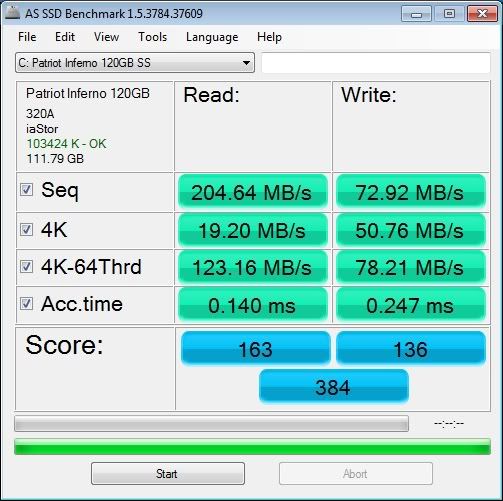
RESULT!!!


better.jpg


This was after replacing the P5KC with a P5Q and enabling ACHI :) Happy days I think.

I also used the Intel® RST drivers as previously suggested.

Thanks for all your help

@ Draeger

If it's the P5KC it will still work as if you connect any SATA drive. However, like mine, if there is no option (regardless of what the manual says) for ACHI (Native Command Queuing) then it may under perform slightly.. as per opening post.
 
Last edited:
Good show.

What's the ATTO benchmark look like now?

Still loading on all the updates and stability test at mo.. but will get them tonight.

Interesting that the write speeds are slower.. The CPU clock has been lowered from the OC 3.5Ghz to stock 2.4GHz. Maybe this has something to do with it. I'm not too worried though.
 
Back
Top Bottom