SSD speed check ?

Soldato
Joined
14 Nov 2002
Posts
4,483
Hi guys, having just got an SSD, how do I check its performing about right ?

I bought the OCZ agility 2 128gb on offer here, I see a couple of people have commented they have a windows experience rating of 7.6 -7.7.

I did a fresh install of win7 64 with just the ssd, and first boot into windows showed a 7.3 WE.
I had some issues when I connected my HDD as secondary, which appear to have been resolved by putting the SSD on sata port 0 and the HDD on 1 (previously reversed).
Now WE is showing just 5.9 !

So what program should I use to test speeds etc, and what results should I expect (bearing in mind its a Sata 2 SSD and mobo).

I have the newest firmware for the SDD , and AHCI is set in mobo bios.

Spec in sig.

 
It's tricky to explain, but I have a Sandisk Ultra with the same controller and flash type.

Basically the performance drops as the disk fills up. Empty disk measured 7.3 for me but after cloning a 45GB C partition to it the performance went down to 5.9. I've filled the drive to around 70GB now and it's not affected the access time to a noticeable degree, the only thing that has changed is the sequential transfer rate which is still far higher than a normal HDD. This is perfectly normal for these types of drive.

Because Flash is block addressed if you wish to write a tiny file to a block (which are quite large) you have to read the whole block first, add the tiny file to the end and then write it back. Wear levelling ensures that all blocks will have at least a couple of bits of data in them. For an empty block data can be written straight away which practically doubles the performance for an empty drive.

The TRIM command helps keep the drive healthy by moving blocks around and marking some as empty, in order to keep drive performance up. If you live your PC idling for a few hours it should sort itself out and you will get some performance back.
 
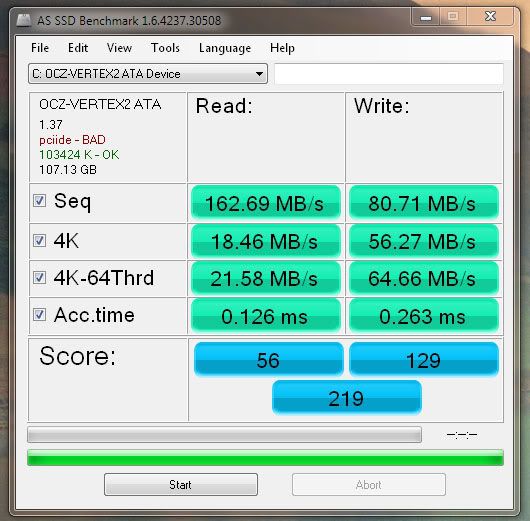
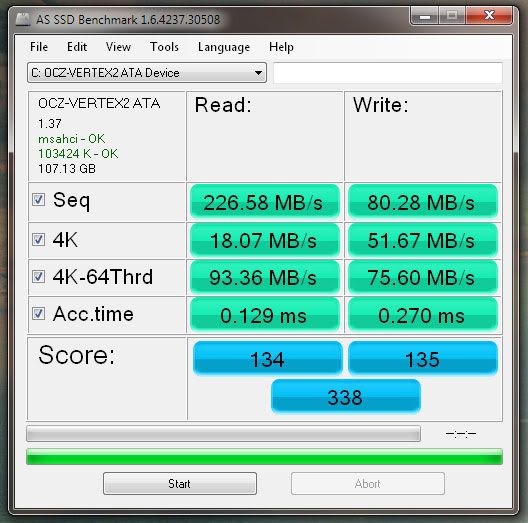
Try one of these (these are also my benchmarks)

intel.jpg


intel1.jpg


intel2.jpg


intel3.jpg
 
Those results match up to my Sandisk drive (same controller and flash as I mentioned) almost exactly. Mine is also 60% full.

So I say you're good to go, the access time is the only real concern, and it matches up to the access time of an empty drive.
 
Cheers ... the seq write time I thought a bit odd .... I run the test on my HDD and that was faster for that test, but nothing else ... in fact it was so slow on the 4k test I gave up and canceled it :p
 
Probably an anomaly, the access time test randomly reads blocks on the drive and the write test randomly writes them. It's always higher because it has to first perform a read and then a write, so it's usually about double the read time on a disk with at least some data on it. It can't be faster on a HDD as the lowest possible seek time (sector to sector access) is about 0.2-0.8ms, average random access time for any sector is about 12ms, in the best case it's around 3 ms and the worst case 20ms (ie moving from the innermost track to the outermost track).
 
Back
Top Bottom