SSD Vista

Associate
Joined
31 Aug 2009
Posts
160
Not really up with SSD drives.
Simple question can you use a SSD with Windows Vista 64bit????
I had a seagate and it suffered the firmware failure so am now thinking about getting an SSD as my main boot drive and switching my WDVillo to my storage drive.
I know vista does not have the trim surport of Win7 but once I have my OS all my drivers and A.V. that is all the ssd would have on everything else would go on other drive.

 
When I was considering SSD for Vista I was looking at Crucial or Intel because of their toolbox/wiper tool. Pretty sure they support on request maintenance so don't have to worry about no TRIM.
 
When I was considering SSD for Vista I was looking at Crucial or Intel because of their toolbox/wiper tool. Pretty sure they support on request maintenance so don't have to worry about no TRIM.

Ahh thanks for that info. Still unsure what drive to go for and still looking into it.
 
Personally, I've been considering an Intel 120GB (newish release). Although with the 25nm G3 getting closer to release I might as well wait a bit longer now.

The advantage of the Intel range is the toolbox for on-demand clean-up maintenance. This makes up for Vista not supporting TRIM.

Other controllers such SandForce (as used by OCZ, Crucial Force, Patriot Inferno drives) require you to log out of Windows and leave system idle for the SSD firmware to perform maintenance. I don't know how long you have to wait for that to complete.

The Crucial wiper I mentioned previously was for the M225 range, so not really available any more.
 
Definately I have the corsair c300. With windows 7 (64) loads in an instant. I wouldnt consider a system without an ssd boot drive again.
 
I received a new Intel 120GB, and while it's nice not having a HDD crunch away and a responsive desktop, I'm so far not blown away for the amount it cost.

Currently getting all the post SP2 updates, and will see if things improve. But with SP2 installed Windows Vista Home Premium 64-bit had two full scrolling green loading bars.

I've run the Toolbox System Configuration Tuner that allows you to disable:
  • Superfetch/Prefetch
  • ReadyBoost
  • DIPM (wasn't required on my system, but option is available)
  • Defragmenter

I've not run the SSD Optimizer yet. Will wait until I've installed everything first.

Vista DVD saw the drive as 111.8 GB capacity.

Edit: With a clean install of Vista 64-bit with drivers and Microsoft Office Home & Student 2007, both service packed up and all subsequent updates. And System Restored disabled takes up 24.8GB.
 
Last edited:
I received a new Intel 120GB, and while it's nice not having a HDD crunch away and a responsive desktop, I'm so far not blown away for the amount it cost.

Currently getting all the post SP2 updates, and will see if things improve. But with SP2 installed Windows Vista Home Premium 64-bit had two full scrolling green loading bars.

I've run the Toolbox System Configuration Tuner that allows you to disable:
  • Superfetch/Prefetch
  • ReadyBoost
  • DIPM (wasn't required on my system, but option is available)
  • Defragmenter

I've not run the SSD Optimizer yet. Will wait until I've installed everything first.

Vista DVD saw the drive as 111.8 GB capacity.

Right I hope you get it all up and running nicely please could you keep me up to date how you are getting on with this drive etc.
 
I don't remember how long Lord of the Rings: Online client took to install on my mechanical drive.

Extracted Codemasters Trilogy *.rar pack from September to SSD, and then installed.

This is the trial client from before the game went Free 2 Play, and the extracted installer directory was 9.68 GB. The installer then took 20 minutes to get to NET Framework 1.1 with SP1 stage. In total it took 21 minutes, although this might have been nearer 22 minutes to fully finish as I didn't start timing immediately.

Will edit post later and add a benchmark after I've patched and played game.

System fitted with a DFI LANParty JR P45-T2RS motherboard with the SSD being the only drive on SATA port 0 using cable supplied with SSD.

Using Rapid Storage Technology driver version 9.6.0.104 (23-03-2010)
This is now listed as "Previously released" version, but not found a newer 64-bit version.
Motherboard chipset driver version 9.1.1.1025 (22-12-2009)

When I eventually run bootracer, most of the time will be spent going though BIOS screen and ACHI screen.

EDIT:

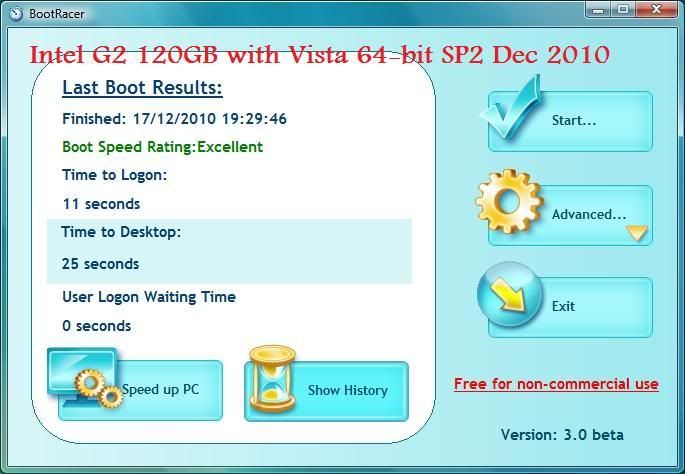
BootRacer 3.0 beta
First run took 44 seconds, so don't know what was happening in the background. Still seems slow shutting down to reboot.
bootracer3beta.jpg


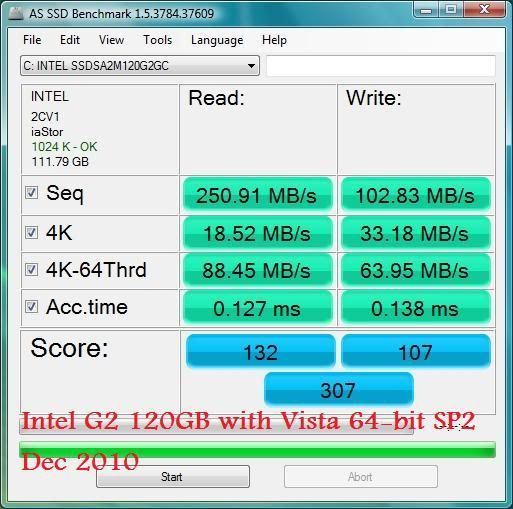
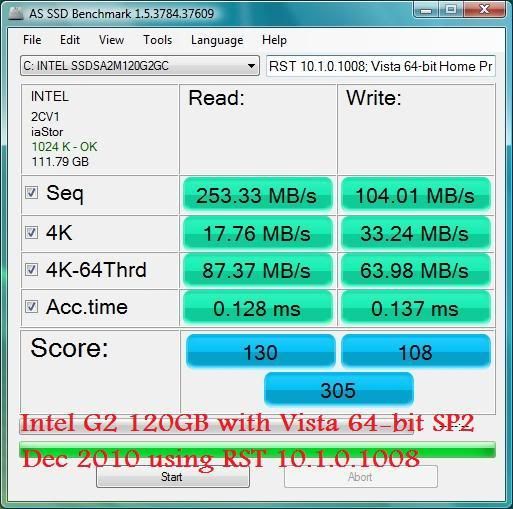
AS SSD Benchmark 1.5.3784.37609
This is meant to be a worst case scenario benchmark due to the type of date it uses.
37.9 GB used for Windows Vista 64-bit Home Premium, Office 2007 Home and Student, Lord of the Rings: Online, and some very small applications like Irfranview, 7-zip, etc.
asssd.jpg
 
Last edited:
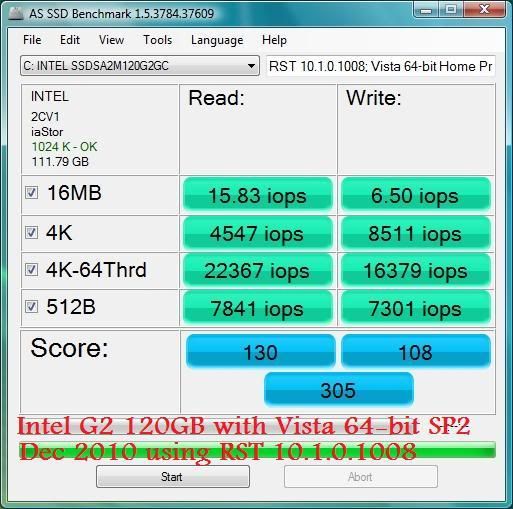
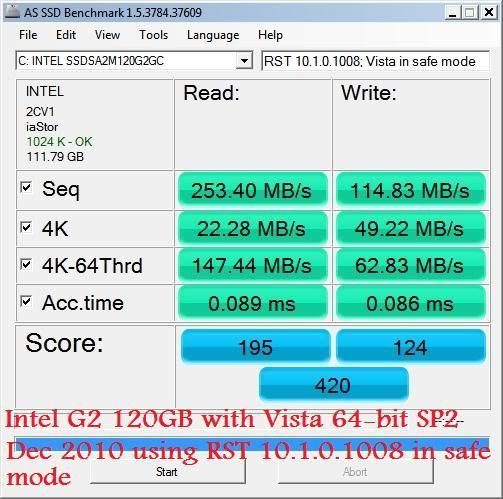
It seems my Vista install might be the cause for my reduced benchmark result (refer to new screen grabs at end). So you might be in the same situation or fair better.

System Specification:
Core2Duo E8400 at stock 3.0GHz
4GB PC6400
DFI LanParty JR P45-T2RS
ATI 4870 512MB
IDE DVD-RW
Currently no other drives connected.

As a result I haven't decided if I'll eek it out to Windows 8, or give in and use my pre-ordered Windows 7 retail that I promised to a family still using XP. If I decide to keep W7 for myself and tell them to buy an upgrade instead :o then with hindsight I would have looked for a cheaper brand as I only went Intel due to Toolbox to maintain performance with the absence of TRIM OS.
Doing reboots and shutdowns Vista still takes longer than I anticipated it would on a SSD (might be unique to my system). With the small circle timer icon remaining for 5 seconds or more. Probably dependant on what I've been doing prior to reboot.

Playing Lord of the Rings: Online I still get a much reduced (compared to mechanical HDD) stutter when entering busy areas, although this doesn't happen as often. Also I now have the graphical effects on High/Very High and using DirectX 10 on a 512MB card playing at 1680x1050. So textures load is probably hitting the SSD. Once I get a 5850 (if it fits) I'll know for sure.

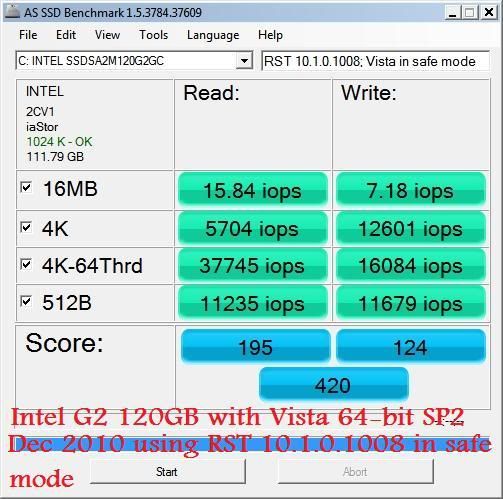
Here are some benchmarks. And you can see I get better results in Safe Mode, so my issue may be related to software I'm using, e.g. BitDefender Antivirus Pro 2011, etc.

Today (18th December) I decided to uninstall RST 9.6.0.1014 and installed 10.1.0.1008 (couldn't find it yesterday).

10.1.0.1008 Normal Boot
asssd2.jpg


10.1.0.1008 Normal Boot IOPS
asssd2iops.jpg


10.1.0.1008 Safe Mode
asssd3.jpg


10.1.0.1008 Safe Mode IOPS
asssd3iops.jpg


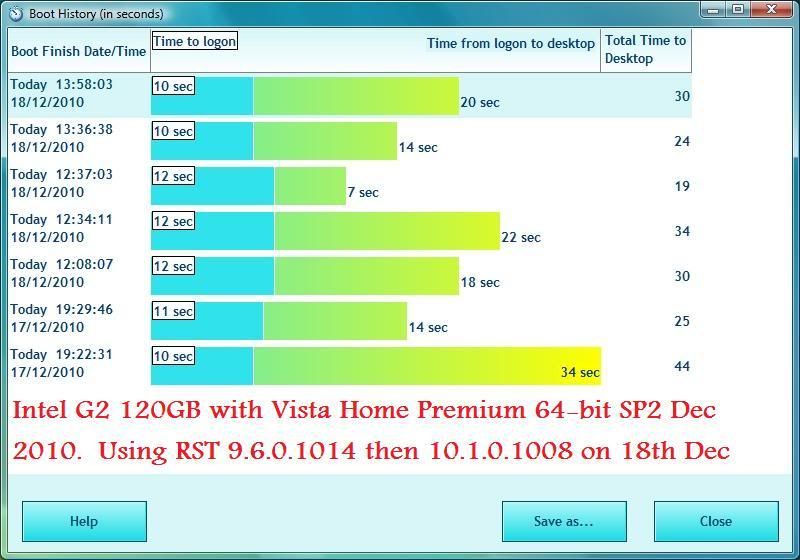
And just a comparison of boot times, although this is still in the early days. First capture and bottom and most recent at top.
br3history.jpg
 
Vista is just fine with SSD's I use both an Intel 80GB & OCZ Vertez 120GB SE on Vista dual boot OSes.

You need to use a different driver for your Intel ICH10 SATA/AHCI device in device manager as the MS Iastor driver is a lot slower than the Intel driver dated 13/09/10 ver no: 10.0.0.1046

Just go to Intels SSD forums for more tips or their website & download the newer RST package:

http://communities.intel.com/community/tech/solidstate?view=discussions

http://www.intel.com/p/en_US/support/highlights/chpsts/imsm
 
Vista is just fine with SSD's I use both an Intel 80GB & OCZ Vertez 120GB SE on Vista dual boot OSes.

You need to use a different driver for your Intel ICH10 SATA/AHCI device in device manager as the MS Iastor driver is a lot slower than the Intel driver dated 13/09/10 ver no: 10.0.0.1046

Just go to Intels SSD forums for more tips or their website & download the newer RST package:

http://communities.intel.com/community/tech/solidstate?view=discussions

http://www.intel.com/p/en_US/support/highlights/chpsts/imsm

Yep, I've been using a newer version than you. Started with 9.6.0.1014 and then 10.1.0.1008 (15/12/2010).

How long does it take for your Intel to shutdown and reboot? As I'm getting 15-18 seconds even after web browsing. I thought Bootracer was causing the delay, so uninstalled it, but its not made any real difference so probably related to processes/services on my install.
 
Yep, I've been using a newer version than you. Started with 9.6.0.1014 and then 10.1.0.1008 (15/12/2010).

How long does it take for your Intel to shutdown and reboot? As I'm getting 15-18 seconds even after web browsing. I thought Bootracer was causing the delay, so uninstalled it, but its not made any real difference so probably related to processes/services on my install.
Usually in the sub 5-10 secs to restart but mine takes 1 min overall from restart to useable Windows as I have lots of devices connected which have to intialise in the bios:

Alienware TactX Keyboard which uses 2 USB ports

Asus D2X Xonar soundcard which has a startup driver which take time to initialise

980X 12 core CPU which takes time for Vista to initialise

All of these add up to a slow overall bootup time only way to improve is for me to remove these devices which is not an option.
 
Shutdown times didn't really improve with my SSD but Windows is fully loaded 15 s after the logo appears. My ~25 s BIOS POST is depressing though.
 
Back
Top Bottom