

-
Notice regarding image hosts and attachments. See here.
You are using an out of date browser. It may not display this or other websites correctly.
You should upgrade or use an alternative browser.
You should upgrade or use an alternative browser.
Stalker 2
- Thread starter Tombstone
- Start date
More options
Thread starter's posts
I have the standard version at the moment, not sure if to buy the ultimate upgrade or just the cost of hope expansion, I saw another person did the upgrade and the cost of hope was still showing as an extra purchase?
Is anyone starting another play through with the version 2.0 update?
Is anyone starting another play through with the version 2.0 update?
There is a patch out today, 113MB ish, the only changelog is "fixed some textures" - Very useful.
Time to see if the obvious things mentioned have been fixed....
Edit*
Nope cannot see wtf they fixed lol, all the visual bugs still the same.
MFW:
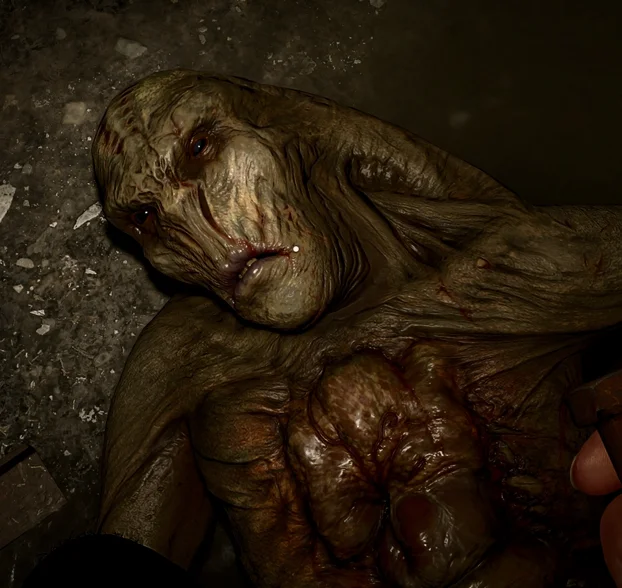
Time to see if the obvious things mentioned have been fixed....
Edit*
Nope cannot see wtf they fixed lol, all the visual bugs still the same.
MFW:
Last edited:
This game reacts really well to injecting MFG, I thought about testing it out to further lower GPU overhead and thus fan noise and reference against not only input latency but frame time queue and general pacing performance that could result in realistic or perceived "lag".
I then let Gemini analyse the DLSS Enabler metrics overlay on each screenshot:
Base settings in game: Epic preset / DLSS Quality / 4K output
FG disabled:

2xFG:

4xMFG:

Gemini:
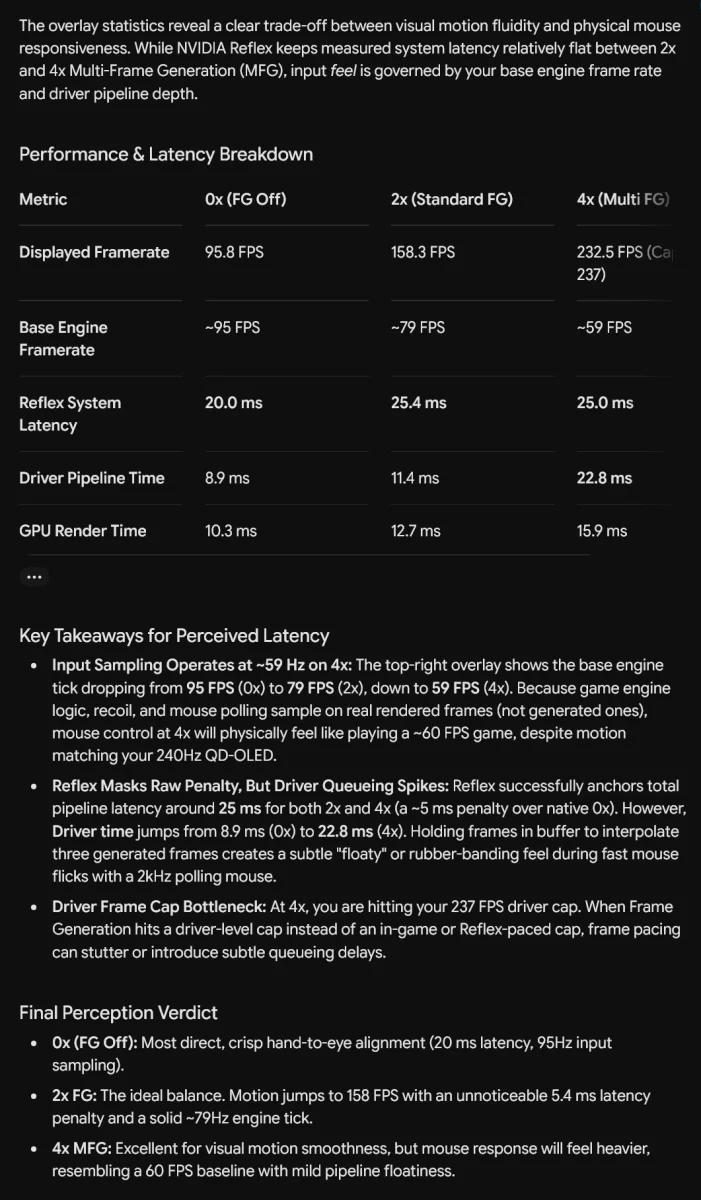
The verdict at the end is bang on really, 4x is more than playable, but 2x is the best balance as 5ms latency introduction going from an average 95fps to a locked 120fps offers a noticeable motion experience with no perceptible introduction of mouse input latency.
I noted my preference for RTSS since it uses Reflex hook anyway so adds no additional latency into capping like the Nvidia control panel or NVapp driver level global cap does, Gemini said:
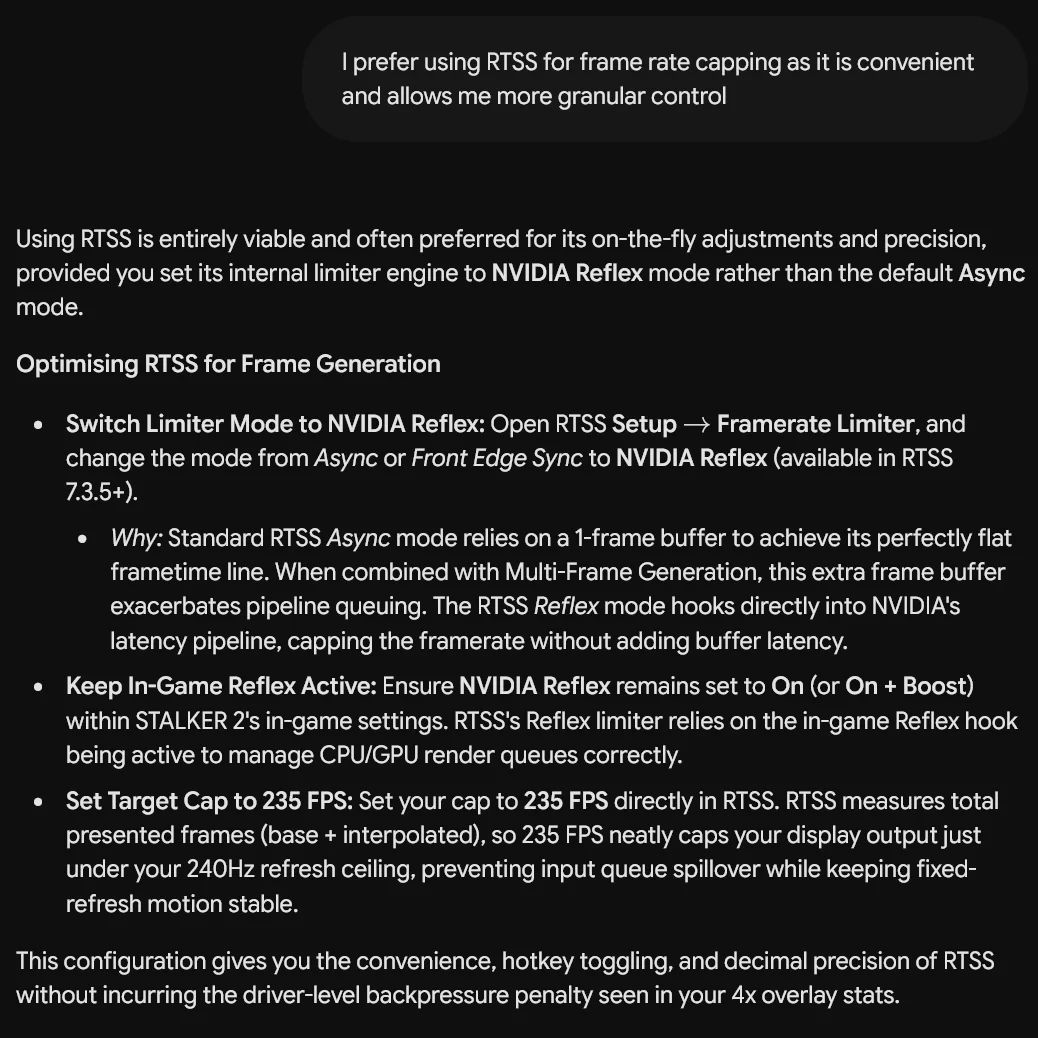
An interesting test in an engine I wasn't expecting to fare so well with injecting a mod this way.
The takeaway from this is I learned having the max fps cap in the nvidia driver is not the most optimum way because that cap is applied at the end of the pipeline, not at the start which is where Reflex is doing its thing (and in turn RTSS with its Reflex hook).
So optimum usage is Gsync on + Vsync on for those who don't notice any OLED VRR flicker, for those who do on their displays, both off and set your framerate caps either ingame or with RTSS and have reflex on. This keeps end to end latency as low as possible and the GPU driver is not adding any extra ms.
I then let Gemini analyse the DLSS Enabler metrics overlay on each screenshot:
Base settings in game: Epic preset / DLSS Quality / 4K output
FG disabled:
2xFG:
4xMFG:
Gemini:
The verdict at the end is bang on really, 4x is more than playable, but 2x is the best balance as 5ms latency introduction going from an average 95fps to a locked 120fps offers a noticeable motion experience with no perceptible introduction of mouse input latency.
I noted my preference for RTSS since it uses Reflex hook anyway so adds no additional latency into capping like the Nvidia control panel or NVapp driver level global cap does, Gemini said:
An interesting test in an engine I wasn't expecting to fare so well with injecting a mod this way.
The takeaway from this is I learned having the max fps cap in the nvidia driver is not the most optimum way because that cap is applied at the end of the pipeline, not at the start which is where Reflex is doing its thing (and in turn RTSS with its Reflex hook).
So optimum usage is Gsync on + Vsync on for those who don't notice any OLED VRR flicker, for those who do on their displays, both off and set your framerate caps either ingame or with RTSS and have reflex on. This keeps end to end latency as low as possible and the GPU driver is not adding any extra ms.

I have ultimate and it includes the expansion. itsliterally listed as one of the ultimate perks on steam.I have the standard version at the moment, not sure if to buy the ultimate upgrade or just the cost of hope expansion, I saw another person did the upgrade and the cost of hope was still showing as an extra purchase?
the stor eupgrade page even says it includes it

S.T.A.L.K.E.R. 2: Heart of Chornobyl - Ultimate Upgrade on Steam
Enter the Chornobyl Anomalous Zone, a vast open world where anomalies, mutants, and rival stalkers await. Scavenge, survive, and forge your own path through a living world shaped by danger, mystery, and the choices you make.Go all-in with the Ultimate Upgrade. Includes extra weapons and gear...
I've started using "Ultra+ Manager" to tweak and try sort out some of the (still!) glaring issues. First notable takes....
1. You can force Ray Reconstruction - I've confirmed it's using it via the DLSS reg hack info, and I'm using the latest RR 4.5 transformer model leaked yesterday and forcing preset F. The performance hit is huge, which makes you think it must be doing something - HOWEVER, I'm not sure it actually is! Need to test it way more thoroughly.
2. Reflections are still the worst thing ever in this game, especially in puddles. They look even worse than they used to and no amount of Reflection specific Ultra+ Manager tweaks I've tried so far will fix them, and forcing ray reconstruction on as describe above does nothing for reflections (again making me wonder what it's actually doing).
3. Shadows were immediately horrible in my test area, especially shadows cast onto buildings and by trees, and shadows being cast inside buildings - like stop motion animation, and flickering. Ultra+ Manager can really help here! Still testing but managed to improve this problem massively already - I think the key settings to tweak are "lighting update speed" and then "lighting mode", "lighting noise quality", "lighting quality", and "lighting resolution". There is only one setting under Shadows - "Extended Shadow Quality", not even tweaked that one yet.
Overall the new lighting model is a big improvement, performance at max in game settings is definitely better too, and in game HDR is much better it seems now (I used to have to use RenoDX to help alleviate the crushed blacks due to the old 'bad lumen'. Not sure I need Reno now).
Lots more to tweak and test though.....
1. You can force Ray Reconstruction - I've confirmed it's using it via the DLSS reg hack info, and I'm using the latest RR 4.5 transformer model leaked yesterday and forcing preset F. The performance hit is huge, which makes you think it must be doing something - HOWEVER, I'm not sure it actually is! Need to test it way more thoroughly.
2. Reflections are still the worst thing ever in this game, especially in puddles. They look even worse than they used to and no amount of Reflection specific Ultra+ Manager tweaks I've tried so far will fix them, and forcing ray reconstruction on as describe above does nothing for reflections (again making me wonder what it's actually doing).
3. Shadows were immediately horrible in my test area, especially shadows cast onto buildings and by trees, and shadows being cast inside buildings - like stop motion animation, and flickering. Ultra+ Manager can really help here! Still testing but managed to improve this problem massively already - I think the key settings to tweak are "lighting update speed" and then "lighting mode", "lighting noise quality", "lighting quality", and "lighting resolution". There is only one setting under Shadows - "Extended Shadow Quality", not even tweaked that one yet.
Overall the new lighting model is a big improvement, performance at max in game settings is definitely better too, and in game HDR is much better it seems now (I used to have to use RenoDX to help alleviate the crushed blacks due to the old 'bad lumen'. Not sure I need Reno now).
Lots more to tweak and test though.....
Last edited:
Yeah from what I have seen/read it appears that Ultra+ does allow you to toggle the new RR and stuff but it probably isn't actually working as it should because you are still operating within software RT/Lumen boundaries since the game itself was not compiled with any hardware RT pipeline, so all hardware routes are ignored - This would explain why you've noticed the above, so it's "working" hence the fps drop, but not, because it's applying the working model on an already compromised pipeline 
Yeah from what I have seen/read it appears that Ultra+ does allow you to toggle the new RR and stuff but it probably isn't actually working as it should because you are still operating within software RT/Lumen boundaries since the game itself was not compiled with any hardware RT pipeline, so all hardware routes are ignored - This would explain why you've noticed the above, so it's "working" hence the fps drop, but not, because it's applying the working model on an already compromised pipeline
This is where I start to lose the plot
My peabrain logic thinks that if the fps is basically halved forcing RR on, and the indicator confirms it's on, then it must be doing something good surely??!
I would think so too but I don't think software Lumen is capable of displaying the changes properly so whatever is being done is happening inside the engine but is being dropped in the output pipeline as the dedicated pipeline for it doesn't exist as GSC hard locked it to software Lumen only. Maybe someone can figure it out though not sure.

another day and more patches after the V2 update . This is the last time i purchase an finished game.
No such thing as a finished game these days at release.

Soldato
- Joined
- 10 Nov 2012
- Posts
- 2,589
- Location
- Lincolnshire
No such thing as a finished game these days at release.
I miss the Amiga days. Ahhh simpler times
Last edited:
I miss the Amiga days. Ahhh simpler times
And the PS1 and PS2 days.
No internet connected devices, games had to be 100% finished or else the **** would hit the fan big time.

Associate
- Joined
- 7 Feb 2014
- Posts
- 1,804
- Location
- Lancashire
I don't. You got a game breaking bug back then you were not finishing the game. Updates are a small price to pay.I miss the Amiga days. Ahhh simpler times
I don't. You got a game breaking bug back then you were not finishing the game. Updates are a small price to pay.
There were updates for games back then too.
Associate
- Joined
- 7 Feb 2014
- Posts
- 1,804
- Location
- Lancashire
There were updates for games back then too.
How did you update your Amiga games back in those days? They usually ran entirely off floppy discs didnt they?
Soldato
- Joined
- 10 Nov 2012
- Posts
- 2,589
- Location
- Lincolnshire
I don't ever remember updating any game and I was balls deep in the scene. I wish you could climb into memories.
You got updates from magazines. And the internet was around back then. Only beginning, but still stuff was available on BBS's etc.How did you update your Amiga games back in those days? They usually ran entirely off floppy discs didnt they?
Soldato
- Joined
- 10 Nov 2012
- Posts
- 2,589
- Location
- Lincolnshire
It was mainly PD on magazines. Anyway, I just got this stupid slow walking bug on Stalker 2, any advice?
It was mainly PD on magazines. Anyway, I just got this stupid slow walking bug on Stalker 2, any advice?
You're not over encumbered?