

-
Notice regarding image hosts and attachments. See here.
-
Competitor rules
Please remember that any mention of competitors, hinting at competitors or offering to provide details of competitors will result in an account suspension. The full rules can be found under the 'Terms and Rules' link in the bottom right corner of your screen. Just don't mention competitors in any way, shape or form and you'll be OK.
You are using an out of date browser. It may not display this or other websites correctly.
You should upgrade or use an alternative browser.
You should upgrade or use an alternative browser.
The AMD Driver Thread
- Thread starter LtMatt
- Start date
More options
Thread starter's posts


Thanks for pointing this out. This is specifically with ReLive, right?I tested all the recent driver versions and the dark video recording bug is in 25.10.2 and 25.11.1, in 25.10.1 and previous versions it works normal. @AMD_Vik
Here's a screenshot comparison of a video recording in a shadowed area in Black Ops 7. I also tested it in another game (MW2) and it had the same issue so it's not a Black Ops 7 bug. This was using a 9070 XT and I clean installed the drivers using DDU.
https://i.~ibb.co~/93HbvJsg/25-10-1.pnghttps://i.~ibb.co~/G3077DDP/25-10-2.png
Are you using a HDR display? It almost looks like HDR > SDR tone mapping isn't occurring? Is this only happening with BO7? Are you seeing this across other titles?
Last edited:
It's with the record function in AMD Adrenalin record and stream. My monitor is 4K 144Hz SDR (Samsung S28AG70). I also tested it in MW2 which had the same problem, there's a reddit post from 10 days ago describing the same problem here: https://old.reddit.com/r/AMDHelp/comments/1guzzb3/video_recording_too_dark_on_main_monitor/nn0vabf/Thanks for pointing this out. This is specifically with ReLive, right?
Are you using a HDR display? It almost looks like HDR > SDR tone mapping isn't occurring? Is this only happening with BO7? Are you seeing this across other titles?
Last edited:
Thanks for the info. It seems we started tracking this just two days ago. I'll follow the tickets to chime in.It's with the record function in AMD Adrenalin record and stream. My monitor is 4K 144Hz SDR (Samsung S28AG70). I also tested it in MW2 which had the same problem, there's a reddit post from 10 days ago describing the same problem here: https://old.reddit.com/r/AMDHelp/comments/1guzzb3/video_recording_too_dark_on_main_monitor/nn0vabf/

@AMD_Vik I am having my first set of issues with AMD drivers, the latest 25.11.1 won't work correctly with my setup of 9070XT and iGPU on a 9800X3D, If I install it over the top of a previous install it won't allow me to open the software however if I remove it and install it clean it won't recognise my iGPU leaving one monitor blank. Is this something to do with the separation of RNDA2/RDNA4 drivers ? as this is a pretty big issue. Going to downgrade to previous version and hope this is fixed soon.
EDIT - OK looks like this is a known issue, combined driver required. Might be good to get some comms on this and somehow in the future be able to auto download this version if that is what is installed, as that's how my problems occurred, it auto updated and I just couldn't open the software.
Link to DL
Reddit thread with others having similar issues
Reddit
 www.reddit.com
EDIT 2 - downloaded and installed the above and adrenalin still doesn't start @AMD_Vik some guidance here would be helpful if you can ?
EDIT 3 - Only way I can get adrenaline to start is to unplug my iGPU, if I plug the HDMI back in the software will continue to work, this must be some kind of bug ? Any ideas ?
EDIT - OK looks like this is a known issue, combined driver required. Might be good to get some comms on this and somehow in the future be able to auto download this version if that is what is installed, as that's how my problems occurred, it auto updated and I just couldn't open the software.
Link to DL
Reddit thread with others having similar issues
www.reddit.com
EDIT 2 - downloaded and installed the above and adrenalin still doesn't start
@AMD_Vik some guidance here would be helpful if you can ?EDIT 3 - Only way I can get adrenaline to start is to unplug my iGPU, if I plug the HDMI back in the software will continue to work, this must be some kind of bug ? Any ideas ?
Last edited:

Once i installed some new drivers recently, DDU and all that i think, adrenaline didnt launch. So i went meh and just installed them again without doing anything else like uninstalling since its the same driver im just trying to fix the software for, then rebooted then adre.. then launched ok. Dunno if it same would work for you.
Tried about 20 different combos today, only fix that works is to unplug HDMI from iGPU. The software will then start, short term fix for me is to plug third monitor into 9070XT but then the VRAM bug will mean my memory is running higher. Think this is some kind of RDNA 2 / 4 driver divergence and it can't start the software as it sees both my RDNA2 chip and 9070XT RDNA 4.Once i installed some new drivers recently, DDU and all that i think, adrenaline didnt launch. So i went meh and just installed them again without doing anything else like uninstalling since its the same driver im just trying to fix the software for, then rebooted then adre.. then launched ok. Dunno if it same would work for you.
Hopefully this gets resolved soon
somtimes i just insall new drivers over the top of the old drivers works all the timeOnce i installed some new drivers recently, DDU and all that i think, adrenaline didnt launch. So i went meh and just installed them again without doing anything else like uninstalling since its the same driver im just trying to fix the software for, then rebooted then adre.. then launched ok. Dunno if it same would work for you.
You're running displays from both igfx and nv48? if you use the cleanup utility (or ddu), and then run the auto detect installer, does that get you into a working state?Tried about 20 different combos today, only fix that works is to unplug HDMI from iGPU. The software will then start, short term fix for me is to plug third monitor into 9070XT but then the VRAM bug will mean my memory is running higher. Think this is some kind of RDNA 2 / 4 driver divergence and it can't start the software as it sees both my RDNA2 chip and 9070XT RDNA 4.
Hopefully this gets resolved soon
Hi Vik, yes nv48 and igpu. Tried both ddu and the clean up utility, neither workedYou're running displays from both igfx and nv48? if you use the cleanup utility (or ddu), and then run the auto detect installer, does that get you into a working state?
Actually not tried with auto detect after full clean. I will try that shortlyHi Vik, yes nv48 and igpu. Tried both ddu and the clean up utility, neither worked

@AMD_Vik
Any idea on this with Star Citizen in DX11 mode? 25.9.1 works, 25.9.2 and 25.10.2 and 25.11.1 don't. Instant crash on Splash screen start up.
It was even crashing in Vulkan mode, i installed the Vulkan SDK and that fixed it for Vulkan mode.
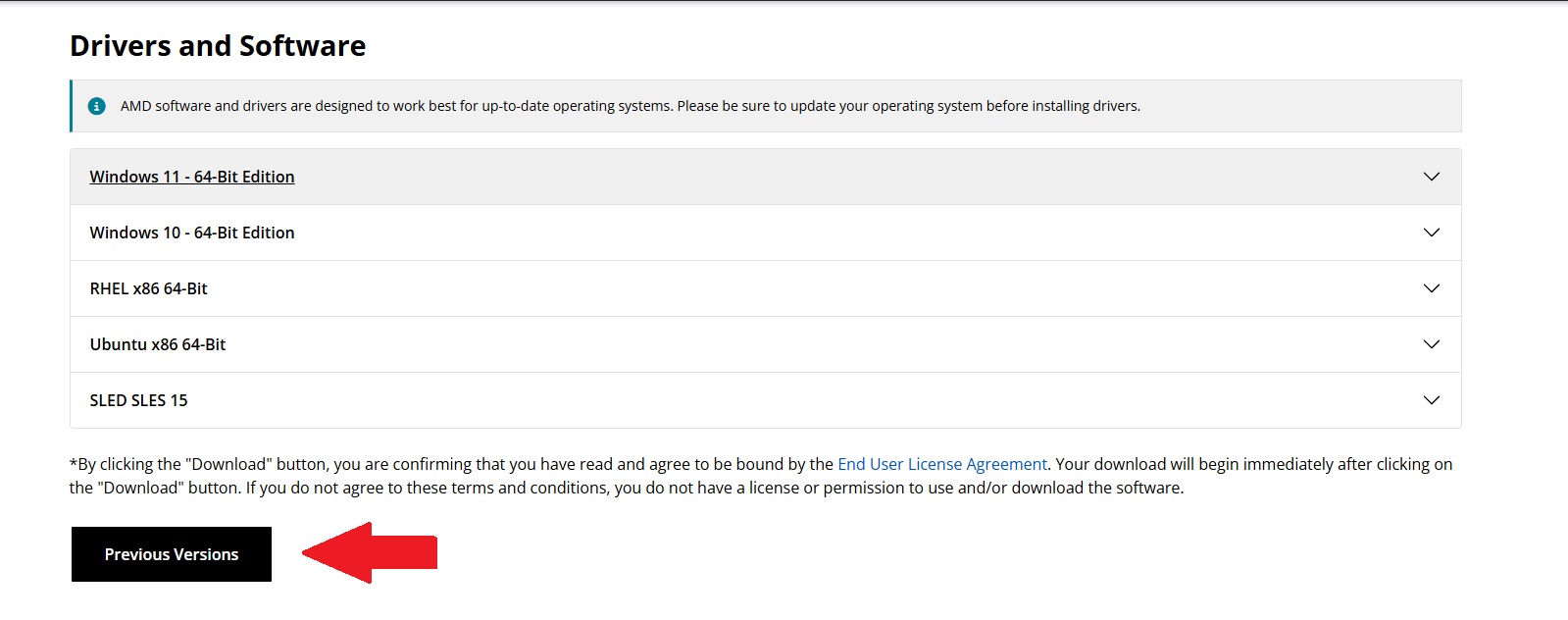
 robertsspaceindustries.com
A bit more detail on it here.
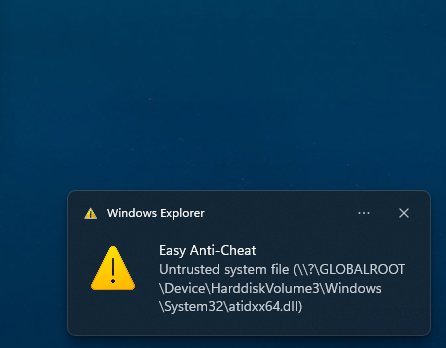
It seems like Windows or EAC is blocking some critical components after the Windows update.
Any idea on this with Star Citizen in DX11 mode? 25.9.1 works, 25.9.2 and 25.10.2 and 25.11.1 don't. Instant crash on Splash screen start up.
It was even crashing in Vulkan mode, i installed the Vulkan SDK and that fixed it for Vulkan mode.
AMD GPU Error code 3221225477 work around. - Community Tech Support - Star Citizen Spectrum
If you have an AMD GPU and you're experiencing the crash on game startup with Error code 3221225477 this fix may work for you. Download and run the AMD…
robertsspaceindustries.com
A bit more detail on it here.
This Star Citizen issue.
AMD GPU Error code 3221225477 work around. - Community Tech Support - Star Citizen Spectrum
If you have an AMD GPU and you're experiencing the crash on game startup with Error code 3221225477 this fix may work for you. Download and run the AMD…

Issue Council - Sign in
Create an account or sign in to Issue Council. Track bugs on and vote on the issues to help the development team identify what to work on next.issue-council.robertsspaceindustries.com
A friend of mine whose running an RX 9070 XT had no issues running Star Citizen on Driver 25.10.2, until last night when he updated Windows 11, right after that he ended up with the same problem, after removing driver 25.10.2 and rolling back to 25.9.1 it was fine again.
I remember this was not a problem for me until i updated Windows.
This problem seems a combination of 3 parties.
1, Microsoft, its only a problem after installing the latest Windows updates.
2, AMD's latest Drivers, because older ones work, and it seems a uniquely AMD problem, Nvidia GPU's seem to work fine.
3, Cloud Imperium Games, Because so far as i know no other game with EAC has this issue.
It seems like Windows or EAC is blocking some critical components after the Windows update.
Last edited:
Amd dont refer to it as a vram bug with it being max speed all the time its to do with refresh rates. Say if you had 60hz in windows for refresh it will go low for idle consumption for vram but if say i switched to 75hz which is my monitor then vram is always running full pelt. Im not sure why as i dont think i got that with nvidia cards but ah well.Tried about 20 different combos today, only fix that works is to unplug HDMI from iGPU. The software will then start, short term fix for me is to plug third monitor into 9070XT but then the VRAM bug will mean my memory is running higher. Think this is some kind of RDNA 2 / 4 driver divergence and it can't start the software as it sees both my RDNA2 chip and 9070XT RDNA 4.
Hopefully this gets resolved soon
Hey skeeteruk, yes I am aware hence the use of my igpu for my third monitor which then fixes the issue for me. 2 monitor are fine as long as the refresh rates are multiples, problem is with 3 it's not possible which is fine but not when the driver breaks my igpu compatibility. Trying again now with the auto detect toolAmd dont refer to it as a vram bug with it being max speed all the time its to do with refresh rates. Say if you had 60hz in windows for refresh it will go low for idle consumption for vram but if say i switched to 75hz which is my monitor then vram is always running full pelt. Im not sure why as i dont think i got that with nvidia cards but ah well.
Last edited:

Associate
- Joined
- 17 Mar 2025
- Posts
- 630
- Location
- solent sound
yeah its a nightmareAmd dont refer to it as a vram bug with it being max speed all the time its to do with refresh rates. Say if you had 60hz in windows for refresh it will go low for idle consumption for vram but if say i switched to 75hz which is my monitor then vram is always running full pelt. Im not sure why as i dont think i got that with nvidia cards but ah well.
ive got the issue that my card has 2 hdmi and 2 dp and my monitors have different refresh rates available over the two connection types so ive either got to replace one of the screens and run a mismatched set and also id have to find one that worked well with the other two so kinda a tricky situation hence why i bought a second gpu
turns out that buying a second expensive gpu might not have actually fixed the issue and might have just added a second problem lol
wouldnt be so bad if the fans on the gpu ramped up when the vram gets hot but it doesnt if the actual gpu temp is not reporting high it wont ramp the fans up
so the only other work around is to just set the fans flat out at all times which well is loud to say the least
bit of a headache this one lol
@AMD_Vik, Same issue with AMD clean utility then using the auto detect utility, it all installs fine and all 3 monitors are detected but unless I unplug the third monitor from my iGPU, adrenaline will not start. that Reddit thread I posted above has many with same issue.
the two factors affecting this are vertical blanking intervals between connected panels, and peak display bandwidth of all connected monitors.Amd dont refer to it as a vram bug with it being max speed all the time its to do with refresh rates. Say if you had 60hz in windows for refresh it will go low for idle consumption for vram but if say i switched to 75hz which is my monitor then vram is always running full pelt. Im not sure why as i dont think i got that with nvidia cards but ah well.
My issues also possibly started after the latest windows update, possibly related ?@AMD_Vik
Any idea on this with Star Citizen in DX11 mode? 25.9.1 works, 25.9.2 and 25.10.2 and 25.11.1 don't. Instant crash on Splash screen start up.
It was even crashing in Vulkan mode, i installed the Vulkan SDK and that fixed it for Vulkan mode.
AMD GPU Error code 3221225477 work around. - Community Tech Support - Star Citizen Spectrum
If you have an AMD GPU and you're experiencing the crash on game startup with Error code 3221225477 this fix may work for you. Download and run the AMD…
A bit more detail on it here.
It seems like Windows or EAC is blocking some critical components after the Windows update.
Last edited:
My issues also possibly started after the latest windows update, possibly related ?
Could be...