


Sorry auto correct has gone crazy on my phone!! "Some old Nvidia crud"Thanks for getting back to me. What drivers are you running? I wonder if it's some old. Visit crud that I still need to delete
-
Notice regarding image hosts and attachments. See here.
-
Competitor rules
Please remember that any mention of competitors, hinting at competitors or offering to provide details of competitors will result in an account suspension. The full rules can be found under the 'Terms and Rules' link in the bottom right corner of your screen. Just don't mention competitors in any way, shape or form and you'll be OK.
You are using an out of date browser. It may not display this or other websites correctly.
You should upgrade or use an alternative browser.
You should upgrade or use an alternative browser.
The AMD Driver Thread
- Thread starter LtMatt
- Start date
More options
Thread starter's postsSorry what's FRTC? I was using the in game limiter.25.12.1
I use the FRTC and limit my fps there to 144 or 120 depending. I can start Ark later and give you a heads up on settings if that's helpful ?
OK just googled this. I've been playing in windowed fullscreen rather exclusive, because that's what the game recommends.
But a heads up on settings would be ace.
How do most people wipe Nvidia from their computers before a swap? Am I looking at a reinstall of windows?
I haven't updated to 25h2 yet. Should I do that?
Also. What's the best way to get Freesync working? On Nvidia it was. Vsync off in game, on in control panel and g-sync in control panel.
Is AMD the same? Thanks everyone
Last edited:

Frtc is a setting in adrenalin. I set mine to 119fps if I am targeting 120. 143fps if I am targeting 144, no idea why but it stops any screen tear. It can either be a global setting or per game. Always seems to be best for me rather than in game limiter.Sorry what's FRTC? I was using the in game limiter. But a heads up on settings would be ace.
How do most people wipe Nvidia from their computers before a swap? Am I looking at a reinstall of windows?
I haven't updated to 25h2 yet. Should I do that?
Also. What's the best way to get Freesync working? On Nvidia it was. Vsync off in game, on in control panel and g-sync in control panel.
Is AMD the same? Thanks everyone
Freesync. yeah turn it on in adrenalin then ensure vsync is off. FRTC will help as well with the top limit.Sorry what's FRTC? I was using the in game limiter.
OK just googled this. I've been playing in windowed fullscreen rather exclusive, because that's what the game recommends.
But a heads up on settings would be ace.
How do most people wipe Nvidia from their computers before a swap? Am I looking at a reinstall of windows?
I haven't updated to 25h2 yet. Should I do that?
Also. What's the best way to get Freesync working? On Nvidia it was. Vsync off in game, on in control panel and g-sync in control panel.
Is AMD the same? Thanks everyone

Man of Honour
- Joined
- 8 Nov 2007
- Posts
- 16,626
- Location
- Outer Space
Nothing special at all, but for me it is meaning that it is working in Fallout 4 ok....
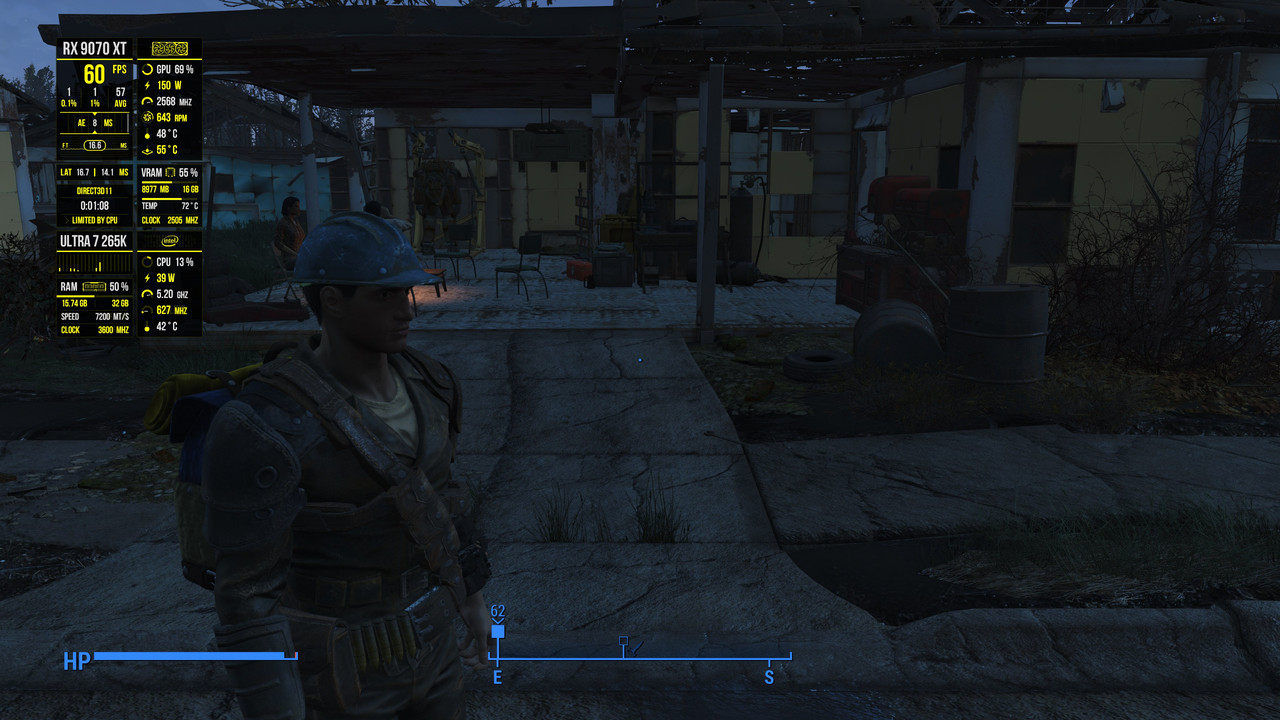
locked, via RTSS, to 60fps, things can happen in that game if not limited.
At least, apart from figuring things out from Nvidia familiarity, first impressions with the TUF card are good
Hello AMD

What's the stats overlay you're using in this pic?
AMD Software: Adrenalin Edition 26.1.1 Release Notes
Article Number: RN-RAD-WIN-26-1-1
Last Updated: January 21st 2026.
- New Features
- Optional install of AI Bundle
- New Product Support
- AMD Ryzen™ AI 9 HX 475
- AMD Ryzen™ AI 9 HX 470
- AMD Ryzen™ AI 9 465
- AMD Ryzen™ AI 7 450
- AMD Ryzen™ AI 7 445
- AMD Ryzen™ AI 5 435
- AMD Ryzen™ AI 5 430
- New Game Support
- Starsand Island
- Avatar: Frontiers of Pandora™ - From the Ashes Edition
- Fixed Issues
- Some shadows may not render correctly while playing Call of Duty®: Black Ops 7 on some AMD Graphics Products on Radeon™ RX 5000 series and Radeon™ RX 6000 series graphics products.
- Texture corruption may be observed when playing Enshrouded while at the first “Elixir Well” location on Radeon™ RX 7000 series and Radeon™ RX 9000 series graphics products.
- Application may fail to launch while playing Diablo 4 with usernames containing non-english characters on Radeon™ RX 7000 series and Radeon™ RX 9000 series graphics products.
- Some lights may not render correctly while playing Microsoft Flight Simulator 2024 during nighttime scenes on Radeon™ RX 7000 series and Radeon™ RX 9000 series graphics products.
- Application crashes when using Unreal Engine 5.6 Editor with Lumen HWRT enabled on Radeon™ RX 5000, Radeon™ RX 6000, Radeon™ RX 7000 and Radeon™ RX 9000 series products.
- Intermittent visual corruption may be observed while navigating Chromium and Electron apps on Radeon™ RX 5000 series and Radeon™ RX 6000 series graphics products.
- Slow window resizing may be observed (related to vkAcquireNextImage extension) while developing games that use the Vulkan API on Radeon™ RX 7000 series and Radeon™ RX 9000 graphics products.
- Player sprites may not render correctly while playing Cassette Beasts on Radeon™ RX 7000 series and Radeon™ RX 9000 series graphics products.
- Artifact may appear when playing Baldur’s Gate 3 with TAA enabled on Radeon™ RX 5000 series and Radeon™ RX 6000 series graphics products. .
Known Issues
- Intermittent application crash or driver timeout may be observed while loading a saved game in Cyberpunk 2077 with Path Tracing enabled. AMD is actively working on a resolution with the developer to be released as soon as possible.
- Intermittent application crash or driver timeout may be observed while playing Battlefield™ 6 on AMD Ryzen AI 9 HX 370. AMD is actively working on a resolution with the developer to be released as soon as possible.
- Intermittent application crash or driver timeout may be observed while playing Roblox Player (Car Zone Racing & Drifting) when task switching between media on Radeon™ RX 7000 series products.
- Texture flickering or corruption may appear while playing Battlefield™ 6 with AMD Record and Stream on some AMD Graphics Products. .

Man of Honour
- Joined
- 12 Jul 2005
- Posts
- 22,168
- Location
- Aberlour, NE Scotland
I used to joke about Nvidia drivers and their large download size but I just downloaded this new driver and it's 1.6Gb!!

I used to joke about Nvidia drivers and their large download size but I just downloaded this new driver and it's 1.6Gb!!
908MB for me

Last edited:
and the optional 34GB AI bundle
 www.reddit.com
Might give comfyui a try again now it (should) work properly with AMD.
Still seems big though considering the model I think it comes with being quite small and I don't actually want that particular one.
Reddit - Please wait for verification
www.reddit.com
Might give comfyui a try again now it (should) work properly with AMD.
Still seems big though considering the model I think it comes with being quite small and I don't actually want that particular one.
Last edited:

Soldato
- Joined
- 29 Aug 2010
- Posts
- 8,880
- Location
- Cornwall
Has anyone downloaded the 34GB bundle? I presume there was huge demand for such a thing?
But it's OK because it's optional. However they can't put FSR4 on RDNA3 because, why, it might not perform too well and being optional all of a sudden isn't a solution?
AI ******** aside, how are the actual drivers seeming?
But it's OK because it's optional. However they can't put FSR4 on RDNA3 because, why, it might not perform too well and being optional all of a sudden isn't a solution?
AI ******** aside, how are the actual drivers seeming?
I installed the base driver, then going back into Adrenaline you can selectively choose what "AI" stuff to install, chose only comfyui, no need for the other stuff at all so certainly not 34GB (excluding the new models I downloaded)
Now i need to figure out how to use it
Now i need to figure out how to use it

Associate
- Joined
- 31 Mar 2014
- Posts
- 64
You know what really ******* me off?
AMD's reasoning for FSR4 is that only RDNA4 has FP8 compute, that is true, however.... both RDNA2 and RDNA3 have Int8 and the leaked version runs on Int8, so AMD have developed an Int8 version of FSR.
You know what else runs on Int8? DLSS3, the RTX 3000 series also didn't have FP8, it had Int8 and that's what DLSS3 ran on.
FSR could have been as good as DLSS3 as far back as RDNA2, RX 6000 series.
Why didn't AMD make a proper DLSS3 competitor in 2020? more than 5 years ago, they could have been, i think, in a more competitive position today.
This is the sort of crap where i just despair at AMD.
Radeon Group are silly billy's. Any company with half a brain would be immediately hiring the optiscaler fellas, or at the very least giving them free graphics cards and components and immediate driver access to get FSR 4 in as many games as possible. No matter how dirty or experimental... Just get it done.
Reminds me of the RadeonPro guy, our equivalent to nvinspector who we lost to bloody Raptr of all places.
That sounds like the combi driver for rdna2/rdna3/4 I haev to use that as I am using iGPU which is RDNA2 plus my 9070XTI used to joke about Nvidia drivers and their large download size but I just downloaded this new driver and it's 1.6Gb!!
Yeah his software was brilliant, used it a lot when I had my 290XRadeon Group are silly billy's. Any company with half a brain would be immediately hiring the optiscaler fellas, or at the very least giving them free graphics cards and components and immediate driver access to get FSR 4 in as many games as possible. No matter how dirty or experimental... Just get it done.
Reminds me of the RadeonPro guy, our equivalent to nvinspector who we lost to bloody Raptr of all places.