

-
Notice regarding image hosts and attachments. See here.
-
Competitor rules
Please remember that any mention of competitors, hinting at competitors or offering to provide details of competitors will result in an account suspension. The full rules can be found under the 'Terms and Rules' link in the bottom right corner of your screen. Just don't mention competitors in any way, shape or form and you'll be OK.
You are using an out of date browser. It may not display this or other websites correctly.
You should upgrade or use an alternative browser.
You should upgrade or use an alternative browser.
The AMD Driver Thread
- Thread starter LtMatt
- Start date
More options
Thread starter's posts

Soldato
- Joined
- 13 Sep 2010
- Posts
- 3,117
Checked yesterday and wasn't getting any disk activity at idle, but just checked now and ReBar is disabled....
From the patch notes - "AMD Smart Access Memory may become disabled after driver installation on Windows® 10 systems."
Does that mean it will need re-enabling, or that it doesn't work with this driver?
From the patch notes - "AMD Smart Access Memory may become disabled after driver installation on Windows® 10 systems."
Does that mean it will need re-enabling, or that it doesn't work with this driver?

Nicely done...
There isn't a way to autoload a profile within the adrenalin software is there, PC starts, steam big picture loads and I am usually on the sofa by then (joypad gamer), start a game then the fans spin up to 100% after a time. Thenn my lazy backside has to get up off the sofa, alt out of the game, load the profile..
Just a slight annoyance that they cannot be autoloaded..
I always assumed it auto loaded... is that not the case?Nicely done...
There isn't a way to autoload a profile within the adrenalin software is there, PC starts, steam big picture loads and I am usually on the sofa by then (joypad gamer), start a game then the fans spin up to 100% after a time. Thenn my lazy backside has to get up off the sofa, alt out of the game, load the profile..
Just a slight annoyance that they cannot be autoloaded..
Is this 22h2 or earlier? I have some theories but 19045 should work fineChecked yesterday and wasn't getting any disk activity at idle, but just checked now and ReBar is disabled....
From the patch notes - "AMD Smart Access Memory may become disabled after driver installation on Windows® 10 systems."
Does that mean it will need re-enabling, or that it doesn't work with this driver?
Soldato
- Joined
- 13 Sep 2010
- Posts
- 3,117
Yep, 22H2 with latest updates (ESU - 19045.7846).... to be clear, ReBar was already disabled (so maybe why I wasn't getting the disk writes... I have no idea how long it's been off for!) and I haven't installed the 26.11.1 driver yet, was just curious whether I should expect it to work afterwards, based on the patch notesIs this 22h2 or earlier? I have some theories but 19045 should work fine
Mine doesn't.I always assumed it auto loaded... is that not the case?
Ah yeah, ReBAR == off will also avoid the issue in addition to disabling EEUYep, 22H2 with latest updates (ESU - 19045.7846).... to be clear, ReBar was already disabled (so maybe why I wasn't getting the disk writes... I have no idea how long it's been off for!) and I haven't installed the 26.11.1 driver yet, was just curious whether I should expect it to work afterwards, based on the patch notes
@AMD_Vik any murmurings about this annoying random crash in CoD MW4?
 forums.overclockers.co.uk
First game in a good few years that is pretty much unplayable atm. Not sure if it is buggy game or a driver bug. I've submitted some bug reports nevertheless.
CoD Modern Warfare 4 - 2026-10-23
The camping is driving me mad. I really want to like this game but I've already broken my Glorious Model O by hammer fisted it in a rage, seriously, lying on the floor in Shipment? But seriously though, im all for slowing down once in a while and re focusing but it is quickly becoming boring...
forums.overclockers.co.uk
First game in a good few years that is pretty much unplayable atm. Not sure if it is buggy game or a driver bug. I've submitted some bug reports nevertheless.
unfortunately no, that looks like a generic error seen with a TDR. It's also implicating a kind of scary component there? It's not pulling a driver binary like the d3d12 umd or anything like that :/@AMD_Vik any murmurings about this annoying random crash in CoD MW4?
CoD Modern Warfare 4 - 2026-10-23
The camping is driving me mad. I really want to like this game but I've already broken my Glorious Model O by hammer fisted it in a rage, seriously, lying on the floor in Shipment? But seriously though, im all for slowing down once in a while and re focusing but it is quickly becoming boring...
First game in a good few years that is pretty much unplayable atm. Not sure if it is buggy game or a driver bug. I've submitted some bug reports nevertheless.
Charlie did catch something recently with purple corruption seen in DMZ, though.
Last edited:

ASRock quietly rolls out new firmware after disastrous previous update killed Radeon RX 7900-series GPUs — company provides no clarity on warranty coverage for dead cards or changelog
ASRock has rolled out a new firmware update for its Radeon RX 7000-series graphics cards. The latest VBIOS version 1.0.6 appears to be a follow-up to the previous 1.0.5 release. According to community reports, that older version was bricking some of the company's Radeon RX 7900 XT and RX 7900 XTX graphics cards. The new update has now quietly made its way to the ASRock official website, although the company has not published a changelog or provided any details on what the new update addresses.
ASRock subsequently listed the 1.0.5 VBIOS update for 10 graphics card models, spanning its Radeon RX 7600 XT, RX 7700 XT, RX 7800 XT, RX 7900 XT, and RX 7900 XTX families. However, several Radeon RX 7900 XT and RX 7900 XTX owners reported that their systems failed to boot after installing the firmware.
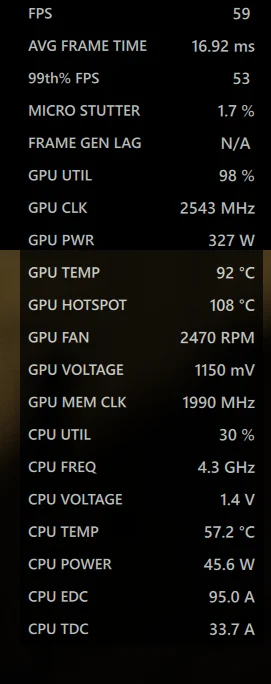
Think I've sussed it.unfortunately no, that looks like a generic error seen with a TDR. It's also implicating a kind of scary component there? It's not pulling a driver binary like the d3d12 umd or anything like that :/
Charlie did catch something recently with purple corruption seen in DMZ, though.

 This will be the second time I've had to open the card and re-paste it. The joys of old cards lol. Hopefully the pads don't give out on me when I open it up again.
Last edited:

Associate
- Joined
- 1 Sep 2013
- Posts
- 1,684
ToastyThink I've sussed it.

Man of Honour
- Joined
- 12 Jul 2005
- Posts
- 22,208
- Location
- Aberlour, NE Scotland
Try a phase change pad on the die. I did it to my 7900GRE and the temps have never been better. I have a Thermalright Helios v2 on the gpu die and Gelid extreme pads on the memory and vrms.Think I've sussed it.
Thanks. Haha like minds.. I've got a kryonaught sheet to go on.Try a phase change pad on the die. I did it to my 7900GRE and the temps have never been better. I have a Thermalright Helios v2 on the gpu die and Gelid extreme pads on the memory and vrms.
 and I'm sure I did Gelid pads too last time but now I'm thinking that might have been on my older 6700XT. I'll see when I open it up.

Associate
- Joined
- 18 May 2020
- Posts
- 239

AMD Radeon Software Adrenalin 26.11.2 - VideoCardz.com
Stability and reliability improvements. New Feature Support Adds support for ROCm 10.2 New Game Support Crimson Desert Enhanced: Charting the Unknown DLC
 videocardz.com
This one fixes the outstanding EEU disk write case for RDNA 1+2 on windows 10AMD Radeon Software Adrenalin 26.11.2 - VideoCardz.com
Stability and reliability improvements. New Feature Support Adds support for ROCm 10.2 New Game Support Crimson Desert Enhanced: Charting the Unknown DLC
you wouldn't believe how long it was to just get that on the release notes.
I'd be able to confirm if those were the crashes you were hitting via kernel memory dmps. let me know how you get on.
Update: Following the installation of the updated driver 21 days ago, the AMD timeout errors have been completely resolved.
To confirm stability, I restored all system settings that were previously disabled during troubleshooting, including hardware acceleration and PBO. I also ran scenarios that previously triggered the crashes—such as gaming while screen sharing on Discord and streaming YouTube—and experienced zero timeouts.
Prior to this driver update, extensive hardware and software troubleshooting (including replacing display cables, reseating the GPU, swapping the vertical mount, and performing a clean Windows installation) failed to resolve the issue, leading me to believe the hardware was defective.

Soldato
- Joined
- 19 Feb 2007
- Posts
- 16,300
- Location
- Sol
Update: Following the installation of the updated driver 21 days ago, the AMD timeout errors have been completely resolved.
To confirm stability, I restored all system settings that were previously disabled during troubleshooting, including hardware acceleration and PBO. I also ran scenarios that previously triggered the crashes—such as gaming while screen sharing on Discord and streaming YouTube—and experienced zero timeouts.
Prior to this driver update, extensive hardware and software troubleshooting (including replacing display cables, reseating the GPU, swapping the vertical mount, and performing a clean Windows installation) failed to resolve the issue, leading me to believe the hardware was defective.
This is what happens when companies AI vibe code, Many more companies than AMD or Nvidia are having issues, A company my GF works for started using AI to write various programs and now they are running into a whole host of issues that requires a hell of a lot more man hours to fix than if they did it themselves.
AI may be great down the road but right now it's crap.