Upgrade Query

Soldato
Joined
16 Apr 2007
Posts
23,474
Location
UK
Hey all,

I am working my way up to upgrading my current computer in quite a big way, and I could use some advice on which motherboard to go, for the upgrades I have in mind.

My current spec and the upgrades I plan are below:

CPU: Intel 6600K -> AMD 5600x
RAM: 2x 8GB 2666 -> 2x 16GB 3600 (or 4x 8GB)
Motherboard: ASUS Z170-A -> Unsure (see below)
GPU: ASUS 1080Ti Astrid -> 3080 Founders Edition
PSU: EVGA 650W -> Possibly 850W PSU

I am pretty confident that I am happy with my decision for the CPU and GPU upgrade, but I am a bit lost regarding the other items...

RAM: Through my research, it looks like 3600 RAM is the one to go for - I am keen to upgrade to 32GB - Should I be looking for 4x8GB or 2x16GB? I can’t see myself upgrading past 32GB, so space for future RAM slots isn’t an issue.

Motherboard: Obviously with the move to AMD, I will need a change of motherboard - Through my research, it looks like a decision between B550 and X570. I currently have an M.2 256GB SSD and a 500GB SSD. I plan, sometime next year, to upgrade the 500GB SSD to 1TB, but have no other plans to upgrade storage.

I don’t require wifi, Bluetooth would be helpful but not essential, and would like as many USB slots as possible.

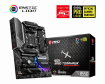
The one board I have in my eye is the MSI B550 Tomahawk - but I am open to suggestions - I’m not too clued up regarding choosing motherboards.

PSU: I currently have an EVGA 650W PSU - it hasn’t missed a beat, however I have read a lot of people recommending a PSU above 650W for the setup I have in my plans. What do you all think? I was looking at an 850W Corsair PSU.

Any advice is greatly appreciated :)

Thanks,
Marky
 
My basket at Overclockers UK:
Total: £276.04 (includes shipping: £11.10)

750 wats is recommended for a 3080.

From testing it does look like 4*8 gig is slightly better overall for the new 5*** series ryzen so if its not much more expensive than 2*16 buy 4*8gig.

My basket at Overclockers UK:
Total: £113.69 (includes shipping: £8.70)

Best value and with the above motherboard supporting 2*m.2 slots it keeps the cable spaghetti down :)
 
Hi
The x570 offers 4 more pcie4 lanes so if you use 2 m2 drives it won't affect you performance.

3080 psu recommended is 750w but I think your 650w would be fine but if your unsure change it.

Personally 2 x 16gb would be my choice to allow for further expansion.

Motherboards with wifi usually have blue tooth.
 
With daisy chain DIMM slot wiring motherboards two DIMMs is better for signaling, if wanting to overclock memory.
Performance wise there's no diffference between 4x 8GB single rank DIMMs and 2x 16GB dual rank DIMMs.
Though except for Samsung B-die (8 Gbit chips) there's no absolute guarantee about 16GB DIMM being dual rank.

Difference betweene B550 and X570 is latter being all PCIe v4 platform.
That means 2GB/s bandwidth even form x1 PCIe slot.
So once PCIe v4 becomes norm in NVMes, you could get lots of nice bandwidth mass storage by using PCIe x1 M.2 adapters.
 
My basket at Overclockers UK:
Total: £276.04 (includes shipping: £11.10)

750 wats is recommended for a 3080.

From testing it does look like 4*8 gig is slightly better overall for the new 5*** series ryzen so if its not much more expensive than 2*16 buy 4*8gig.

My basket at Overclockers UK:
Total: £113.69 (includes shipping: £8.70)

Best value and with the above motherboard supporting 2*m.2 slots it keeps the cable spaghetti down :)

Regarding the PSU - Would I be OK to buy all the other components in this build, and test them out on my 650W PSU? I don't know what the consequences are if I used a lower Watt PSU than required...

Wow SSD prices have fallen a bit since I last checked... Now I'm wondering about replacing both my M.2 and SSD for just one M.2 1TB Drive...

Hi
The x570 offers 4 more pcie4 lanes so if you use 2 m2 drives it won't affect you performance.

3080 psu recommended is 750w but I think your 650w would be fine but if your unsure change it.

Personally 2 x 16gb would be my choice to allow for further expansion.

Motherboards with wifi usually have blue tooth.

I'm not savvy enough to know what you're talking about regarding PCIE4 lanes...

So in this build I'm planning, the only thing that will effect PCIE4 lanes are the M.2 Drive and the 3080?

If I was considering, in the future, to install a sound card or an additional SSD/M.2 Drive, would I be better off going for an X570 motherboard?

I am 100% confident that I won't need to upgrade over 32GB RAM in the future (and if I do, it'll be long enough away that I will likely require a new motherboard by that time).

With daisy chain DIMM slot wiring motherboards two DIMMs is better for signaling, if wanting to overclock memory.
Performance wise there's no diffference between 4x 8GB single rank DIMMs and 2x 16GB dual rank DIMMs.
Though except for Samsung B-die (8 Gbit chips) there's no absolute guarantee about 16GB DIMM being dual rank.

Difference betweene B550 and X570 is latter being all PCIe v4 platform.
That means 2GB/s bandwidth even form x1 PCIe slot.
So once PCIe v4 becomes norm in NVMes, you could get lots of nice bandwidth mass storage by using PCIe x1 M.2 adapters.

Overclocking RAM isn't something I am likely to get involved with. As above, I'm a little confused regarding the PCIe4 differences between B550 and X570.
Is the general jist that B550 would be fine, but X570 is future proof?

Thanks for all your responses thus far :)

Marky
 
the 550's have the pcie-4 support limited to gpu and 1 storage lane and the rest are pcie-3 , the 570's have all pcie-4.
so if you wnt the gpu and 1 m.2 at pcie-4 thenthe 550 is fine, you want more storage at pcie-4 then you will need a 570 mobo. Basically they are locking functions/features in on the 570's
 
@Marky if your going to add second m2 then x570 would be a better choice as there wil be no impact on performance.

Msi x570 tomahawk Wi-Fi is one of the best value motherboards although you don't need Wi-Fi it has bluetooth. There are more tp choose from depending on **** ypu wanf yp spend.

Psu i think your 650w is good enough which evga model is it ?
 
the 550's have the pcie-4 support limited to gpu and 1 storage lane and the rest are pcie-3 , the 570's have all pcie-4.
so if you wnt the gpu and 1 m.2 at pcie-4 thenthe 550 is fine, you want more storage at pcie-4 then you will need a 570 mobo. Basically they are locking functions/features in on the 570's

@Marky if your going to add second m2 then x570 would be a better choice as there wil be no impact on performance.

Msi x570 tomahawk Wi-Fi is one of the best value motherboards although you don't need Wi-Fi it has bluetooth. There are more tp choose from depending on **** ypu wanf yp spend.

Psu i think your 650w is good enough which evga model is it ?

OK it does sounds like X570 would be the best way to go, considering I may wish to upgrade Storage options in the future. Thanks for explaining :)

The PSU is a EVGA SuperNOVA G2 650W
 
OK it does sounds like X570 would be the best way to go, considering I may wish to upgrade Storage options in the future. Thanks for explaining :)

The PSU is a EVGA SuperNOVA G2 650W
Thats a quality unit and i believe enough a quick google should give you more insight. If the psu is old say nearlly 10 years then i would change it.

If you have any doubts change it for peace of mind.

https://www.google.co.uk/search?cli...5gBAKABAcgBCMABAQ&sclient=mobile-gws-wiz-serp
 
Also make sure the motherboard you get has bios flashback this will allow you yo update the motherboard to take the new cpu. This is very important.
 
OK it does sounds like X570 would be the best way to go, considering I may wish to upgrade Storage options in the future. Thanks for explaining :)
Difference between PCIe v3 and PCIe v4 NVMe is unlikely to make any difference to loading times of most games for many years.

Though if wanting to add more NVMes over the years, this kind adapter would give that 2GB/s bandwidth from x1 slot when there are budget PCIe v4 NVMes.

Though because of slot positioning X570 Tomahawk would have only one x1 slot open for use when using high end graphics cards.
Gigabyte X570 Aorus Elite does better in that.
 
Thats a quality unit and i believe enough a quick google should give you more insight. If the psu is old say nearlly 10 years then i would change it.

If you have any doubts change it for peace of mind.

https://www.google.co.uk/search?cli...5gBAKABAcgBCMABAQ&sclient=mobile-gws-wiz-serp

Also make sure the motherboard you get has bios flashback this will allow you yo update the motherboard to take the new cpu. This is very important.

Brill, thanks Micky :) I think I'll stick with my 650W and see how it performs in that case!...

Difference between PCIe v3 and PCIe v4 NVMe is unlikely to make any difference to loading times of most games for many years.

Though if wanting to add more NVMes over the years, this kind adapter would give that 2GB/s bandwidth from x1 slot when there are budget PCIe v4 NVMes.

Though because of slot positioning X570 Tomahawk would have only one x1 slot open for use when using high end graphics cards.
Gigabyte X570 Aorus Elite does better in that.

I'm a nightmare when picking components - I'm going back and forth, back and forth regarding whether to go for B550 or X570.

I don't really want to spend too much money on the Motherboard - I can possibly get a B550 Tomahawk for around £100, which I am tempted by - However, if it was really worth the extra money I think I would invest in a better one, but the B550 looks like it would do everything I need for the time being, I just need to be wary about the SSDs I guess?

As a hypothetical... If I get a B550 board, like the Tomahawk and go for the following setup:
1x M.2 SSD
1x 2.5" SSD
1x 3080

This would work well...
If I wanted to add a Soundcard to the mix, would that be problematic?
And if I wanted to add an additional M.2 or 2.5" SSD, it would be stealing bandwidth from the other SSDs?

Hope that makes sense, I just want to get my head around it :p

Thanks,
Marky
 
B550 one m2 and ssd gpu runs at full speed x16.

B550 2 x m2 gpu runs at x8

Gpu speeds

Pcie4 x16 is full speed so if it runs at x8 its the same speed as pcie3 x16, the diffrence in performance is about 3% on high end cards like the 3080.

Hope thats an ok explanation.
 
B550 one m2 and ssd gpu runs at full speed x16.

B550 2 x m2 gpu runs at x8

Gpu speeds

Pcie4 x16 is full speed so if it runs at x8 its the same speed as pcie3 x16, the diffrence in performance is about 3% on high end cards like the 3080.

Hope thats an ok explanation.

That does help a lot, thank you :D

How about Sound Cards, would they effect the bandwidth?
And are M.2 and the 2.5" SSDs separate in this case? I.e. Could I have 1x M.2 and 2x 2.5" SSD and see no downgrade?
 
That does help a lot, thank you :D

How about Sound Cards, would they effect the bandwidth?
And are M.2 and the 2.5" SSDs separate in this case? I.e. Could I have 1x M.2 and 2x 2.5" SSD and see no downgrade?

Yes you could have 4 ssd and 1 m2.

Sound card im unsure of, x 1 or x 4 it will still have little affect on gpu performace witb 1 m2 drive.
 
RAM: Through my research, it looks like 3600 RAM is the one to go for - I am keen to upgrade to 32GB - Should I be looking for 4x8GB or 2x16GB? I can’t see myself upgrading past 32GB, so space for future RAM slots isn’t an issue.

You want four ranks of RAM, preferably two dual-ranked sticks.

How about Sound Cards, would they effect the bandwidth?

Motherboard sound is generally good enough.
 
You want four ranks of RAM, preferably two dual-ranked sticks

Sweet, I'll be looking for 4x8GB 3600 - Is there a way to determine which RAM is dual-ranked?

Motherboard sound is generally good enough.

Yeah I tend to agree, but I did have a Sound Card once before and it did seem to make a difference - However, this was years ago, and the Motherboard Sound may not have been as good...

Some of the reviews for the B550 Tomahawk reference an older/worst audio codec, than other similarly priced Motherboards...
 
I can possibly get a B550 Tomahawk for around £100, which I am tempted by - However, if it was really worth the extra money I think I would invest in a better one, but the B550 looks like it would do everything I need for the time being, I just need to be wary about the SSDs I guess?

As a hypothetical... If I get a B550 board, like the Tomahawk and go for the following setup:
1x M.2 SSD
1x 2.5" SSD
1x 3080

This would work well...
If I wanted to add a Soundcard to the mix, would that be problematic?
And if I wanted to add an additional M.2 or 2.5" SSD, it would be stealing bandwidth from the other SSDs?
That would be superb price for the quality of board.

There's PCI_E4 x1 slot far from graphics card and it isn't affected by usage of M.2.
Page 29:
https://download.msi.com/archive/mnu_exe/mb/E7C91v2.1.pdf

Anyway at least with speakers there isn't much use for separate sound card, unless integrated turns out to be EMI magnet.
For headphone gaming separate soudn cards have better hardware and extra features.
Though external Sound BlasterX G6 USB sound card Creative sells for £70 as B-stock is extreme bang for buck for headphone gaming.
 
Back
Top Bottom