


Well......ive not seen this before

Soldato
Joined
12 Feb 2014
Posts
3,150
Location
Somewhere Only We Know
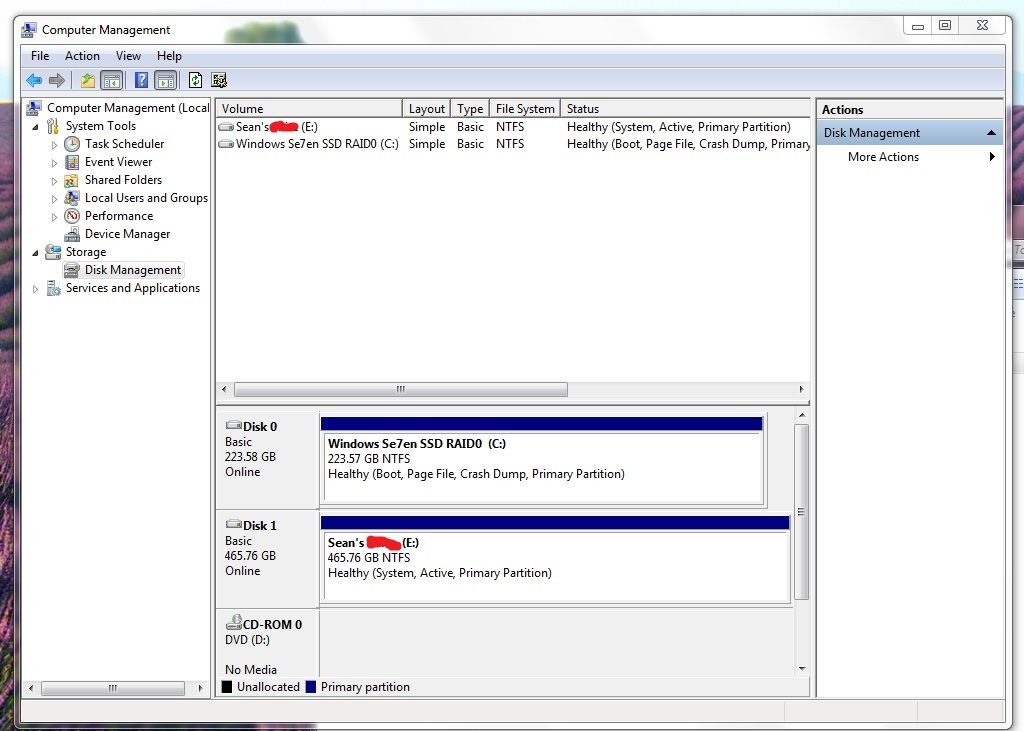
Here's one for you, whats wrong with this picture ?

I'll give you a clue, this is a fresh install of windows.
Im just curious as to why this has happened as ive never seen it before, if you cant see what I mean i'll leave you guessing for a while.
 
Last edited:

The system's booting off the HDD, not the SSD. Its a common problem if there are multiple drives available when you install. Windows will put the boot files on whichever disk it resolves as disk0 at the time, regardless of where you ask it to install itself. This is why its always advisable to only have a single drive connected at install time.
 
What I actually saw was the system reserve partition that windows normally creates before installing windows itself, normally 100mb is missing completely and looks like it's not been created, never seen this before.
 
windows will only ever make that partition if it needs to. As rpstewart points out, this will be when your boot drive is anything other than the drive windows is installed on.

I'd be more surprised to see this reversed:)
 
Nah windows will always create that if you install manually and let it do what it likes with the disks. You can do a little trick to remove it and if you use an autounnatend.xml file you can set it so it doesn't create that as standard. Its mainly required for bitlocker but can be a pain when imaging/deploying/offsetting partitions etc.
 
Nah windows will always create that if you install manually and let it do what it likes with the disks. You can do a little trick to remove it and if you use an autounnatend.xml file you can set it so it doesn't create that as standard. Its mainly required for bitlocker but can be a pain when imaging/deploying/offsetting partitions etc.

This sounds useful - care to elaborate on how you do this, for the rest of us.

Mark
 
Back
Top Bottom


