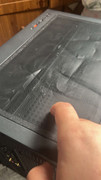
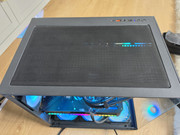
To fix a bent or creased magnetic mesh PC dust filter, you need to
apply low, controlled heat to flatten the plastic mesh back into its original shape.
Step 1: Remove the Filter
Take the magnetic mesh completely off the computer tower. Never try to repair or apply heat to the filter while it is attached to the case, as this can transfer heat directly to your internal computer components.
Step 2: Use the Ironing Method
The most reliable way to flatten warped mesh is with a standard clothes iron:
- Place the filter on a completely flat, hard, heat-resistant surface (like an ironing board).
- Lay a thin, clean piece of fabric or a towel completely over the dust filter to protect the plastic from direct contact with the metal plate.
- Turn your iron to its lowest heat setting (no steam).
- Gently pass the iron over the towel-covered filter a few times. Do not leave the iron sitting in one spot.
- Immediately place a heavy, flat object (like a large textbook) on top of the filter while it cools to lock the flat shape in place.
Step 3: Alternate Option (Warm Water)
If you do not have an iron, you can submerge the filter in warm (not boiling) tap water for 1–2 minutes to soften the plastic mesh. Take it out, sandwich it between two heavy, flat surfaces, and let it dry completely.