What's your storage tally

Permabanned
Joined
15 Oct 2018
Posts
1,595
In March 2025 I said to frens I'm up to 21 TB in HDDs + 5.5 TB in SSDs / NVME drives.

2 x 2TB WD MyPassport drives form part of the above that I plug in to my Living Room TV.

What are the storage capacities people here are playing with?
 
It'll just be an excuse for willy-waving and you'll be left feeling very inadequate. Read some of the NAS threads if you want to see what people are using.
 
Would have been more interesting if you were asking how many drives people are using and why.

For instance if only gaming one NVMe is popular.

For DAW there are practical reasons for three or four drives and back up.
The same goes for video work.

If you work with batches of large files, the latest Gen5 8tb NVMe currently outshine the rest at a cost.

If you build systems for multiple use, or media you may have driven configuration preferences, and as someone else stated, there are then the people building servers racking up armfuls or the largest capacity HDD's
 
Got the following...

Crucial 64GB Real SSD C300 2.5inch (Decommissioned)
Crucial CT256M4SSD2CCA 256GB M4 SATA III 6Gb/s (Decommissioned)
Samsung M3 1TB USB 3.0 Portable Hard Drive (Still works but don't use)
WD 2 TB Elements Portable Hard Drive (No longer works just makes clicking sound)
Corsair MP510, Force Series, 1920GB M.2 NVMe PCIe x4 Gen3 (Now inside a USB4 external NVMe enclosure)
Seagate BarraCuda 8TB, Internal Hard Drive, 3.5 Inch, SATA, 6GB/s 5.400 RPM (Decommissioned)
Toshiba 4TB Canvio Basics Portable External Hard Drive (Plugged into Samsung TV since day one)
Crucial X6 2TB Portable SSD (Plugged into my Mac permanently as a Time Machine drive)
Crucial P3 Plus SSD 4TB M.2 NVMe PCIe Gen4 (Plugged into current motherboard as a second drive)
fanxiang 1TB Portable SSD, Up to 2000MB/s (Plugged into USB 3.2 Gen2x2 port on back of motherboard)
fanxiang External SSD USB Stick 512GB Up to 2050MB/s (Partitioned as exFAT its my portable drive)
Crucial T710 4TB SSD NVMe M.2 PCIe 5.0 x4 Gen5 (Plugged into main M2 slot on motherboard)
 
It'll just be an excuse for willy-waving and you'll be left feeling very inadequate. Read some of the NAS threads if you want to see what people are using.

While I'm grateful for the storage I have, I have no illusions about it being an e-peen flexing amount, especially as I've seen a few times people selling their 6 or more 10 TB+ HDDs on the MM.

I was just wondering what 'normal' people tend to have storage-wise these days.
 
Last edited:
too much to count. North of 100TB just in the house. 4 NAS half a dozen PCs a few laptops and about 2 dozen usb drives. Not sure how this helps anyone in anyway though.

I just totted it up. It's over 100TB in the NAS, probably approaching 150TB when you add all the PCS. My gaming PC has 32TB of SSD with in it alone. (2x8TB + 2x 4TB + 4x2TB + 256GB NVme
 
Last edited:
Toshiba 4TB Canvio Basics Portable External Hard Drive (Plugged into Samsung TV since day one)
Any issues with connecting a 4TB HDD to your TV? The manual for my Philips TV (a 2022 model) says it only supports up to 2 TB, which is a recurring theme with many devices, like with the old SkyHD boxes only being upgradeable up to 2TB. Presumably this is due to FAT32 (or equivalent) storage limitations, though I have video files larger than 4GB (the max size for a single file on FAT32) working fine, so I'm wondering.

I've begun to question this sort of thing after inserting a 64GB SD card in to an old Nokia N95, which seems to run fine and recognise the full capacity, despite the Wiki page saying it only supports up to 32GB cards.
 
Any issues with connecting a 4TB HDD to your TV? The manual for my Philips TV (a 2022 model) says it only supports up to 2 TB, which is a recurring theme with many devices, like with the old SkyHD boxes only being upgradeable up to 2TB. Presumably this is due to FAT32 (or equivalent) storage limitations, though I have video files larger than 4GB (the max size for a single file on FAT32) working fine, so I'm wondering.

I've begun to question this sort of thing after inserting a 64GB SD card in to an old Nokia N95, which seems to run fine and recognise the full capacity, despite the Wiki page saying it only supports up to 32GB cards.

If you want high storage capacity HDD get a Kodi box. No issues with 8tb connected the my amlogic

Also allows you access to NFS/samba share on nas
 
I’ve just unplugged the 4TB Toshiba drive from the TV and plugged it into my PC, it was detected and is formatted as NTFS. I’ve recorded some things on it before which worked fine.

Is there anything I can do to test it for you?
 
9TB - Main Rig: 1TB Crucial P5+ (Boot), 2TB Crucial P5+ (Program Storage: Read Only in most cases), 2TB Crucial MX500 SATA (Temp Storage before transfer to long term storage), 4TB Crucial T500 (Mixed use at moment)
8TB - Secondary Rig: 2TB Crucial T500 (Boot), 2TB Crucial MX500 SATA (Temp Storage before transfer to long term storage), 4TB Crucial T500 (Program Storage: Read Only in most cases)
6TB - NAS (Slow long term storage and online access for extended family as drop/pickup box of old photos and videos): SATA WD Red 3TB x 2 (Now called Pro versions, they weren't called that back then)
~1TB - Backup Rig (Fast long term storage): 500GB SATA, 250GB SATA, 250GB SATA (Was going to be expanded but prices obviously mean this is going to remain as is for now)

So just over 23TB of storage here altogether.
 
Any issues with connecting a 4TB HDD to your TV? The manual for my Philips TV (a 2022 model) says it only supports up to 2 TB, which is a recurring theme with many devices, like with the old SkyHD boxes only being upgradeable up to 2TB. Presumably this is due to FAT32 (or equivalent) storage limitations, though I have video files larger than 4GB (the max size for a single file on FAT32) working fine, so I'm wondering.

I've begun to question this sort of thing after inserting a 64GB SD card in to an old Nokia N95, which seems to run fine and recognise the full capacity, despite the Wiki page saying it only supports up to 32GB cards.
Most often, this claims of maximum disk size are related to the market. In a lot of cases the maximum size stated is the maximum size available at the time of manufacture.
 
I’ve just unplugged the 4TB Toshiba drive from the TV and plugged it into my PC, it was detected and is formatted as NTFS. I’ve recorded some things on it before which worked fine.

Is there anything I can do to test it for you?
Does your TV's manual say anything about a limitation to the external disk drive capacity it supports?
 
Most often, this claims of maximum disk size are related to the market. In a lot of cases the maximum size stated is the maximum size available at the time of manufacture.

Yes, that certainly seems to be the case when it comes to devices that use SD cards, like the Nokia N95. I'm sure I saw it referenced on older sites that it only supported up to 8GB, then 16 GB, then Wiki's currently stated amount of 32GB - all false info going by the 64GB card I've inserted in mine (the N95 is my MP3 player now - long story).

Could I have replaced my SkyHD box's 320GB HDD with a 4TB drive instead of a 2TB one?

Can I attach a 4TB, or 6TB, or 18TB external hard drive to my TV? Or is the TV's manual true that the TV will only recognise / utilise a 2TB drive?

I want to know :p
 
Last edited:
Yes, that certainly seems to be the case when it comes to devices that use SD cards, like the Nokia N95. I'm sure I saw it referenced on older sites that it only supported up to 8GB, then 16 GB, then Wiki's currently stated amount of 32GB - all false info going by the 64GB card I've inserted in mine (it's my MP3 player now, long story).

Could I have replaced my SkyHD box's 320GB HDD with a 4TB drive instead of a 2TB one?

Can I attach a 4TB, or 6TB, or 18TB external hard drive to my TV? Or is the TV's manual true that the TV will only recognise / utilise a 2TB drive?

I want to know :p

get a dedicated video player.

The ones in the LG are pretty good. but a dedicated box is way better. Better UI and proper frame rate display, easier audio/sub selection, wider codec support

£50 will get you one, look for the new AMlogic models with AV-1 codec support, no problem connecting large capacity USB HDD.
 
Yes, that certainly seems to be the case when it comes to devices that use SD cards, like the Nokia N95. I'm sure I saw it referenced on older sites that it only supported up to 8GB, then 16 GB, then Wiki's currently stated amount of 32GB - all false info going by the 64GB card I've inserted in mine (the N95 is my MP3 player now - long story).

Could I have replaced my SkyHD box's 320GB HDD with a 4TB drive instead of a 2TB one?

Can I attach a 4TB, or 6TB, or 18TB external hard drive to my TV? Or is the TV's manual true that the TV will only recognise / utilise a 2TB drive?

I want to know :p
This type of question comes up often on the internet. And you know who is in THE BEST position to answer it, with actual verifiable testing and evidence ? You are, that's who. Sometime you gotta suck it and see. At least thats what I told my wife.
 
This is my current list of storage
NVME-3tb
SSD - 3tb
NAS - 8tb
HDD- 19tb
Backup drives - 29tb
 
Does your TV's manual say anything about a limitation to the external disk drive capacity it supports?
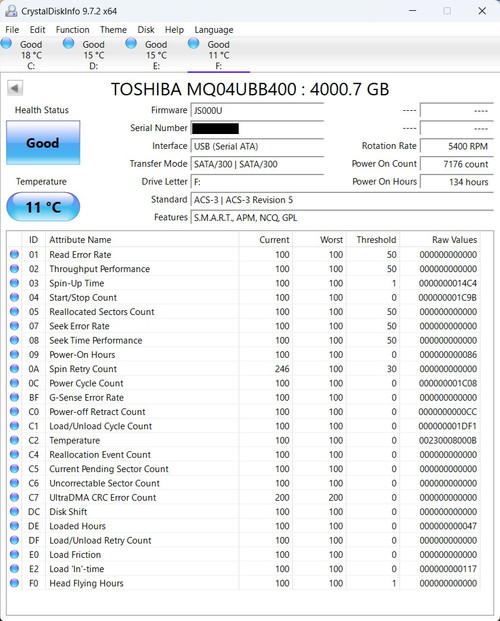
Don't know where the manual is or if I even kept it. Here's the health status of the Toshiba drive...


I bought it on the 25th November 2019 and plugged it into the TV as soon as it arrived. Power on time is 134 hours, that must mean its only powered when the TV is on. I don't watch a lot of TV as that's 134 hours in just over 6 years.
 
Back
Top Bottom