

You are using an out of date browser. It may not display this or other websites correctly.
You should upgrade or use an alternative browser.
You should upgrade or use an alternative browser.
would i notice a SSD
- Thread starter apwbee
- Start date
More options
Thread starter's posts


They are too expensive.
That's a very general comment. Too expensive is person-specific depending on budget available etc.
And to the OP, if you're considering a 64gb, you may as well spend the extra £30 or whatever it is (or save £30 if thinking of the Vertex) and get the Corsair S128, just over £170 (128GB).

Corsair is the cheapest with good reason.
I run a 30gb vertex. The difference between that and the F1 I use as my secondary operating system is astonishing.
If you're planning on using it to store media you've missed the point. £/gb it looses to hard drives. But no one needs a terabyte hard drive to store programs and operating system. I've got two copies of linux and one of XP fitting very comfortably on 30gb. If someday the space restriction drives me mad, I'll raid 0 it with a second vertex.
edit; actually, I add a condition to this. If your computer is a quick one, yes you will definitely notice. If your computer is a very slow one, then you'll see some difference but it won't be spectacular. Computers work to the lowest common denominator / limiting factor. In most high end computers thats the hard drive, so moving to ssd makes the most sense.
I run a 30gb vertex. The difference between that and the F1 I use as my secondary operating system is astonishing.
If you're planning on using it to store media you've missed the point. £/gb it looses to hard drives. But no one needs a terabyte hard drive to store programs and operating system. I've got two copies of linux and one of XP fitting very comfortably on 30gb. If someday the space restriction drives me mad, I'll raid 0 it with a second vertex.
edit; actually, I add a condition to this. If your computer is a quick one, yes you will definitely notice. If your computer is a very slow one, then you'll see some difference but it won't be spectacular. Computers work to the lowest common denominator / limiting factor. In most high end computers thats the hard drive, so moving to ssd makes the most sense.
Last edited:
still the HDD is the slow part of any pc, the SSD will make the system start up far qucker and programs will start up right away
the HDD is tends to be the common denominator for slow pcs, ok maybe ram as well but if you got 1gb (XP), 2gb or more (Vista,7) should be fine there
for cost Corsair S128, it may seem that its no better then an HDD but data rate (90/70) is not all that important with SSDs as its the access times that makes them fast, and it only costs £171, next one up from that is the samsung 128gb for £269 and your only getting 200MB/s read speeds, norm day to day use you not see much improvement between corsair SSD and the samsung
i find 64gb your likey going to fill that up depending on what OS is used and what programs and games are installed (i have used 50GB on mine right now)
its up to you just make sure you get only corsair or samsung or if you wish to burn bit more money vertex (for the same thing)
the HDD is tends to be the common denominator for slow pcs, ok maybe ram as well but if you got 1gb (XP), 2gb or more (Vista,7) should be fine there
for cost Corsair S128, it may seem that its no better then an HDD but data rate (90/70) is not all that important with SSDs as its the access times that makes them fast, and it only costs £171, next one up from that is the samsung 128gb for £269 and your only getting 200MB/s read speeds, norm day to day use you not see much improvement between corsair SSD and the samsung
i find 64gb your likey going to fill that up depending on what OS is used and what programs and games are installed (i have used 50GB on mine right now)
its up to you just make sure you get only corsair or samsung or if you wish to burn bit more money vertex (for the same thing)

Associate
- Joined
- 18 Mar 2009
- Posts
- 876
- Location
- Indiana, United States.
Well Apwbee,
I have a 60gb ssd and you will notice a huge difference and 60gb is not all that bad. I would go Vertex solely for their customer service dedication and the wiper utility. I have plenty of room for current apps/games. I admit I intentionally install lesser played games on my old hdd but I don't think I'm missing much on rct2 . I would say no matter what the rest of your specs are, you'd crap at how faster these really are. You really can't describe it over the internet, it just has to be experienced.
I have a 60gb ssd and you will notice a huge difference and 60gb is not all that bad. I would go Vertex solely for their customer service dedication and the wiper utility. I have plenty of room for current apps/games. I admit I intentionally install lesser played games on my old hdd but I don't think I'm missing much on rct2
. I would say no matter what the rest of your specs are, you'd crap at how faster these really are. You really can't describe it over the internet, it just has to be experienced.The vertex is not the same thing, and seek times are not all that matter.
Vertex is now on its sixth iteration of firmware I believe, with every one an improvement on the previous. However ocz fitted a jumper to the drives, which combined with their support forums mean you can update your drive. That's fantastic customer service. If you break it, they'll replace it with no hassle whatsoever. OCZ rma is excellent.
I believe it shares memory chips with the samsung drives, however the controllers and firmware are not the same. As all the media about stuttering will attest, these are important.
As for seek times. The less time taken to get to the data the better. However if seek times were all that mattered, there would be no enthusiasm for raid 0. Raid 0 does nothing for seek times, but greatly improves data transfer speeds. As the many many people with raptors in raid, or these days ssds in raid will agree, it does make things rather quicker.
I'm glad you like your corsair, but it remains a budget option, and I'm not sure budget ssd is a sensible phrase. I think the corsair would be excellent paired with a middle to low spec system, but thats unlikely to be one with an ssd.
Vertex is now on its sixth iteration of firmware I believe, with every one an improvement on the previous. However ocz fitted a jumper to the drives, which combined with their support forums mean you can update your drive. That's fantastic customer service. If you break it, they'll replace it with no hassle whatsoever. OCZ rma is excellent.
I believe it shares memory chips with the samsung drives, however the controllers and firmware are not the same. As all the media about stuttering will attest, these are important.
As for seek times. The less time taken to get to the data the better. However if seek times were all that mattered, there would be no enthusiasm for raid 0. Raid 0 does nothing for seek times, but greatly improves data transfer speeds. As the many many people with raptors in raid, or these days ssds in raid will agree, it does make things rather quicker.
I'm glad you like your corsair, but it remains a budget option, and I'm not sure budget ssd is a sensible phrase. I think the corsair would be excellent paired with a middle to low spec system, but thats unlikely to be one with an ssd.

Associate
- Joined
- 15 May 2006
- Posts
- 496
Yup i think these drives are the future as far as drives to put your OS on your 100's gb of music and "other" media id leave off for now!

Associate
- Joined
- 18 Feb 2009
- Posts
- 1,253
- Location
- PorthEmmet, Cornwall
I would say no matter what the rest of your specs are, you'd crap at how faster these really are. You really can't describe it over the internet, it just has to be experienced.
Couldn't have out it better myself - even considering taking my rig into work so that my bosses can see just how good these things are, as I'm trying to get them to take up SSD's for their laptop users (and we have many of them) but they need to see it to believe it, and at the moment are just plain sceptical about the benefits of them.
Vertex is now on its sixth iteration of firmware I believe, with every one an improvement on the previous. However ocz fitted a jumper to the drives, which combined with their support forums mean you can update your drive. That's fantastic customer service. If you break it, they'll replace it with no hassle whatsoever. OCZ rma is excellent.
+1 for this. I know others will argue that other makes don't do this as 'they've got their product right first time' but I think the ability to alter the performance or add additional functionality is priceless. There are also those who would say that flashing firmware is too much work but again I say that when using such a high end product in an early incarnation you should expect to have to do some work to keep it at peak performance - how many here flash mobo's to new BIOS for added CPU support or stability?
This is the Overclockers forums guys, not 'PC **** World'!

We tweak. It's what we do. It's what we are - tweakers!
Yup i think these drives are the future as far as drives to put your OS on your 100's gb of music and "other" media id leave off for now!
Absolutely they are the future, and for the time being that means a small SSD for OS/Apps and larger mechanical drives for storage.
Corsair S128 ++
Thing that kills user experience with micro lags / loading times is the seek time of a HDD. I moved my OS and games from an older Raptor 4.5ms to a new Corsair 0.2ms.
Read/Write speeds are the same, so while long/large files e.g. booting xp/vista/win7 takes the same time ~70MB/s read, loading a new level (transitioning zone) on games such as Fallout3, Mass Effect, WoW takes a fraction of the time, 22x faster from 4.5ms to 0.2ms.
The Corsair is a relatively cheap drive, so if you do want the Read/Write speeds, look to get a RAID 0 OCZ Vertex which will push ~250MB/s. That of course depends on how much you are willing to spend.
In my case, I have a finite budget, so looking at the games I played, I didn't mind the initial loading times, but I did want to speed up level/zone transitions in WoW. WoW like many games is made up of objects, textures, models - lots of little small files that thrashes the heads of HDDs, however, perfect for the SSD.
Your mileage my vary, depending on what you do, if yours is a games PC - then you will notice the difference. If however you have a work PC, edit huge photoshop files, code avi's etc, then SSD cost/GB isn't quite the level of affordability it needs to be.
On a note for MLC wear/tear and possible longevity concerns, I have disabled pagefile, index, prefetch/superfetch and use the Raptor for win/IE8/FF/chrome temp dir.
Thing that kills user experience with micro lags / loading times is the seek time of a HDD. I moved my OS and games from an older Raptor 4.5ms to a new Corsair 0.2ms.
Read/Write speeds are the same, so while long/large files e.g. booting xp/vista/win7 takes the same time ~70MB/s read, loading a new level (transitioning zone) on games such as Fallout3, Mass Effect, WoW takes a fraction of the time, 22x faster from 4.5ms to 0.2ms.
The Corsair is a relatively cheap drive, so if you do want the Read/Write speeds, look to get a RAID 0 OCZ Vertex which will push ~250MB/s. That of course depends on how much you are willing to spend.
In my case, I have a finite budget, so looking at the games I played, I didn't mind the initial loading times, but I did want to speed up level/zone transitions in WoW. WoW like many games is made up of objects, textures, models - lots of little small files that thrashes the heads of HDDs, however, perfect for the SSD.
Your mileage my vary, depending on what you do, if yours is a games PC - then you will notice the difference. If however you have a work PC, edit huge photoshop files, code avi's etc, then SSD cost/GB isn't quite the level of affordability it needs to be.
On a note for MLC wear/tear and possible longevity concerns, I have disabled pagefile, index, prefetch/superfetch and use the Raptor for win/IE8/FF/chrome temp dir.
The vertex is not the same thing, and seek times are not all that matter.
Vertex is now on its sixth iteration of firmware I believe, with every one an improvement on the previous. However ocz fitted a jumper to the drives, which combined with their support forums mean you can update your drive. That's fantastic customer service. If you break it, they'll replace it with no hassle whatsoever. OCZ rma is excellent.
I believe it shares memory chips with the samsung drives, however the controllers and firmware are not the same. As all the media about stuttering will attest, these are important.
As for seek times. The less time taken to get to the data the better. However if seek times were all that mattered, there would be no enthusiasm for raid 0. Raid 0 does nothing for seek times, but greatly improves data transfer speeds. As the many many people with raptors in raid, or these days ssds in raid will agree, it does make things rather quicker.
I'm glad you like your corsair, but it remains a budget option, and I'm not sure budget ssd is a sensible phrase. I think the corsair would be excellent paired with a middle to low spec system, but thats unlikely to be one with an ssd.
The point with the Corsair is that it's so much cheaper than any other decent SSD option is that if you actually feel you're not getting decent enough bandwidth out of it, you can RAID 0 another one in for less than a tenner more than the cost of a single 128GB Vertex (giving very similar transfer speeds and twice the storage). And bear in mind that the slower transfer rates of the Corsair are the written-to speeds; they start off faster, and they stay faster for longer than other (smaller) SSDs because you are unlikely to use all the space straightaway.
Agreed that SSDs are unlikely to be put in a mid-low end system; it's not their prime-time yet for mainstream.
Associate
- Joined
- 1 Dec 2008
- Posts
- 109
- Location
- Stuttgart, Germany
I put a Vertex 60GB in my PC the other day and installed Vista 64 + SP1 + Windows Updates on it. The OS now is about 14.5GB. It was fast on a VelociRaptor but now it is super snappy fast. The benchmark below was done before I installed the OS. I'll run another benchmark after I install flight sims FS9 and FSX.
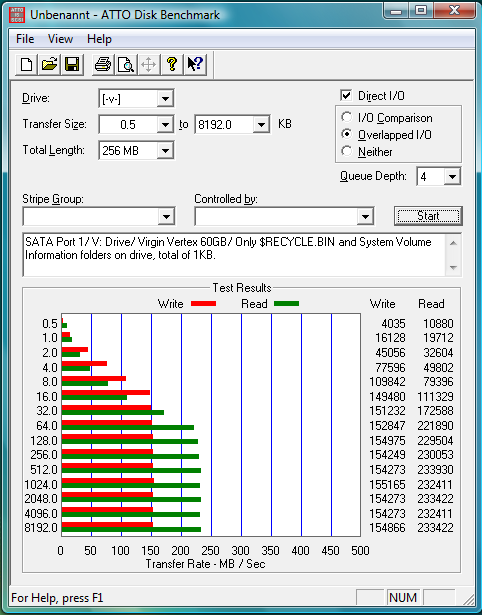
The benchmark below was done before I installed the OS. I'll run another benchmark after I install flight sims FS9 and FSX.
Last edited:
Associate
- Joined
- 18 Mar 2009
- Posts
- 876
- Location
- Indiana, United States.
I put a Vertex 60GB in my PC the other day and installed Vista 64 + SP1 + Windows Updates on it. The OS now is about 14.5GB. It was fast on a VelociRaptor but now it is super snappy fast.
Nice bench. Identical to mine.

EDIT: wait hang on, all my read speeds are faster than my writes sorry.
Your bank balance would go ouch, ask youself if you really need the speed above capacity for the same money, could even raid 2+ decent hd drives. Do you mind if startup and app opening takes a few seconds longer? if yes go for the ssd otherwise stick to hdd's for now.
Last edited:
Associate
- Joined
- 18 Mar 2009
- Posts
- 876
- Location
- Indiana, United States.
Why spend the same amount of money for hdd's? 
SSD's are not cheap true. But for all you know the OP could have an i7 and 3x gtx285's.
I just recently got laid off but bought my Vertex when I had a good check. I do not regret it or wish I had that money back despite being very broke. I'm actually glad I bought it because now at least I have something to do/play with now that I got a lot more free time.
SSD's are not cheap true. But for all you know the OP could have an i7 and 3x gtx285's.
I just recently got laid off but bought my Vertex when I had a good check. I do not regret it or wish I had that money back despite being very broke. I'm actually glad I bought it because now at least I have something to do/play with now that I got a lot more free time.
I put a Vertex 60GB in my PC the other day and installed Vista 64 + SP1 + Windows Updates on it. The OS now is about 14.5GB.
That's a problem with just one of those smaller drives, Vista can balloon so much more than XP. I started off with a vlite v64 sp2, no hibernate, no pagefile - and after a weeks use of MS updates, the OS is already 17.2G.
You really need room for OS + every app to makes sure you are getting the most out of the SSD. Training yourself to be tidy and space conscious is a difference when moving from HDD to SSD.
Associate
- Joined
- 1 Dec 2008
- Posts
- 109
- Location
- Stuttgart, Germany
That's a problem with just one of those smaller drives, Vista can balloon so much more than XP. I started off with a vlite v64 sp2, no hibernate, no pagefile - and after a weeks use of MS updates, the OS is already 17.2G.
You really need room for OS + every app to makes sure you are getting the most out of the SSD. Training yourself to be tidy and space conscious is a difference when moving from HDD to SSD.
That's absolutely correct. Originally I was going to purchase a 30GB drive, glad I didn't. I disabled page file, hibernate, system restore. And with SSDs you need to disable auto defrag as defrag is an SSD killer.
Associate
- Joined
- 18 Feb 2009
- Posts
- 1,253
- Location
- PorthEmmet, Cornwall
Do you mind if startup and app opening takes a few seconds longer?
It's not just that though - the whole OS operates so much more smoothly with an SSD, as others have said the 'snappy' feel of Vista (or Win7) is awesome - it's how an OS ought to have been all along!
I just recently got laid off but bought my Vertex when I had a good check. I do not regret it or wish I had that money back despite being very broke. I'm actually glad I bought it because now at least I have something to do/play with now that I got a lot more free time.
Sorry to hear that m8, but glad you've got more time to enjoy your rig!
That's a problem with just one of those smaller drives, Vista can balloon so much more than XP. I started off with a vlite v64 sp2, no hibernate, no pagefile - and after a weeks use of MS updates, the OS is already 17.2G.
You really need room for OS + every app to makes sure you are getting the most out of the SSD. Training yourself to be tidy and space conscious is a difference when moving from HDD to SSD.
Absolutely correct! Over the years we've been spoiled with the ever increasing capacity of HDD's, so now going to an SSD does require better discipline with space usage. I've always said that once someone gets their first SSD with the intention of just trying OS and a 'few' Apps, they'll very quickly become so used to the speed that they'll want everything to be running off SSD goodness! Can't wait for prices to start coming down and capacities to rise - the next few months/years should be very good for us users.
Similar theme to the above, what does moving from one ssd to two in raid 0 achieve?
I'm pretty happy with the single one, but have no idea where the bottlenecks in my system are at the moment. Can't test either, as a large part of it is on rma.
Once the system is running again, it'll be a 4ghz q9550 w/4gb of ram at 5-5-5 942MHz. I doubt it'll go faster than that, so to speed it up I either need i7 or an ssd. Hard to guess which.
I'm pretty happy with the single one, but have no idea where the bottlenecks in my system are at the moment. Can't test either, as a large part of it is on rma.
Once the system is running again, it'll be a 4ghz q9550 w/4gb of ram at 5-5-5 942MHz. I doubt it'll go faster than that, so to speed it up I either need i7 or an ssd. Hard to guess which.

Man of Honour
- Joined
- 29 Nov 2008
- Posts
- 13,583
- Location
- London
Similar theme to the above, what does moving from one ssd to two in raid 0 achieve?
I'm pretty happy with the single one, but have no idea where the bottlenecks in my system are at the moment. Can't test either, as a large part of it is on rma.
Once the system is running again, it'll be a 4ghz q9550 w/4gb of ram at 5-5-5 942MHz. I doubt it'll go faster than that, so to speed it up I either need i7 or an ssd. Hard to guess which.
at the moment, for people with computers like yours, Hard Drives are the slowest components, yet when upgraded to an SSD contain the biggest speed increase. Going from a Q9550 to an i7 will be a tad faster but will be hard to notice unless you do a lot of transcoding. An SSD is the best upgrade one can make to an already fast system as Hard Drives are the biggest bottlenecks.