X-25M G2 - weird 4k writes / problems

Associate
Joined
22 Sep 2009
Posts
4
I have read many threads here about the new Intel SSD X-25M G2 and people are getting around 22-30MB/s read, and about 60MB/s write in 4k random tests in CDM (CrystalDiskMark 2.2).

However in CDM (100MB test) I get only about 17.5MB/s in read and about 31MB/s in write. Sequentials are on par with other, but 4K test produced dreadful scores.

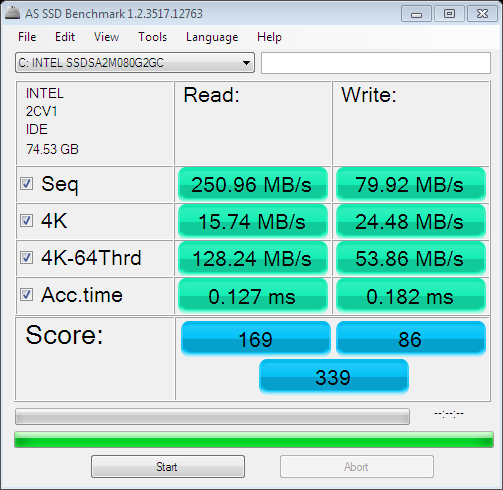
In "AS SSD Benchmark"-a new SSD benchmark, I get 16mb/s read 24mb/s write in 4K tests. Rather low compared to others.

I have about 61GB of free space on the drive. I have previously had this 4k read/write issue which prompted me to use HDDErase 3.3. I secure erased the entire drive and reinstalled Windows 7 which has AHCI enabled. Partition is aligned correctly by Win7 and its been verified on a different forum.

I have tested with SuperFetch / Caching on/off, and Eset Antivir on/off with similar results.

So my CDM scores are about 25%/45% read/write lower then what others are getting. Any ideas what is going on here?

System is Dell Precision M6400.

Untitled.png


as-ssd-benchINTELSSDSA2M08092020091.png


And the proof that its aligned correctly by Windows 7.
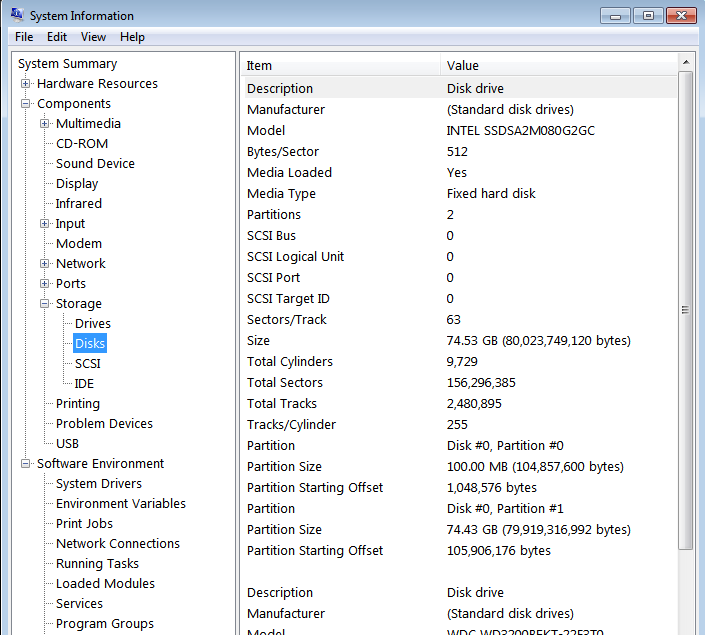
sysinf.png
 
Last edited:
I assume any firmware updates from intel have been done?

We cant rule out the mobo here. What is your motherboard? Ensure it is connected to the main sata controller and not the "addon" ones that come on some mobos which are usually processed by a not-so-good jmicron or similiar controller.
 
I assume any firmware updates from intel have been done?

We cant rule out the mobo here. What is your motherboard? Ensure it is connected to the main sata controller and not the "addon" ones that come on some mobos which are usually processed by a not-so-good jmicron or similiar controller.

The drive has the latest firmware update. I have a laptop so all connections are where they should be.
 
The drive has the latest firmware update. I have a laptop so all connections are where they should be.

Hmmm.

Well now were stuck on whether it is a compatibility issue or the drive is bad.

I assume you cant try it on another machine? Other than that, I dont know what to suggest.
 
Hmmm.

Well now were stuck on whether it is a compatibility issue or the drive is bad.

I assume you cant try it on another machine? Other than that, I dont know what to suggest.

On a good note, i have since found several other people on other forums experiencing the same EXACT problem. So far they are all laptops. Someone suggested to me that perhaps its a problem with "mobile chipsets"... :(:confused:

Try another machine, laptops are slower cause of motherboard?:confused:

I wish i had another machine to try it on.

The only other system i have here is a Mini10 and that does me no good.
 
On a good note, i have since found several other people on other forums experiencing the same EXACT problem. So far they are all laptops. Someone suggested to me that perhaps its a problem with "mobile chipsets"... :(:confused:


I wish i had another machine to try it on.

The only other system i have here is a Mini10 and that does me no good.


By mobile chipsets they are referring to laptop motherboards in general. This indeed could be the problem.

If thats the case you cant really do anything other than get a new laptop (assuming it is the chipset at fault and not intel being lazy breaking things in the firmware).

Your only option is to try it in a friends PC or something.
 
By mobile chipsets they are referring to laptop motherboards in general. This indeed could be the problem.

If thats the case you cant really do anything other than get a new laptop (assuming it is the chipset at fault and not intel being lazy breaking things in the firmware).

Your only option is to try it in a friends PC or something.

Well, its all speculation at this point. Intel is offering to send me a new drive. But whats the point, if the laptop's motherboard is the problem.

I mean, at this point, what else could possibly be the problem??:confused: Im not saying my laptop is slow cuz its not. Its pretty fast. Much faster than before. But the it just bothers me that im not running the SSD at its full potential when i spent US$250.00 on it!
 
Well, its all speculation at this point. Intel is offering to send me a new drive. But whats the point, if the laptop's motherboard is the problem.

I mean, at this point, what else could possibly be the problem??:confused: Im not saying my laptop is slow cuz its not. Its pretty fast. Much faster than before. But the it just bothers me that im not running the SSD at its full potential when i spent US$250.00 on it!

Why not take on this offer. Could be a borked controller somehow, who knows? If the performance is still the same, then fine. At least you've got a new SSD.:D
 
Back
Top Bottom