x25-m Vista optimisations

Associate
Joined
23 Jun 2003
Posts
393
Seems like a lot of conflicting information around about what not to change and what to change when running an ssd that does NOT suffer from stuttering, in particular the intel ssd. Got one coming this week, and would like suggestions about how to set up Vista. My thoughts so far:

Disable superfetch and prefetch
Disable drive indexing
Disable defrag
Enable advanced write caching

Any other ideas?

Thanks

 
I would enable superfetch/prefetch anyway, it's gonna be done with it extremely quickly and having the data in RAM is still gonna be a lot faster than reading it off the SSD.
 
I have superfetch/prefetch disabled and I don't notice any different to it being on. SSD's are enough fast. If using the SSD Tweaker tool, you can choose to use the prefetching for boot only or apps only I believe.. But with SSD's it isn't necessary IMO.

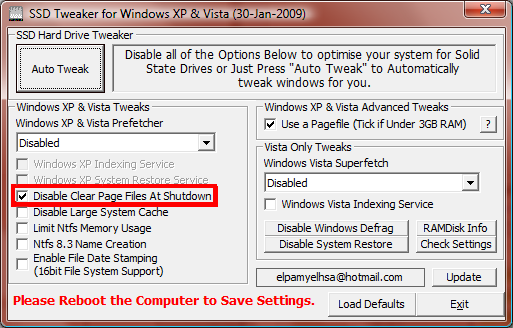
Here are the settings I use:

disableclearpage.png

the red band was just there to point out an option you dont want to change as it slows shutdown times.

Other tweaks would be to move your pagefile to mechanical HDD if you are still using one. Otherwise to consider disabling the pagefile.
 
Other tweaks would be to move your pagefile to mechanical HDD if you are still using one. Otherwise to consider disabling the pagefile.

for 1 machine i had the parts available so i moved the pagefile onto a compact flash card in a IDE socket onto the mobo. hehe worked fine there.


also i dont use superfetch or prefetcher because the machine i use has too random a usage pattern for superfetch to be of any benefit to me.
 
Back
Top Bottom