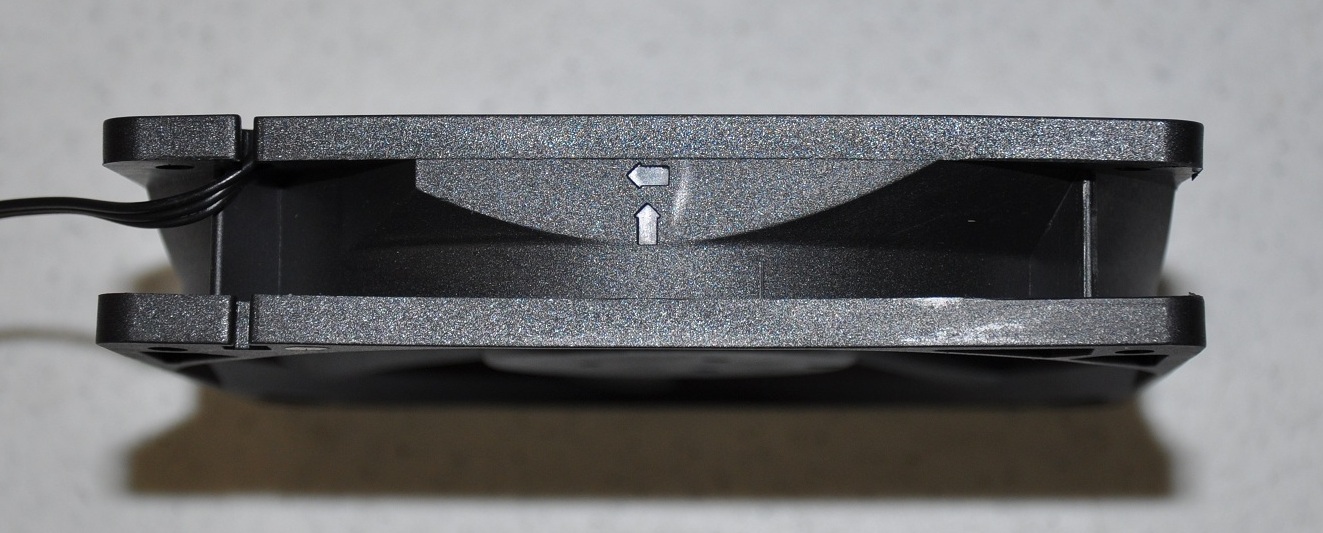
Fan air direction

Associate
Joined
21 Jul 2011
Posts
545
I'm installing quite a few fans and it strikes me as important that they blow air in the right direction :P

But none of the fans say on them which way the air will flow. So is there anyway to tell which way the air is going to go?
 
But none of the fans say on them which way the air will flow. So is there anyway to tell which way the air is going to go?

Usually the main sticker on the front indicates that it will be drawing/pulling air through the fan from the sticker side.

It's easy to check this by hooking one up and feeling the airflow for yourself.
 
Usually the main sticker on the front indicates that it will be drawing/pulling air through the fan from the sticker side.

It's easy to check this by hooking one up and feeling the airflow for yourself.

Because this is a new build I was wary of putting any power through it until everyone was hooked up.
 
You sure non of the fans have something like this?

How-to-Install-Hydro-Series-H100-Extreme-Performance-Liquid-CPU-Cooler-picture-8.jpg
 
As above.

Because this is a new build I was wary of putting any power through it until everyone was hooked up.

With a new build ideally you should only power up a skeleton setup first to check the core components are working correctly (helps with troubleshoooting if you run into issues) - CPU/HS, memory and gfx card. You could easily attach 1 fan for an airflow test.
 
In this image the air would be blowing away from the viewer.
sidebyside2.jpg


Usually airflow will move from the unframed side to the framed side. Blade movement is anti-clockwise.
 
Back
Top Bottom