• Competitor rules

    Please remember that any mention of competitors, hinting at competitors or offering to provide details of competitors will result in an account suspension. The full rules can be found under the 'Terms and Rules' link in the bottom right corner of your screen. Just don't mention competitors in any way, shape or form and you'll be OK.

2600k + motherboard advice

The 2700k is not necessarily a higher binned chip than the 2600k. Also many 1090t's clocked higher than 1100t's because they werent necessarily higher binned either.

Although you may be correct about the 2700k/2600k, I disagree about the 1090T/1100T - 1100T users can hit 4.2, 1090T users were lucky to get above 4Ghz

Theres a thread on XS where they are discussing the i2700k - looks like it clocks the same (slightly higher multiplier wall) but uses slightly less volts ;)
 
Although you may be correct about the 2700k/2600k, I disagree about the 1090T/1100T - 1100T users can hit 4.2, 1090T users were lucky to get above 4Ghz

Theres a thread on XS where they are discussing the i2700k - looks like it clocks the same (slightly higher multiplier wall) but uses slightly less volts ;)

1090T owners hit 4.2GHZ fine didn't they?
My originally 1055T 125W did 4025MHZ easily.
 
Yeah a number of 1090t's hit 4.2ghz.. i've had one hit 4.3 before as well (not my chip though, overclocked it for a friend). Maybe the 1100 used less voltage to hit the same heights, but can't really see it tbh.
 
From all the AMD systems i've seen (and i've seen allot!) MOST 1090t's hit a wall at 4Ghz at sensible voltage. Obviously there are exceptions to this rule.

Anyways back on point - Even if the 2600 and 2700's perform the same - surely resale value will be slighter better with a 2700. At this moment in time if you get a 2700 cheaper than what most retailers are selling they're 2600's it would be a wiser decision to go for the 2700!!
 
I take it ALL back - forgive me Asrock.

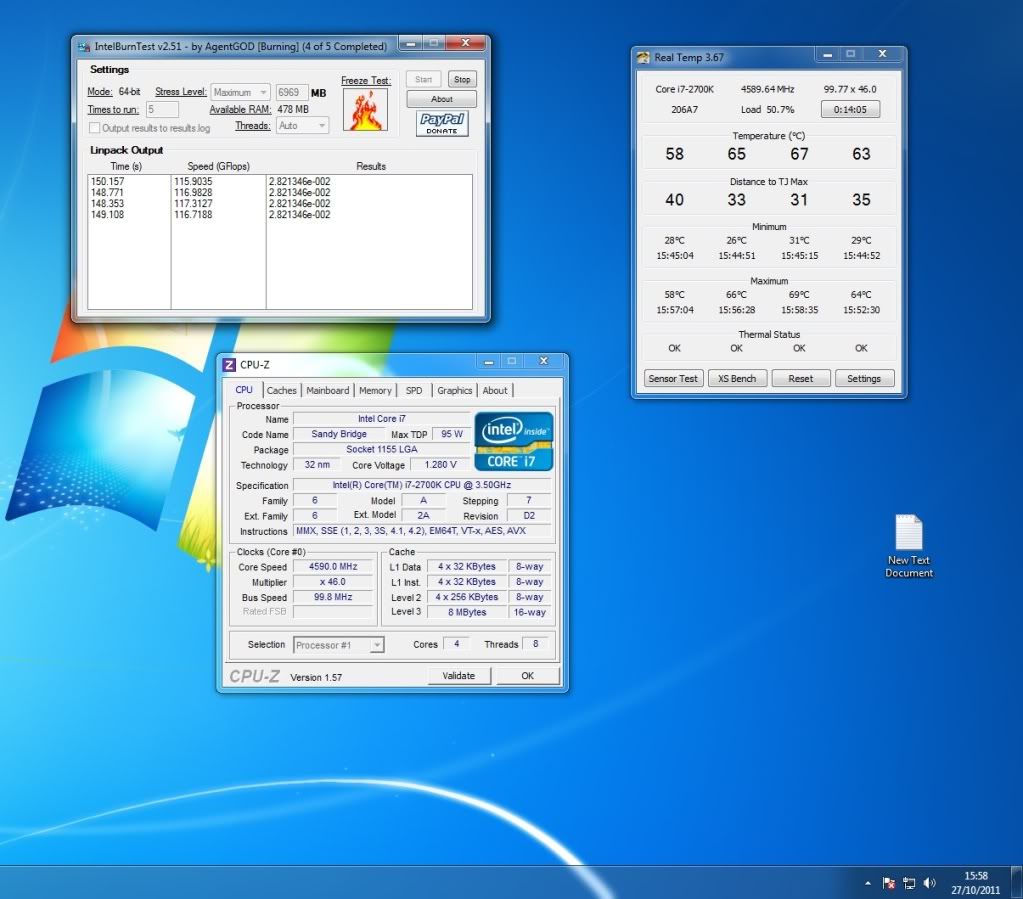
Looks like intel has pulled a fast one with the 2600k's - taken the better binned ones and rebadged them as 2700's:

i2700k4_6.jpg


It took me all of 3 seconds to acheive this overclock with the auto OC profiles! prob needs more tweaking but sorry, gotta get ready for BF3!!
 
thanks mate

i'll be ordering the motherboard, cpu, cooler around november 12th cus thats when my bank is paying up ;)

when i get it setup, i will ask about overclocking, has i have never oc'ed a intel system before.
 
tbh i'm looking forward to the change .

but i will miss the CH V board tbh, i wish'ed intel boards was more like amd boards in terms of features

Same here mate - CHIV was best board i've had :(
If you get the asrock board - overclocking is soo easy its unbelievable - just select one of the predefined overclock profiles and thats it! :)
 
Same here mate - CHIV was best board i've had :(
If you get the asrock board - overclocking is soo easy its unbelievable - just select one of the predefined overclock profiles and thats it! :)
using that does it change the BCLK Base Clock ? i've heard upping it can damage it.

also if setting ram to 1600 does that up the BCLK Base Clock ?
 
Last edited:
Zoomee, change the Spread Spectrum to make it say 100 base.

And the predefined overclock profiles don't change the BLCK, and setting RAM to 1600MHZ would just use a higher RAM multiplier, it won't affect the BLCK.
 
spread spectrum has something to do with noise distortion on the cpu I think! - its usually the first thing to disable when overclocking otherwise it can cause problems.

@@Martin - Its set to auto mate, think it disables as soon as you enable any kind of oc-ing. Seems this board clocks the BCLK slightly lower than 100 at 99.8 - even at stock settings....
 
Back
Top Bottom