Overclock help

Associate
Joined
26 Jun 2010
Posts
505
Location
Hartlepool
Hay Guys,
Any idea why my 4.6 and 4.6 overclocks stopped working when i installed two new SSD`s Yet the 5.0 overclock still works fine?
could it be they just need more voltage? or is it something to do with populating the sata III ports now?

Any thoughts?

 
Hi soundesciple.

Please fix your sig.

Only 4 lines of text are allowed.


You may use a signature (commonly used in email messages) in your posts. You can specify in your profile a signature to use at the bottom of your posts. When you post, there is an option to use your signature. A signature may contain one or more images but they must fit within a box with maximum dimensions of 400 x 75 pixels (width x height) and with a maximum (combined) file size of 20k. Images containing mostly very large words or animated .gifs will not be permitted. You may also add 1 consecutive lines of normal or smaller text directly above or underneath the image with no spaces inbetween image and text. If no images are used then up to 4 consecutive lines of normal or smaller text is permitted. Do not pad out your text lines with blanks lines. A line of text is defined as having a maximum length of 400 pixels. If you want to turn the signature off in the future, you can come back and edit your post. If you have specified a signature in your profile, the box will be automatically ticked for you.
 
When you say they don't work what happens or doesn't happen?

Have you used different modes for the SATA controller in the different profiles?
 
yea i'm ok at 4.4 on full auto, but it wont accept 4.6 at all, i think you have to adjust the stuff below ( cpu voltage) but until i know exactly what to adjust i'm not touching anything.

on 4.6 the pc just turns off instantly
 
yea i'm ok at 4.4 on full auto, but it wont accept 4.6 at all, i think you have to adjust the stuff below ( cpu voltage) but until i know exactly what to adjust i'm not touching anything.

on 4.6 the pc just turns off instantly

Yes its weird aint it, on mine none of the pre-installed o/c`s worked when i first got the board so i manually o/clocked it, then after i done a fresh install of win 7 and added more drives my 4.6 and 4.8 stopped working but the 5.0 still worked, and the pre-installed 4.2 and 4.4o/c`s started working :confused:
 
Hay guys just an update on the o/c profiles.
had a tinker with Bios again and got my o/c`s working again.

All i needed to do was up the Core Current Limit to get them to boot.
And up the Turbo Boost Power Limits (short) and (long) to keep them stable.

Also, doing this allowed me to drop the CPU Load-Line Calibration from 2 to 3 lowering the temps about 5c.

Decided to delete the 4.8 profile as the 5.0 one works fine and setup a 4.5 one for 24/7 use.

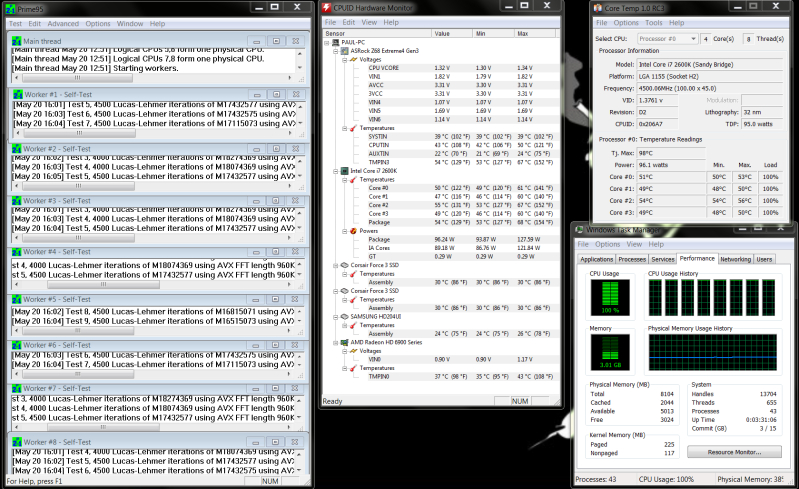
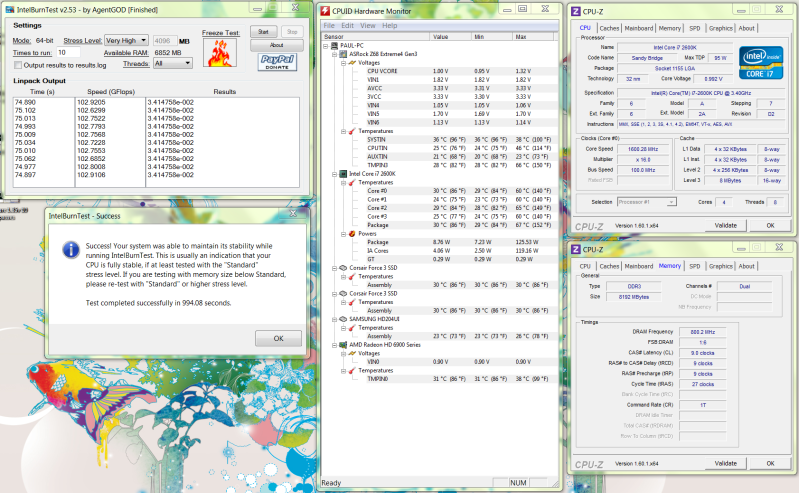
I just ran IBT very high settings on 4.5ghz @1.29v 10runs with a pass and am now running Prime95 Blend v277, it`s been running for about 40mins now with temps maxing at 65c.

I will post a screen shot when primes done.
 
looking good to me.
Prime9545ghz129voffset005stable.png


and IBT
intelburntest45ghz129voffset005stable.png


Has anyone got 4.5 with lower volts or should i be happy and stick with this?
 
if you or anyone else can get to 4.6 on manual with the same mobo as me, can you post up images of the bios pages please, so much easier this way, thanks
 
I will have a go later and let you know if i can do it, i don`t have a camera at the moment but i will jot the settings down for you, and post them up here.

what settings are you trying at the moment?
 
thanks, i'm stuck on 4.4 Auto, it wont go any higher, i have not adjusted any settings yet, it also crashed on Turbo.... i'm too scared to try manual :D :D:D

i'm trying for 4.6 but i expect this has to be manual, because on auto it crashed as soon as i saved an exited.
thanks.
 
Last edited:
IM SCARED OF AUTO lol, it whacks too many volts through the CPU
Try manual, set your multiplyer to 46.
Set cpu voltage to offset +0.05
set DRAM voltage to 1.5 (if thats what there default is)

And leave all the rest on Auto. Save and re boot

(But make sure you have a aftermarket cpu cooler as the stock one cant cope at 4.6)

If it boots ok you can do a bit of reading up to fine tweek the other settings.

Use HWmonitor to keep an eye on the temps while you run prime95 on blend.

Dont let temps go above 80c.

If that dont work i will have a go and post up settings that work on mine.

Good look and dont be afraid, as long as you dont go above 1.35v it should be fine.
 
IM SCARED OF AUTO lol, it whacks too many volts through the CPU
Try manual, set your multiplyer to 46.
Set cpu voltage to offset +0.05
set DRAM voltage to 1.5 (if thats what there default is)

And leave all the rest on Auto. Save and re boot

(But make sure you have a aftermarket cpu cooler as the stock one cant cope at 4.6)

If it boots ok you can do a bit of reading up to fine tweek the other settings.

Use HWmonitor to keep an eye on the temps while you run prime95 on blend.

Dont let temps go above 80c.

If that dont work i will have a go and post up settings that work on mine.

Good look and dont be afraid, as long as you dont go above 1.35v it should be fine.


Forget that mate i just tried it and there`s more settings need changing fo it to boot. i will post them tomorrow for you.
 
thanks, take a look at my sig just in case yours isn't the same as mine, if it is i'll print off this page and OC as per your latest posts.

i think you have to adjust quite a lot on manual, that's why i cant do it :D

plus getting above 4.4 on auto is a problem on other forums too, it either does it strait away or it has to be fooled around with for ages on manual
 
Back
Top Bottom