***The Official Samsung Galaxy S III Thread***

Just so you know, you can queue files in Windows explorer using this, been using it for ages and lots of people seem to be now too. Far superior to anything else.

It will make your life a lot easier when transferring files between devices and workstations etc etc.

 
Wow! Airdroid is superb, far better than wifi file transfer! :D

I love how you can log in too! Ingenious idea that! :D

Can do everything essentially on your phone via your browser, call logs, send and receive texts, photo viewer, video player (haven't tried this though as you need quicktime installed.........¬_¬), send a webpage to your phone, install apps onto your phone! A very complete package with a nice simple UI, although it looks like apple's OSX ¬_¬ :p

Highly recommend this app!

Transfer speeds are a bit better than wifi file transfer too (on my 60MB/6MB connection although only getting 29MB and 2.90 on my PC but my S gets 49MB/4MB on my mobile :confused: stupid virgin superhub!), I get 1.65MB/s as opposed to 1.60MB/s



Would like to only have 1 desktop on the airdroid website though and to be able to remove the widgets and shortcuts!!!!!

Also doesn't work on firefox nightly/UX, looses connection as soon as you connect but works just great when using the stable build of chrome.
 
Would like to only have 1 desktop on the airdroid website though and to be able to remove the widgets and shortcuts!!!!!

Do you mean the home screens? You can remove them by pushing the context/menu button and clicking edit. You can have up to 7 home screens or just 1. Also by holding your finger on an icon/widget you can drag it to the bottom right hand corner to delete or more it elsewhere/resize it.
 
Do you mean the home screens? You can remove them by pushing the context/menu button and clicking edit. You can have up to 7 home screens or just 1. Also by holding your finger on an icon/widget you can drag it to the bottom right hand corner to delete or more it elsewhere/resize it.

I mean for airdroid on the desktop browser, these homescreens and the wee widgets you see on the right side of each homescreen :p

tCeSW.jpg


EDIT:

I know this isn't the right thread to talk about this sort of thing, but things went a little off topic regarding wifi transfer methods etc. :p


You can blame mrk for that! :p :D
 
Last edited:
Curious observation regarding ‘Cell Standby’ high battery % being reported while I’m at work which I’ve only really taken notice of today.

I mentioned before that I’m getting 2 extra bars reception on HSDPA at work compared to what I was getting shown on the S2 and I think I know why now…

I noticed that in Settings > About > Status that the cell reception is at -93 to -97dBm which represents a weaker cell reception so the phone is trying to maintain the HSDPA reception all the time as opposed to dropping to 3G when the phone is idling or running basic sync so HSDPA is not required.

Now, on the S2 I was running with 3’s specific modem which allowed the radio to run at 3G when idle and switch to HSDPA when I start doing stuff online. Obviously the stock modem isn’t optimised for the 3 network so I’m now quite confident that this may be the area I should check out and flash a 3 UK optimised modem so that it can drop to 3G when idle and not constantly try and maintain a high signal on HSDPA.

Will report back!

My Desire did this anyway regardless of the network operator and I assumed that's just what happened.

I thought my SIII was doing it too, but I think that downstairs I'm in a fringe HSDPA area and it switching a lot due to that, not going idle.

Woud be interested to hear of any progress you make.
 
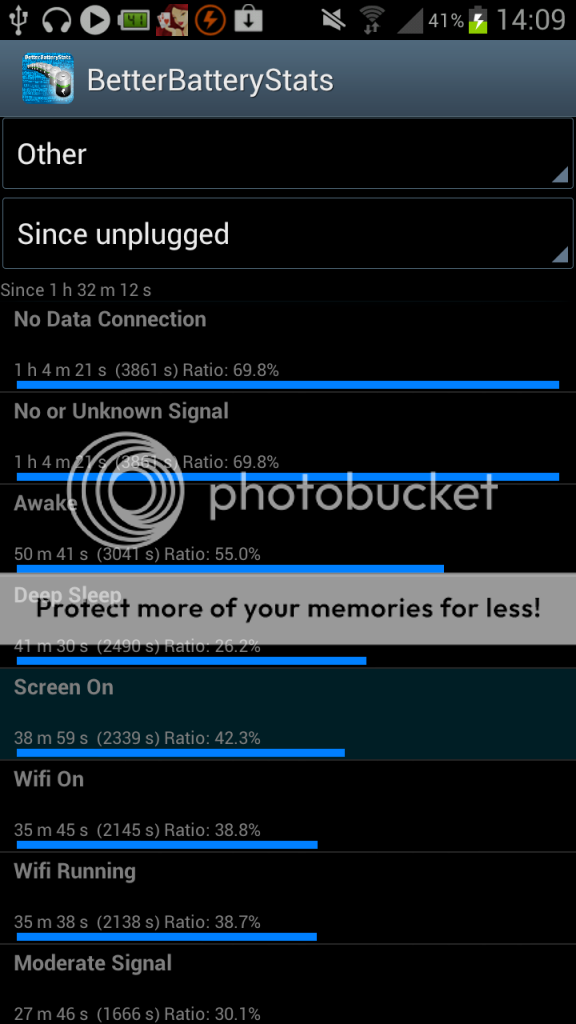
Screenshot_2012-06-13-14-09-521.png


Am I right in saying this is my likely cause of the quick battery drainage? (Not the highlighted one, just all of it in general)

I am hoping to get Sure Signal ASAP which I am hoping will resolve me signal issues, along with this..

EDIT - Sorry about the size, i'll be sure to adjust it next time :D

Anyone? :)
 
HSDPA is an elevated state, your phone will not stay in it for more than upto X time typically, I wouldn't worry to much and it will be like your SGS2, early all phones work with the same timeouts etc...

if you want to see your connection type it's in Settings > about > status Mobile network type. HSPAP is HSPA+ before anyone asks :)

Mike at a guess the power control counts the 3g, 2g and 802.11x radio as the same power object if that's what you are asking.
 
Can anyone else try Mobile Signal Widget and see if it's reporting signal strength correctly?
Mines stuck on 0dBm, no bars and a sad Android - it is correctly displaying H, 3G and wifi though.

Want to see if it's an SIII or a Three problem
 
Mobile Signal Widget does not work on Cable & Wireless for me either, same 0dB saddroid

Great - at least it's not just me.

Been watching the info in the status screen and my phone is all over the place. Switching between HSDAP:9, HSPAP:15 and UMTS:3 all with a signal levels under -100dBm.
Maybe going for Three was not the best idea for signal despite their signal claims for the area. Anyone successfully used one of those 3G Boosters? The kind with the 2 aerials - one outside and one inside and the small box inbetween?? I'm guessing the law is a bit of a gray area with them but do they do much good??
 
Last edited:
Is anyones sgs3 heating up ?

I was browsing the zedge app and it started to get warm from underneath and also from the top after 5-10mins
 
Last edited:
Is anyones sgs3 heating up ?

I was browsing the zedge app and it started to get warm from underneath and also from the top after 5-10mins

My S2 use to do this a lot, less so on ICS. I've noticed it a bit on the S3 and am just use to it now. Never had it cause my S2 any issues, which use to sometimes get pretty hot when charging as well.
 
Is anyones sgs3 heating up ?

I was browsing the zedge app and it started to get warm from underneath and also from the top after 5-10mins

Think most of these quadcore phones will have over heating to some extent...my One X gets quite warm when browsing, listening to music. My iphone4 got warm and even my BB9900, which is a 1.2ghz cpu single core gets warm when being used.

As long as it doesnt get stupidly hot to the touch then its fine.
 
Think most of these quadcore phones will have over heating to some extent...my One X gets quite warm when browsing, listening to music. My iphone4 got warm and even my BB9900, which is a 1.2ghz cpu single core gets warm when being used.

As long as it doesnt get stupidly hot to the touch then its fine.

MY bb9900 also got hot !!!!
 
First day:


Happy enough with that, auto brightness switched off, set around halfway.

Still waiting for my 64gb sd card to show up from amazon but I did stick a load of mp3s on the phone last nigh tot check it out, quite impressed with the sound quality and EQ, although why you'd want to add reverb I don't know!
Supplied headphones are ok but I plugged in my sennheiser cx-300s and it was a definite improvement.

Just received the OTA update, on vodafone - (not rooted) and it updated fine. Not sure what else it changed but it added "music store" and "my web" apps - both vodafone, I was just going to start moaning but found you could uninstall them.. so I duly did :)
 
Last edited:
Back
Top Bottom