


• Competitor rules

    Please remember that any mention of competitors, hinting at competitors or offering to provide details of competitors will result in an account suspension. The full rules can be found under the 'Terms and Rules' link in the bottom right corner of your screen. Just don't mention competitors in any way, shape or form and you'll be OK.

Overclocking 7950

The memory speed or voltage will have basically no effect on your GPU temps unless you have an all in one heatsink that covers the memory as well. Usually there is a separate heatsink assembly for the ram/VRM's and the main heatsink/fan is attached to the GPU core only.
 
I tried again, 1.031V with a 1000mhz and 1575mhz memory clock, this time i moved the power limit (%) bar up to full whack (20%) and it seems to be stable so far. Ran 2x heaven benchmarks with every option on full whack and 1080p and got a score of 1103 and average fps 43.8.

Might try and take it up more
 
OK, I assumed you'de already done the 20% power limit, thats a given for overclocking.

Anyway, good luck with it. Its a great card and if you want to push towards 1200MHz then give me a shout :)
 
it keeps putting my voltage down to 1.174 and it only goes up to 1100 on the core clock, im using msi afterburner as well
 
Thats ok, dont worry about it for the time being. just try and bench at that first to see if its stable. Set afterburner to log temps while you bench.
 
I tried it with the following settings

Core V = 1.181v
Core c = 1100mhz
mem c = 1575mhz

my temps rose to around 80-85 degrees and i only gained an fps increase of 3 (same settings everything maxed out)
 
Maybe your case cooling isnt very good, your temps are a bit high.

Drop the voltage to about 1.17 and bench again. Run the standard settings for the heaven thread. Normal tesselation, DirectX 11, High shaders, 4X anisitropy, 4XAA, 1080p Full screen.
 
Just ran it with those settings and core volt at 1.174

Temps were around 75-80 again

Fps was around 77

 
might be best if i keep it at stock volts with a 1000mhz core clock speed untill i get better cooling

Temps at stock volts is around 59-60 with a max of 61 at settings full whack, so it is probably my case cooling that needs improving
 
Last edited:
Just ran it with those settings and core volt at 1.174

Temps were around 75-80 again

Fps was around 77
These settings are fine, your gaming temps will be about 75c Max, maybe less if you use vsync.

If you want you can increase the fan speed a little to lower the temps a bit but its fine really. Its a good place to start tweaking from.
 
that fan was screaming at around 95% allready, i guess i could use different profiles for diff games?
 
OK try and run 1100 core at 1.165v then.

Check your maximum temperature when gaming and your maximum temps during benching heaven, and note your maximum fan speed. There are checkboxes in the afterburner monitoring section for all these.

What case do you have?

Your temps are a lot higher than mine, although I did reapply thermal paste on mine.
 
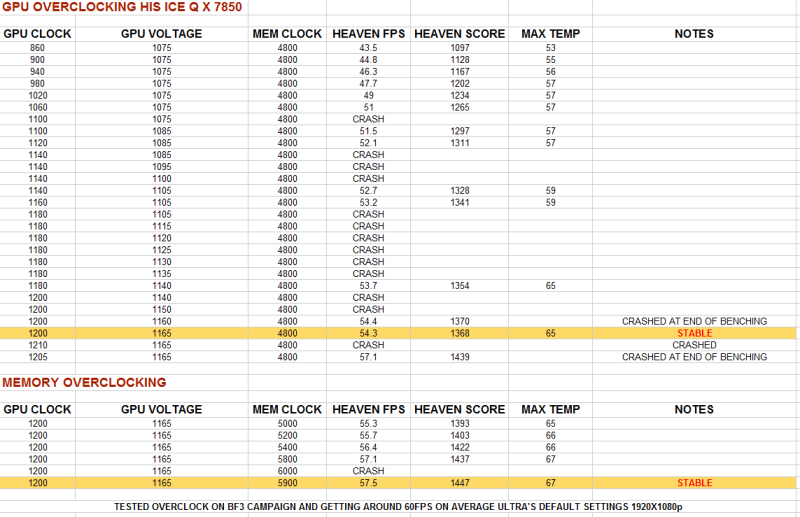
Increasing the voltage and trying to wing an overclock is not the way to go. Each card is different so you'll need to do it incremently whilst using unigene for benchmarks, then play something like BF3 for half an hour after you're stable in Unigene. If you get crashes, grey screens in game then reduce the Memory speed and try it again.

What Joe Bloggs got for his overclock or seeing results on 3D Mark vantage gives you something to aim for. However what these don't tell you is whether their setups are under water or air; what temps they got and what fan profile they were running.

When I did my 7850 (see below) I could monitor temperatures and when gpu throttling occured. Doing it this way I found the sweet spot for my fan profile (loudness) vs temps and maximum overclock. By taking a wild stab in the dark you'll never know this.

MAJNUSBENCHRESULTS.png


HTH
 
Back
Top Bottom
