Firmware update for the Samsung 840 EVO drives out tomorrow

Well mine was a *******.

Completed the first step, the firmware update. Shutdown, then nothing. PC wouldn't turn back on. Power button did nothing, power button on motherboard did nothing. In the end I plugged motherboard, CPU and graphics card into old PSU I had, and it powered on. Then I added SSD and it got to Windows and I could finish the SSD restoration. Swapped PSUs and it works again...

Now to reconnect all fans and HDDs and put PC back together. It is quiet at least. No HDDs, no fans, fans on 970 not spinning. Nice and silent :).
 
Why is there massive difference in performance after the restoration of the same size 250 GB 840 EVO in the two examples of Tune benchmarks above? E.g. average read 446MB/s vs 231Mb/s. Is the read speed affect by age/wear of the drive and % used space?

Edit: nm, misunderstood your question.
 
Last edited:
Here is mine after updating

PmjiZvB.png


Does this look ok?

No! TBH that looks like most of them BEFORE the fix...

What SATA bus is it running on?
 
Why is there massive difference in performance after the restoration of the same size 250 GB 840 EVO in the two examples of Tune benchmarks above? E.g. average read 446MB/s vs 231Mb/s. Is the read speed affect by age/wear of the drive and % used space?

I am on SATA 2 so not getting the full speed benefit of SATA 3.
 
Updated my 1tb Evo with 436gb used. Firmware updated ok, surprised how fast that went, only took less than 5 secs. PC shutdown and booted back into Windows 8.1 ok.

The restore process took around 50mins. Opening programs does seems a little more responsive.

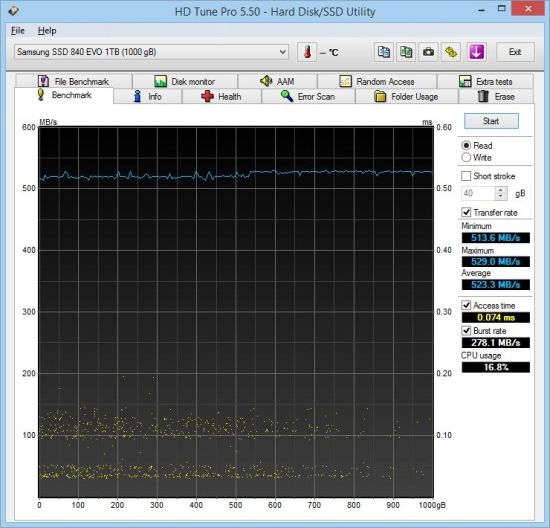
One thing I have noticed with HD Tune is the minimum speed has vastly increased, it always started of at 330MB/s, even after a secure erase on an empty drive. It now instantly jumps to 500MB/s+.

Capture2_zps61ee94c0.jpg
 
Well mine was a *******.

Completed the first step, the firmware update. Shutdown, then nothing. PC wouldn't turn back on. Power button did nothing, power button on motherboard did nothing. In the end I plugged motherboard, CPU and graphics card into old PSU I had, and it powered on. Then I added SSD and it got to Windows and I could finish the SSD restoration. Swapped PSUs and it works again...

Now to reconnect all fans and HDDs and put PC back together. It is quiet at least. No HDDs, no fans, fans on 970 not spinning. Nice and silent :).

The update must have corrupted the BIOS in your power supply.

:D
 
Not one of the worst effected but...
Before:


After:


So looks like it's sorted the "issue" at the moment.

Now I wonder if this is a permanent solution?

And are new drives going to have the new firmware from the start?
and effectively not going to be affected!

Safe to buy a new Samsung EVO I wonder?????????????????????
Need a bigger games drive soon. But want some sort of assurance that this problem has now been put to bed before buying another Samsung EVO.
 
Not one of the worst effected but...
After:


So looks like it's sorted the "issue" at the moment.

Now I wonder if this is a permanent solution?

And are new drives going to have the new firmware from the start?
and effectively not going to be affected!

Safe to buy a new Samsung EVO I wonder?????????????????????
Need a bigger games drive soon. But want some sort of assurance that this problem has now been put to bed before buying another Samsung EVO.

Better consistency, but its still 100MB/s short of what you should be achieving!

I think the Samsung statement said any new drives that left the factory after Oct 1st would have the fix on them already.
 
Better consistency, but its still 100MB/s short of what you should be achieving!

I think the Samsung statement said any new drives that left the factory after Oct 1st would have the fix on them already.

Fair comment.

Though this has been a pretty heavilly used drive over the last 12 months plus (if that makes any difference).

And other benchmarks like Samsungs own (CD and AS SSD) show much higher figures that are not that far off what I got when I bought the drive.

Never to sure how much credence to put in these bench marks myself. Personally I try not to run these sorts of things too often (EG. only if I suspect an issue) and basically the drive feels pretty snappy :)
 
This sort of brings home the issue me thinks.

Before running the Samsung clean up program, a full system AV scan took 29/30 minutes (pretty consistent over many weeks... run each day at 7 PM). Now (last four days), takes 14/15 minutes.

PS. all internal drives are SSD's.
 
Fair comment.

Though this has been a pretty heavilly used drive over the last 12 months plus (if that makes any difference).

After the update, it should make no difference how much you have used the drive.

If it's connected to SATA 3 interface, you should be getting ~500MB/S
 
After the update, it should make no difference how much you have used the drive.

If it's connected to SATA 3 interface, you should be getting ~500MB/S

Re-ran HD tune with 8MB blocks and speed now shows as 500MB +
Graph pretty near identical to others on this thread and other related ones..

Here goes:
 
Last edited:
Back
Top Bottom