


I'm using a decent pass through crimper as well. I've changed all connectors that go into the switch so everything is working as it should now. I moving to a patch panel later in the year which'll completely get rid of this issue
You are using an out of date browser. It may not display this or other websites correctly.
You should upgrade or use an alternative browser.
You should upgrade or use an alternative browser.
*** Official Ubiquiti Discussion Thread ***
- Thread starter RoyMi6
- Start date
More options
Thread starter's posts

The FlexHD turned up the other day. I had one cable fed from where the internet comes in downstairs via a US-8-60W to upstairs and powering my nanoHD AP all neatly done and hidden in ducting. I decided to use this cable as a link to a spare US-8-60W switch so fed power via a bedroom socket into the loft, put the PoE switch up there, removed the connector to the upstairs AP put it directly into the new switch. Then made up a new patch lead to power the existing AP. Next job once my mate turns up some time this week is to mount the FlexHD outside and pass through a cable into the loft via a soffit. Shame that there'll be 1 Gbps between two APs but I can't get much more than 500 Mbps out of them anyway so shouldn't be noticeable at all. The whole point to the FlexHD is to give better coverage in the garden and anything bandwidth hungry is generally cabled in anyway. Think I've lost 4kg in sweat alone as it's horribly hot in the loft!
In the future I might get a 10 Gbps uplink capable switch with 1 Gbps PoE (if prices aren't still mental) and switch the cable from downstairs into a spare port on my Mikrotik 10 Gbps switch and then power cameras etc but that's a while off, besides it's a furnace up there and I'm not sure how well a bigger switch would fare.
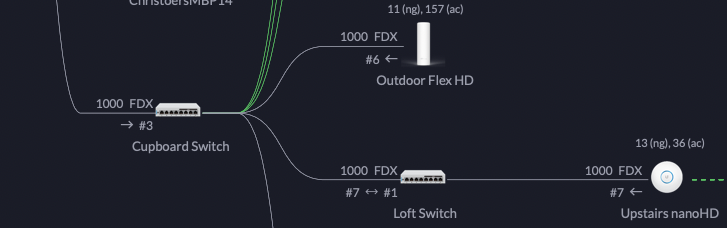
The FlexHD is downstairs at the moment, I've never had two UniFi APs before but I'm impressed with how fast clients fail over if I reboot one or power one off. I only put it in to adopt it and also provide wifi whilst the cable for the nanoHD was being done.
In the future I might get a 10 Gbps uplink capable switch with 1 Gbps PoE (if prices aren't still mental) and switch the cable from downstairs into a spare port on my Mikrotik 10 Gbps switch and then power cameras etc but that's a while off, besides it's a furnace up there and I'm not sure how well a bigger switch would fare.
The FlexHD is downstairs at the moment, I've never had two UniFi APs before but I'm impressed with how fast clients fail over if I reboot one or power one off. I only put it in to adopt it and also provide wifi whilst the cable for the nanoHD was being done.

I have a Gen1 cloudkey which has been extremely slow recently as well as going offline.
Today I thought I'd do a hard reset to see if it would fix things.
Downloaded the recent back of all settings
Reset the cloudkey
Tried to restore the backup I had but I'm getting "The backup file you are trying to load is from a newer version of the UniFi Controller and cannot be used with this controller."
I've logged in via SSH and updated to the latest cloudkey firmware but still getting the same error
Does anyone know the link to the controller firmware? ... I forgot to check which version but it maybe the latest release.
Today I thought I'd do a hard reset to see if it would fix things.
Downloaded the recent back of all settings
Reset the cloudkey
Tried to restore the backup I had but I'm getting "The backup file you are trying to load is from a newer version of the UniFi Controller and cannot be used with this controller."
I've logged in via SSH and updated to the latest cloudkey firmware but still getting the same error
Does anyone know the link to the controller firmware? ... I forgot to check which version but it maybe the latest release.

I have a Gen1 cloudkey which has been extremely slow recently as well as going offline.
Today I thought I'd do a hard reset to see if it would fix things.
Downloaded the recent back of all settings
Reset the cloudkey
Tried to restore the backup I had but I'm getting "The backup file you are trying to load is from a newer version of the UniFi Controller and cannot be used with this controller."
I've logged in via SSH and updated to the latest cloudkey firmware but still getting the same error
Does anyone know the link to the controller firmware? ... I forgot to check which version but it maybe the latest release.
You could set it up from scratch, update to the latest version through the GUI and then restore the backup.
Nope. There is no ‘radio’ reason to do that. It’s only held on the mount by a clip and one small screw so natural vertical mounting with the weight holding it down on the mount is probably best. I usually put a clear tie-wrap around the AP and whatever I’m tying it to as well as the mount isn’t the strongest given the weight it’s holding in place.I’m mounting my Flex HD soon, it’s going to be high up, near to the roof of the n a standard two story house. I’ve read some people saying in this sort of situation it’s better to mount it upside down. Any truth in this?
From the description I thought that was what they had done?You could set it up from scratch, update to the latest version through the GUI and then restore the backup.
Nope. There is no ‘radio’ reason to do that. It’s only held on the mount by a clip and one small screw so natural vertical mounting with the weight holding it down on the mount is probably best. I usually put a clear tie-wrap around the AP and whatever I’m tying it to as well as the mount isn’t the strongest given the weight it’s holding in place.
Thanks! I was going to go for the wall mount as the supplied tie wraps are too short for the drain pipe, and I don’t have any longer ones at home.
That was my plan mate but wouldn't allow me to setup the cloudkey from scratch.You could set it up from scratch, update to the latest version through the GUI and then restore the backup.
I ended up doing another hard reset which allowed me to set the cloudkey up from scratch than do all the updates.
Once updated I was able to restore my backup. So far cloudkey is running much better.

I've had a Dream Machine for nearly 3 years for my 900m/bt FTTP broadband. I've begun the switch to EE fibre (A good chunk cheaper than BT). I'm assuming that on the Dream Machine console I just remove my BT login and sign in using my EE credentials and it'll be a trouble free process?
I had the Dream Machine installed by a 3rd party at the same time as having ethernet run around the house so he did all the setup.
I had the Dream Machine installed by a 3rd party at the same time as having ethernet run around the house so he did all the setup.
Looking at replacing FlexHD and U6 Lite with one mounted in the loft, got a 4 bed detached house.
I would try the U6 Lite in the loft on its own before investing in more APs to see how coverage works as it depends on the structure of your house walls and floors and other objects in the path.
For example I have what appears to be excessive with two old AC Pros and an U6 Pro in my loft, plus another U6-Pro in the kitchen downstairs. I had to do this as the house has two full height extensions so there's a brick and block double wall dividing some parts internally plus block internal walls and the kitchen has foil backed plasterboard on the ceiling added over the original artexed board so it needs it own AP.
If the house had been built in its current shape originally and without the foil backed plasterboard in the kitchen two would be fine in the loft, and possibly even one if the internal walls weren't block. I went with mostly loft fitting as we're renovating the house and that keeps them out of the way despite a little extra signal loss.
I'll be hopefully starting networking project re chasing out walls and having APs mounted, they will be mounted in the loft too to keep tucked away, I considered ceiling mount. Mixture of 2.4G and 5G devices etc. circa 25+ due to IOT devices.
Correct.I'm assuming that on the Dream Machine console I just remove my BT login and sign in using my EE credentials and it'll be a trouble free process?