*** Official Ubiquiti Discussion Thread ***

Following on from the Protect thoughts (awaiting Synology pricing too).

I have Ring at present, like all things tech related it’s ticked the requirements box on the whole and still does. Based on some reading on the Unifi site, for a small 2 or 3 camera setup Cloud Key 2 Plus will suffice with a a bigger drive. Yes ultimately it would be good to use the NVR product for drive resilience and such.

I assume if I want to recorded from an out building that isn’t connected to the main network, I’ll have to have a wireless AP to mesh to. So camera <> switch <> AP AP none of the cameras except the doorbells are Wi-Fi capable.

These are the cameras I’m looking at:
G4 Doorbell Pro (if I can get power there), currently using a Ring battery powered doorbell. Wish I'd got a network cable there recently for PoE.

Camera AI Bullet
Camera G4 Pro
Camera G5 Bullet

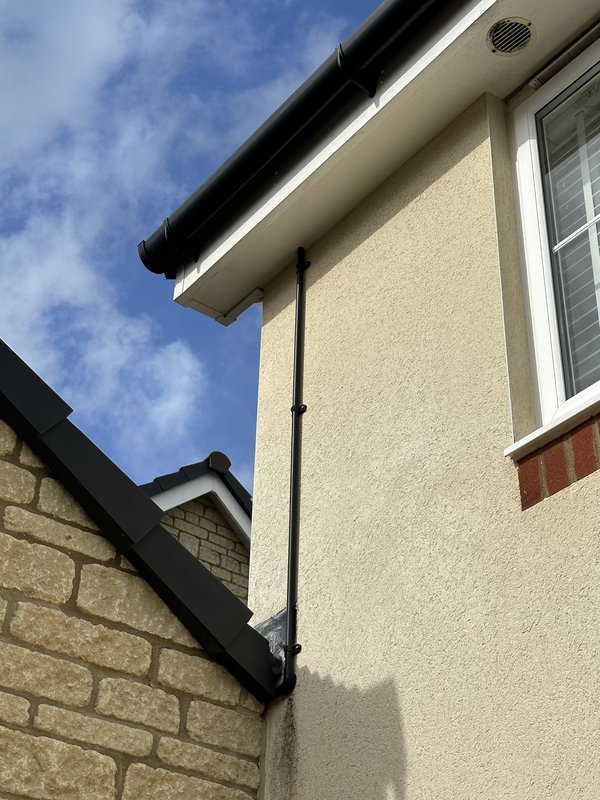
All for outdoor usage, where I'd use black conduit behind the black drain pipes etc.

Looking at the PoE requirements I’d prob use a spare US-8-60W switch I have for two of the cameras that would be mounted on the house and cables run to the loft to an existing patch pannel.

 
Their Instant cameras are wifi. I doubt you'll get a Doorbell Pro, and if I'm being honest, it doesn't offer much over the regular G4, the IQ is nearly the same.
 
Decent weather this morning, I had my mates ladder in the garage and I'd been working some late days recently, so I took the day off and did some jobs. No pics of the steps, I'm bad enough up a ladder as it is, without fannying around taking pics.

Whilst up there, had a good look in the gutters due to recent heavy rainfall and all is well.

First up was installing The UAP-FlexHDin my soffit, giving ~400-500 Mbps across the garden. I like to sit out there and work and the sporadic connection has annoyed me since we moved in nearly 2 years ago.

IMG-7278.jpg


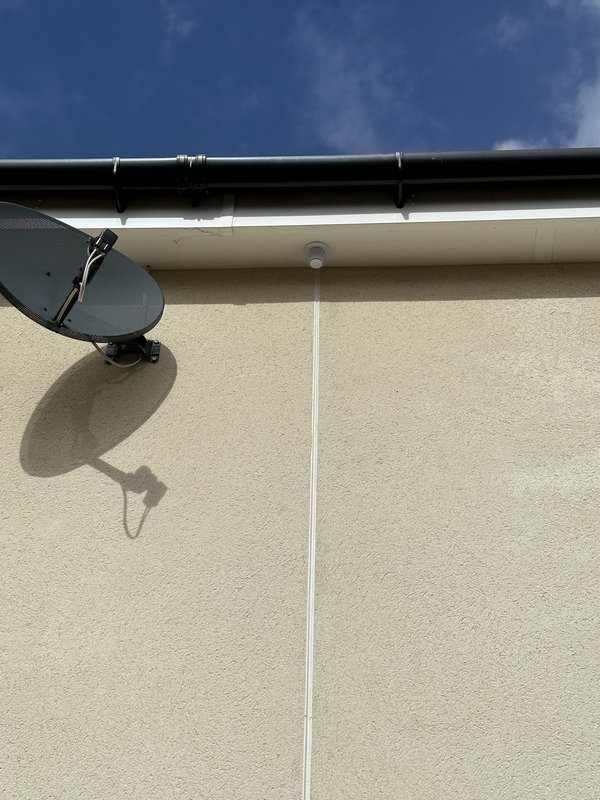
I then put another hole in the soffit to run Cat 6 to the garage for a future CCTV install. 20mm ducting and into a gap between the wall and roof. Fixed the reason why the water was coming over leaving the dirty mark on the render. Inspection elbow at the bottom to make it easy installing a replacement cable (regretting I didn't run two, but whatever).

IMG-7280.jpg


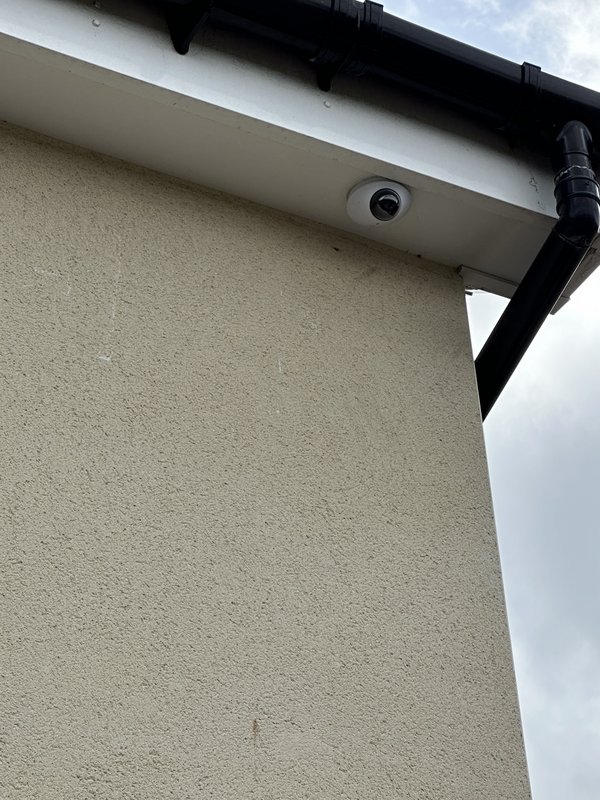
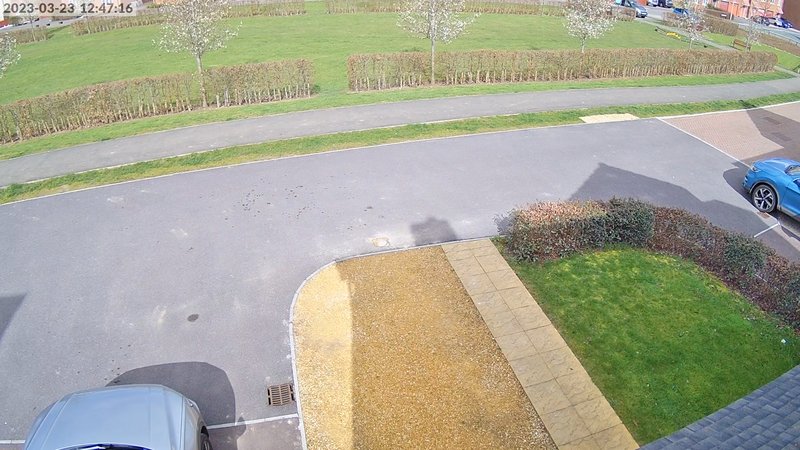
Next up was a G4 Dome at the front of the house, again mounted to the soffit. This gives really good coverage and nice IQ. I plan on covering the garage in the future.

IMG-7283.jpg


Front-of-House-3-23-2023-12-47-17.jpg


Final job was installing my newly acquired G4 Doorbell, this was a pig as I had to drill at an angle not to risk either blowing the render or blowing the internal plasterboard which is in the hallway, so I went at an angle to bring it into my office next to the front door, with the power cable and entry location neatly hidden away behind my bookshelf.

Lucky I started when I did, I finished around 1 and since then we've had a monsoon all afternoon. I then decided to move my Lack Rack mounted homelab kit over to my newly arrived Penn Elcom rack.


Looking at something similar, but I'll be using black conduit for a AP install partly down the wall. I have an AC Mesh mounted on a wall, but the network cable is only currently cable tied to the drain pipe. With the weather improving looking at putting it in conduit and tidying up. Have to say I like the Flex-HD mount though. Mmmm food for thought.

G4 dome too, I'm about to have new windows, new facias and new guttering installed. Not overly keen in putting holes in new kit, but we'll see. £12k+ lighter in the wallet :(

The loft space is where my patch panel and wall rack is with a Cisco 24 port PoE switch with decent power budget.
 
Last edited:
Their Instant cameras are wifi. I doubt you'll get a Doorbell Pro, and if I'm being honest, it doesn't offer much over the regular G4, the IQ is nearly the same.

Ok many thanks. Doorbell is the main problem area along with lack of garage cabling. Doorbell may well not be feasible re the drilling and routing of cables... How responsive is the Unifi Protect app, my frustration with Ring is the delay on the app results in the person already gone. Wi-Fi for the Ring device is very good, I think it's just the junk aspect of Ring and battery.

Sorry, just found this
which details the products.
 
Last edited:
Put the Modem in Router mode, connect directly to it with cable and see if the issue persists, if it does, it's likely to be related to congestion and/or power levels coming through the cable.

If not, put the USG back in and connect your computer to it and nothing else and check. If there's no issue, you know it's inside your network and you would have to check each subsequent device, changing cables if necessary.


I've stripped the network down to just the Hub 4, Wired laptop and a wireless laptop.

Samknows has given me speeds ranging from 250 to 1145 at the router and anywhere from from 1mb to 30mb Wifi and 3mb - 600 -850 wired.

It seems to be all over the place.

I cant do an online check as i get a " we cant check right now try again later" for the last 3 days.

But a check via the router says i have issues with my home network
 
These are the cameras I’m looking at:
G4 Doorbell Pro (if I can get power there), currently using a Ring battery powered doorbell. Wish I'd got a network cable there recently for PoE.

Ive been trying to get one of these for ages but they are as rare as anything in terms of stock, I just have the normal G4 Doorbell at the moment.
 
Ive been trying to get one of these for ages but they are as rare as anything in terms of stock, I just have the normal G4 Doorbell at the moment.

Fair do. I've got A Ring Doorbell Pro 2 atm, so I expect the G4 would be a step on that regardless. Would be nice if the mounting plates are the same.

Looking at the US-16-150W switches again, had one previously and sold it off. Bob and no hope I expect for getting another, in short I'm out of capacity on my 24 port switch and if I'm added some cameras I remember this had a good PoE budget and that all ports were PoE capable.
 
I've stripped the network down to just the Hub 4, Wired laptop and a wireless laptop.

Samknows has given me speeds ranging from 250 to 1145 at the router and anywhere from from 1mb to 30mb Wifi and 3mb - 600 -850 wired.

It seems to be all over the place.

I cant do an online check as i get a " we cant check right now try again later" for the last 3 days.

But a check via the router says i have issues with my home network
I wouldn’t bother with Sam Knows, just use Speedtest.
 
Its gone down again!!
I've switched the hub 4 back to router mode and disconnected the USG.
If I connect the the HUb4 to the main switch. I'm still not getting my network back.. I'm assuming there is an issue if the system is looking for the USG on Ip*** but the HUb4 is on another ip address.
 
G4 Doorbell up and running and I'm more than happy with it. I've removed the Ring Door View from my Ring account and cancelled protect, got an email straight away with a pro-rata refund of £23.31. Stuck it and the spare battery on Facebook Marketplace, see if I get any bites locally.
 
G4 Doorbell up and running and I'm more than happy with it. I've removed the Ring Door View from my Ring account and cancelled protect, got an email straight away with a pro-rata refund of £23.31. Stuck it and the spare battery on Facebook Marketplace, see if I get any bites locally.

Very nice. I need to see if I can get power to the doorbell area :(
 
Virgin finally think its an issue at their end. But its made me think about my network. I could do with tidying it up and the pull of some new shiny bits its hard to resist.

We work from home and can have 3 tv's streaming uhd stuff at any one point plus a dozen CCTV cameras.

So, I've been looking at 10GbE Switches. Just getting my head round an upgrade path really. The house has been wired with cat6a cable. But we also have a number of laptops and tablets and New Tv's that were installed AFTER cabling.


If i'm doing this would it be better to make sure all AP's are connected to 10GbE as well as the media server and CCTV stuff. So I could get away with one or two 5 port USW-Flex-XG.

Our house is over 6000 sq feet brick internal walls circa 1895. But with a large open'ish plan downstairs.

Also thinking of upgrading the USG to a UDM pro and chucking in a U6-E AP for the ground floor to replace our ageing AC-pro
Oh and a bunch of the USW-Flex-mini 5 port switches to replace the netgear and tplink ones currently in use.

Waste of money? Possibly
more robust network?
 
I wouldn't say 10 Gb network will make much of a difference for your use case, UHD streams aren't the highest of bitrates and cameras don't consume all that much either. You ought to get some statistics before going down that path and seeing if you have any saturation anywhere.

I have it because, well, I can, but it does come in very handy for VM backups, personal computer backups etc.

Be careful with the Flex Mini, it doesn't support STP or RSTP, if you use kit such as Sonos or Sky it can wreak havoc.
 
I wouldn't say 10 Gb network will make much of a difference for your use case, UHD streams aren't the highest of bitrates and cameras don't consume all that much either. You ought to get some statistics before going down that path and seeing if you have any saturation anywhere.

I have it because, well, I can, but it does come in very handy for VM backups, personal computer backups etc.

Be careful with the Flex Mini, it doesn't support STP or RSTP, if you use kit such as Sonos or Sky it can wreak havoc.
Using both and having a nightmare with SONOS. Gen 1 stuff no issues... Spent £3k upgrading to latest stuff and dropouts, Slow starts. 1 half of a pair going off etc...I'll cross the Flex mini's off the list then
Any recommendations for small switches.
Only a single output from the wall per room. TV, Nvidia Shield, Sky box. Smarthings, SONOS... (hard wiring SONOS hasnt fixed the issues either)
 
Last edited:
Using both and having a nightmare with SONOS. Gen 1 stuff no issues... Spent £3k upgrading to latest stuff and dropouts, Slow starts. 1 half of a pair going off etc...I'll cross the Flex mini's off the list then
Any recommendations for small switches.
Only a single output from the wall. TV, Nvidia Shield, Sky box. Smarthings, SONOS... (hard wiring SONOS hasnt fixed the issues either)
I’ve been having the same nightmare. For now I’ve put Sonos on a 2G network fully wireless and it’s working like a dream. I’ll have a look at it some other day. I still have sky on a Flex, just not Sonos. I even tried wiring the Arc into a US-Pro and still had issues, dropping everything to STP and setting correct priorities. Wireless like I say seems fine.
 
Using both and having a nightmare with SONOS. Gen 1 stuff no issues... Spent £3k upgrading to latest stuff and dropouts, Slow starts. 1 half of a pair going off etc...I'll cross the Flex mini's off the list then
Any recommendations for small switches.
Only a single output from the wall per room. TV, Nvidia Shield, Sky box. Smarthings, SONOS... (hard wiring SONOS hasnt fixed the issues either)

There's no silver bullet with UniFi & Sonos but what's worked for me was having just 1 Sonos device connected by ethernet and the rest on 2.4GHz only wireless. That worked fine until I wanted Sonos kit in the Study which is on the wrong side of a gable end and a bunch of RSJ's so the signal didn't reach. In the end I put a Sonos Boost in the mix and that is the only device that's connected by ethernet. Since then it's been solid.

As for Sky, if you can put the Sky stuff on a different VLAN then that solves a whole bunch of problems. I have my Q and Q Mini on their own VLAN and since doing that I've had zero problems. Sky Q boxes are fussy about duplex and don't like having the switch ports fixed to full duplex so those ports at set to auto/auto. They've negotiated to 100/full.
 
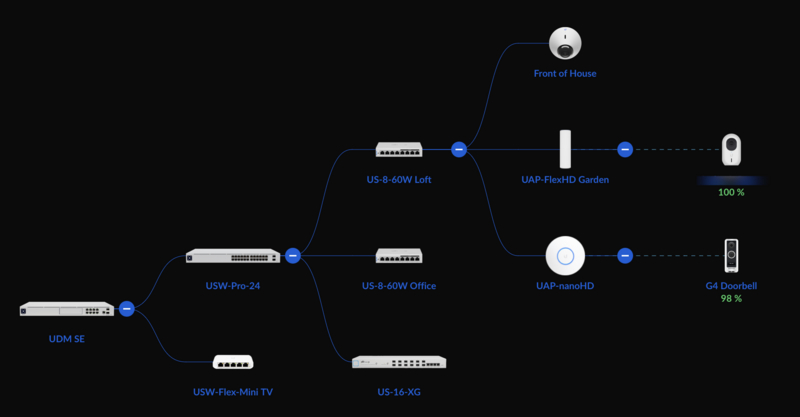
@mattyg this is my setup:

Clean-Shot-2023-03-28-at-18-30-15-2x.png


My ARC used to live off the UDM SE until I got the USW-Pro-24, since then I cabled it into that. Sonos was working without any issues at all for months and then I ran a pair of cables from the loft switch to the main bedroom, 1 port for the Sky mini box, another port for an Apple TV. That's when I started getting random issues with Sonos - not all speakers would show up, sometimes the app on my phone wouldn't connect, music would randomly stop, and worst of all the Arc would drop out when watching TV and switch to the TV speakers, then 15 seconds later back to the Arc. That went down well with the mrs! I set both the loft switch and the USW-Pro-24 to STP and changed the priorities, the USW-Pro-24 being the lowest (best). That also didn't help. In the end I got fed up and just let Sonos run entirelly on wifi which seems to be working for the moment. I will revisit it later, perhaps once I've got rid of Sky Q. FWIW I've disabled wifi entirelly on the Sky boxes.
 
Back
Top Bottom