• Competitor rules

    Please remember that any mention of competitors, hinting at competitors or offering to provide details of competitors will result in an account suspension. The full rules can be found under the 'Terms and Rules' link in the bottom right corner of your screen. Just don't mention competitors in any way, shape or form and you'll be OK.

nvflashk - Flash any BIOS to NVIDIA GPUs - Safe board ID bypass up to 4xxx series including Founders Edition cards

So had a play around with my 2080ti
Power goes to 108%
Does have an effect when change from 100%
But unlocking the voltage slider and changing voltage
Has no effect
Won't go past 1.043v annoyingly
Board power hits 280w at 108%

Overclocked core to 2050mhz
Overclocked vram shows in gpuz was 1750mhz now 2000mhz
Or 7000 now 8000 in xtreme tuner
Probably a little bit left to go but I just did
A very quick overclock

Gpuz perf cap is for power and vrel

So it does overclock at least
So question is
Will flashing another bios really make much difference?
If that voltage would actually go to even 1.1v
Then would probably be happy with it as is

If so
Not done this in ages
Better to flash in windows?
Or in dos?

@Audioboxer
This is my card

This is bios I am eyeing up

That BIOS should flash with regular nvflash from the techpowerup site.

Just command line flash with nvflash64.exe -6 abovebiosromname.rom


Here is some guide info you might need to do protectoff command first https://itigic.com/nvflash-how-to-flash-a-bios-on-an-nvidia-graphics-card/
 
Last edited:

That BIOS should flash with regular nvflash from the techpowerup site.

Just command line flash with nvflash64.exe -6 abovebiosromname.rom


Here is some guide info you might need to do protectoff command first https://itigic.com/nvflash-how-to-flash-a-bios-on-an-nvidia-graphics-card/
thanks mate
did you do yours in windows?
or in dos?
must be showing my age that i prefer dos lol
 
Anyone done this on a FE 4090 to tune the voltage somewhat? We're voltage limited rather than power limit i think with it having the connector.
 
@Audioboxer
or anyone else really
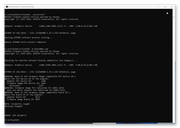
pretty sure this is what happened ages ago
when i tried this before
click picture for bigger image
tried the non mismatched version of nvflash first
so screenshot is of the patched mismatch version i tried second

 
@Audioboxer
or anyone else really
pretty sure this is what happened ages ago
when i tried this before
click picture for bigger image
tried the non mismatched version of nvflash first
so screenshot is of the patched mismatch version i tried second


You can try the tool I posted then and flash in same way and it will allow bypass of mismatch (nvflash64k.exe -6 romname.rom). Alternatively, it's just browsing techpowerup for a BIOS that will flash at a better power rate than your current if you don't want to force mismatch flash.

I'm assuming this card of yours doesn't have dual BIOS?
 
Last edited:
You can try the tool I posted then and flash in same way and it will allow bypass of mismatch (nvflash64k.exe -6 romname.rom). Alternatively, it's just browsing techpowerup for a BIOS that will flash at a better power rate than your current if you don't want to force mismatch flash.

I'm assuming this card of yours doesn't have dual BIOS?
single bios
so now i tried the tool linked nvflashk
though i did
nvflashk -6 romname.rom
not nvflashk64.exe
but it launched it and ran it anyway


edited
tried gigabyte bios
different error message
PROGRAMMING ERROR: EEPROM Program failed
giving it up for tonight now
 
Last edited:
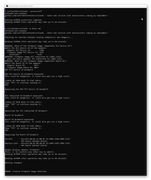
had one last try
used the other guys tool this time
omgvflash
got this error instead
definitely had enough for one night now

PROGRAMMING ERROR: Reading EEPROM status register failed
Nvflash CPU side error Code:2Error Message: Falcon In HALT or STOP state, abort uCode command issuing process.
 
single bios
so now i tried the tool linked nvflashk
though i did
nvflashk -6 romname.rom
not nvflashk64.exe
but it launched it and ran it anyway


edited
tried gigabyte bios
different error message
PROGRAMMING ERROR: EEPROM Program failed
giving it up for tonight now

Did you unlock the card? Might need to do the protect off command

 
Did you unlock the card? Might need to do the protect off command

Yeah did protect off
Thinking that falcon in halt or stop state message
Is somehow relevant
 
Back
Top Bottom